Page MenuHomePhabricator

Save icon is not color filled
Closed, ResolvedPublicBUG REPORT

Assigned To
Authored By
Zm14
Jun 13 2021, 10:43 AM
Referenced Files
F97509360: 2026-08-07_09-50-41.webm
Fri, Aug 7, 5:40 PM
F97509918: 2026-08-07_10-36-51.webm
Fri, Aug 7, 5:40 PM
F97509284: 2026-08-07_09-46-41.webm
Fri, Aug 7, 5:40 PM
F34497523: this.png
Jun 13 2021, 10:43 AM

Description

Sometimes save icon is not color filled (but article is saved correctly) on app (6.8.1 and earlier) on iOS 14.6 and earlier.
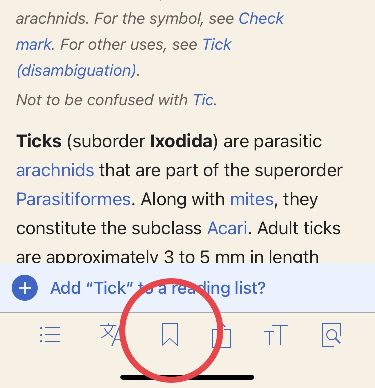
this.png (375×388 px, 124 KB)

Screenshot shows successful saving as indicated by the reading list suggestion, but icon color is not filled.


Update: I discovered a possible cause and with it another symptom:

Say (on the app) by reading Dew point , you click on the wiki link to https://en.wikipedia.org/wiki/Relative_humidity, it redirects to https://en.wikipedia.org/wiki/Humidity#Relative_humidity.

Because of the #Relative_humidity, the save icon is not filled, and the other symptom is that the table of contents in the app shows the article title as "Relative humidity" and not the correct "Humidity".

I hope that helps.


Derived Requirement

Ensure that the Save icon is displayed as filled immediately after an article is successfully saved to a reading list, including when the article is opened from TOC

Test Result - Beta|Prod

Status: ✅ PASS / ❓ Need More Info / ❌ FAIL
Environment: beta/xyzwiki
OS: macOS Tahoe 26.5.2
Browser: Chrome 150
Device: MBA
Emulated Device: NA

Test Artifact(s):

Test Steps

Test Case 1: Ensure the Save icon is filled after saving an article from TOC

  1. Open the Wikipedia iOS app.
  2. Navigate to the Dew point article.
  3. Tap the link of Humidity from TOC
  4. Save the article to a reading list.
  5. Verify that the article is successfully saved.
  6. ✅❓❌⬜ AC1: The Save icon is displayed as filled immediately after the article is successfully saved to the reading list.

QA Results - Test Flight

ACStatusDetails
1T284872#12196178

Event Timeline

Restricted Application added a subscriber: Aklapper. · View Herald Transcript
LGoto triaged this task as Low priority.Jun 14 2021, 6:33 PM
LGoto moved this task from Needs Triage to Bug Backlog on the Wikipedia-iOS-App board.
Aklapper changed the subtype of this task from "Task" to "Bug Report".Feb 17 2023, 8:22 AM

@Gemedet @ABorbaWMF Verified that the Save icon is displayed as filled immediately after an article is successfully saved to a reading list, as seen in the videos below. I will move this to Sign-off. Thanks for all your work!

Test Result - Test Flight

Status: ✅ PASS
Environment: Test Flight
OS: iOS 26*
Browser: Build 2026.08.06 (6141)
Device: MBA
Emulated Device: BrowserStack: iPhone 14Pro v.26.2; IPhone 17 v26.4; iPad Pro 13 v26.0

Test Artifact(s):

Test Steps

Test Case 1: Ensure the Save icon is filled after saving an article opened from TOC

  1. Open the Wikipedia iOS app.
  2. Navigate to the Dew point article.
  3. Tap the link to Humidity from TOC so it opens.
  4. Save the article to a reading list.
  5. Verify that the article is successfully saved.
  6. AC1: The Save icon is displayed as filled immediately after the article is successfully saved to the reading list.
IPhone 17 v26.4iPhone 14Pro v.26.2iPad Pro 13 v26.0
GMikesell-WMF updated Other Assignee, added: GMikesell-WMF.
GMikesell-WMF updated Other Assignee, removed: GMikesell-WMF.