Page MenuHomePhabricator

Page titles breaking in middle of the word on stable
Closed, ResolvedPublic

Description

IOS Safari 8.1, mobile on desktop
Long words in titles are hyphenating in middle of word instead of going to the next line.
Titles should never wrap to a second line in the middle of a word. Its very uncommon for text on the web.
They should wrap in between words.

Current:
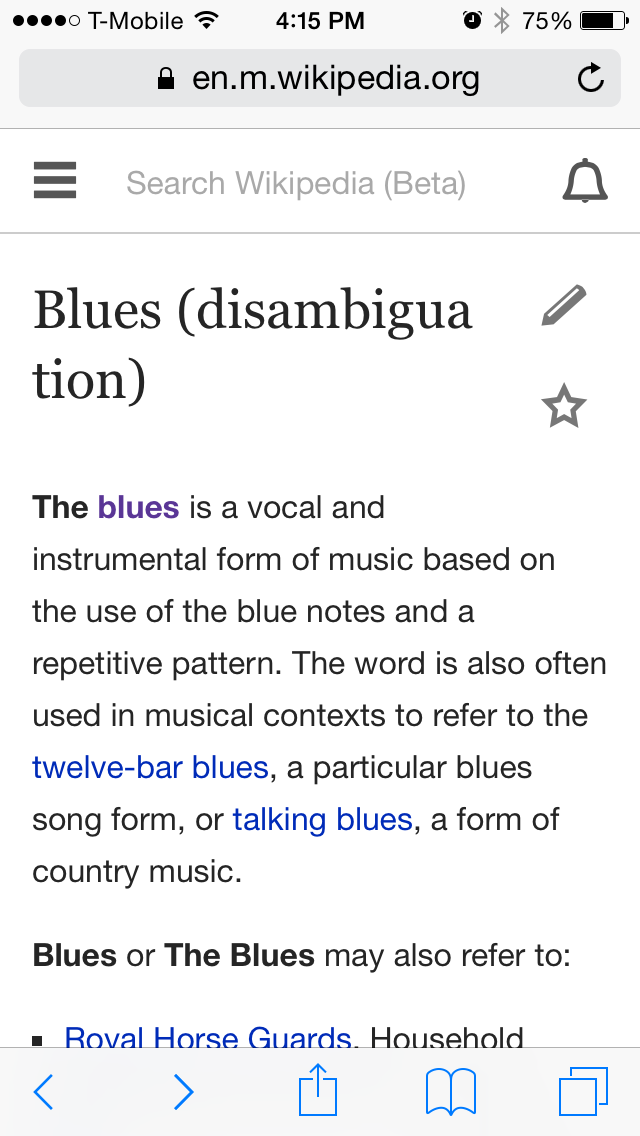
IMG_7986.PNG (640×1,136 px, 101 KB)


Let's remove hyphens and use word-wrap: break-word for page title and section titles per Kaity [1]
[1] https://phabricator.wikimedia.org/T93826#1546072

Event Timeline

• KHammerstein raised the priority of this task from to Needs Triage.
• KHammerstein updated the task description. (Show Details)
• KHammerstein subscribed.
• KHammerstein renamed this task from Text breaking in middle of the word on mobile beta to Page titles breaking in middle of the word on mobile beta.Mar 24 2015, 11:50 PM
• KHammerstein set Security to None.
• KHammerstein updated the task description. (Show Details)

@KHammerstein, how should we handle cases where a word doesn't fit in a line by itself either?

Change 199761 had a related patch set uploaded (by Bmansurov):
Hyphenate page titles

https://gerrit.wikimedia.org/r/199761

Change 199761 merged by jenkins-bot:
Hyphenate page titles

https://gerrit.wikimedia.org/r/199761

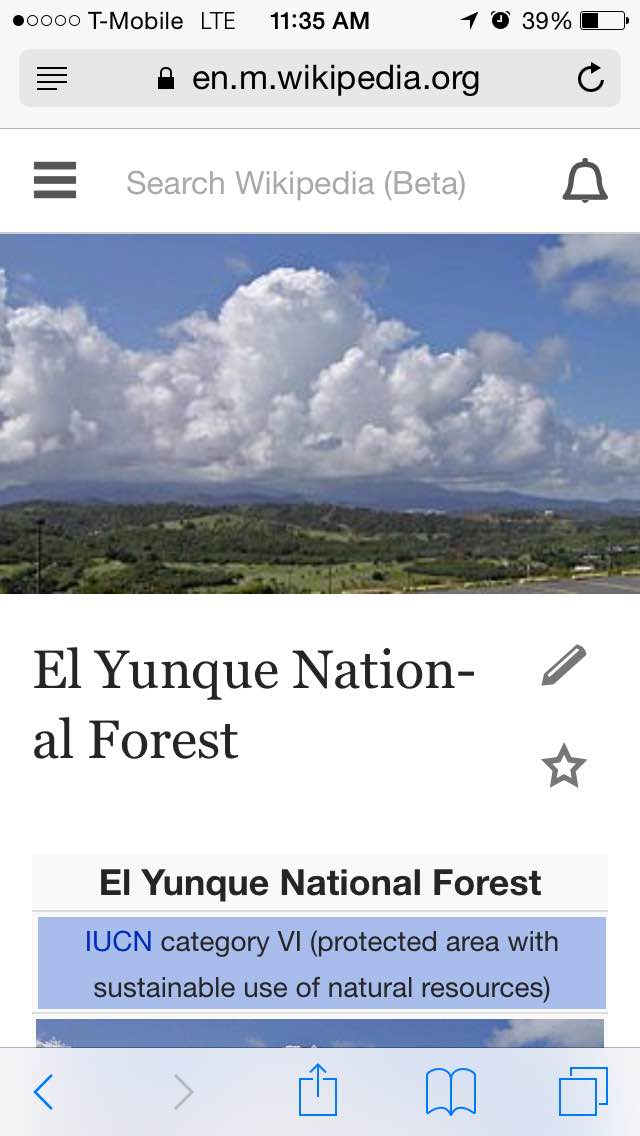
According to @KHammerstein, the word "National" in the screenshot should not be hyphenated.

IMG_8153.jpg (640×1,136 px, 62 KB)

iphone 4s safari

More comments from @KHammerstein:

  1. its most important to not hyphenate all words
  2. I think wrapping without a hyphen is ok
  3. and wrapping should only happen when a word by itself doesn't fit in a line
  4. I looked up antidisestablismentarianism on dictionary.com. they have it working with a hyphen, not sure how. maybe check out how dictionary.com did it? maybe they used a different method

Visit http://dictionary.reference.com/browse/Supercalifragilisticexpialidocious?s=t on a small screen device. Their implementation is unique and can't be easily replicated.

@bmansurov What's the progress on this? Still an important bug.

@KHammerstein, I haven't been able to work on it. @Jhernandez, should we pull it in the next sprint? @phuedx?

The following resources might be helpful here:

It's worth noting that at the moment we [apply hyphens: auto to the title](https://github.com/wikimedia/mediawiki-extensions-MobileFrontend/blob/master/resources/skins.minerva.content.styles/headings.less#L44) and changing this to hyphens: none fixes the example above but might not have the desired effect overall.

@KHammerstein, I haven't been able to work on it. @Jhernandez, should we pull it in the next sprint? @phuedx?

This bug hasn't yet been given a priority, so I'm not sure if we should or not. I'd hazard a guess that this affects all iOS users though.

@Jhernandez
We should prioritize this, saw the bug again today. I see it about every few weeks as an iOS user.

• KHammerstein renamed this task from Page titles breaking in middle of the word on mobile beta to Page titles breaking in middle of the word on stable.Aug 14 2015, 11:25 PM
• KHammerstein updated the task description. (Show Details)

@KHammerstein I don't think we can do something different for titles with words and too-long-word titles like supercalifragilisticexpialidocious.

Either we break words or we hyphen.

If we break words, too-long words will break without hyphen.
If we do hyphens all words will break with hyphens.

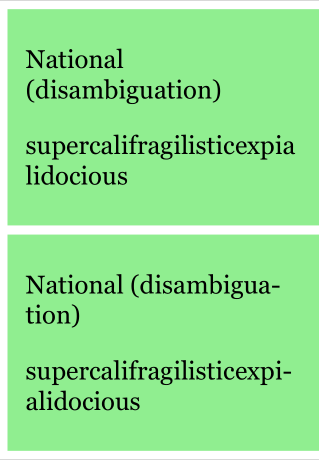
See an example: https://output.jsbin.com/juguzuzuyu
First box is breaking words. Second box is hyphening.

Screen Shot 2015-08-17 at 12.07.10 PM.png (319×460 px, 38 KB)

Note: Hyphens are seldom supported, and wherever they're not supported the words will break without any hyphen (android, chrome, etc, see http://caniuse.com/#feat=css-hyphens)

Let's define exactly what we want here and we'll fix this on a following sprint.

//Source of jsbin to play: https://jsbin.com/juguzuzuyu/edit?css,output

cc/ @bmansurov @phuedx

@Jhernandez
Lets break words. Very long words are less common, and giving them hyphens will hyphenate a lot of shorter words that will be unnecessary and hard to read.

Alright, thanks for the comment @KHammerstein.

Let's go with a simple word-wrap: break-word for titles (both page title and section titles) and remove hyphens where it makes sense.

@Jhernandez
Could we prioritize this for a sprint coming up?

Change 240370 had a related patch set uploaded (by Phuedx):
Break all headings across lines

https://gerrit.wikimedia.org/r/240370

Change 240370 merged by jenkins-bot:
Break all headings across lines

https://gerrit.wikimedia.org/r/240370

240370 caused a styling regression wherein overlay headings have the wrong font-family.

Change 240678 had a related patch set uploaded (by Phuedx):
Fix overlay headings

https://gerrit.wikimedia.org/r/240678

Change 240678 merged by jenkins-bot:
Fix overlay headings

https://gerrit.wikimedia.org/r/240678

This is done but @phuedx there is another regression - T113759 - which stops me signing off this work.

I’ve noticed a similar issue when working with [[ https://gorradandy.com/ | Dandy Hats ]]product pages, especially when longer product titles contain multiple descriptive words. Keeping titles concise and properly structured can make them easier to read across different screen sizes while also improving the overall shopping experience.

I’ve also noticed that long product titles can create similar display issues on [[ https://glow-belts.com/product-category/ufc-championship-belts/ | UFC Belts ]]product pages, especially when titles include detailed information about the belt design, championship name, or material. Keeping the title structure concise and responsive can help prevent words from breaking awkwardly while making UFC Belts easier to browse on different screen sizes.

I’ve noticed a similar issue with longer product titles on Newsboy Hats pages. When a title contains several descriptive words, it can sometimes break awkwardly on smaller screens. Keeping Newsboy Hats product titles concise and using responsive text styling can make the page easier to read and provide a better browsing experience.