<feed xmlns="http://www.w3.org/2005/Atom"><title>The Speed of Thought</title><id>https://phabricator.wikimedia.org/phame/blog/feed/7/</id><link rel="self" type="application/atom+xml" href="https://phabricator.wikimedia.org/phame/blog/feed/7/" /><updated>2023-03-01T22:00:44+00:00</updated><subtitle>**We have moved!** ➡️  Find our latest posts at [techblog.wikimedia.org](https://techblog.wikimedia.org/category/performance/)!

**“**//We want to create value for readers and editors by making it possible to retrieve and render content at the speed of thought, from anywhere in the world, on the broadest range of devices and connection profiles.//**”**  — [Wikimedia Performance](https://www.mediawiki.org/wiki/Wikimedia_Performance_Team)</subtitle><entry><title>WikimediaDebug v2 is here!</title><link href="/phame/live/7/post/183/wikimediadebug_v2_is_here/" /><id>https://phabricator.wikimedia.org/phame/post/view/183/</id><author><name>Krinkle (Timo Tijhof)</name></author><published>2019-12-16T18:48:38+00:00</published><updated>2023-03-01T22:00:44+00:00</updated><content type="xhtml"><div xmlns="http://www.w3.org/1999/xhtml"><p><strong>WikimediaDebug</strong> is a set of tools for debugging and profiling MediaWiki web requests in a production environment. WikimediaDebug can be used through the accompanying browser extension, or from the command-line.</p>

<p>This post highlights changes we made to WikimediaDebug over the past year, and explains more generally how its capabilities work.</p>

<ol class="remarkup-list">
<li class="remarkup-list-item">What&#039;s new?</li>
<li class="remarkup-list-item">Features overview: Staging changes, Debug logging, and Performance profiling.</li>
<li class="remarkup-list-item">How does it all work?</li>
</ol>

<h4 class="remarkup-header">§ 1. What&#039;s new?</h4>

<h6 class="remarkup-header">Redesigned</h6>

<p>I&#039;ve redesigned the popup using the style and components of the <a href="https://design.wikimedia.org/style-guide/visual-style.html" class="remarkup-link remarkup-link-ext" rel="noreferrer">Wikimedia Design Style Guide</a>.</p>

<div class="remarkup-table-wrap"><table class="remarkup-table">
<tr><th>New design</th><th>Previous design</th></tr>
<tr><td><div class="phabricator-remarkup-embed-layout-left"><a href="https://phab.wmfusercontent.org/file/data/kiz4vbmygjwbmausdmzx/PHID-FILE-kgnuwoa75l5zowf7rvnr/Screenshot_2019-12-14_at_01.49.04.png" class="phabricator-remarkup-embed-image" data-sigil="lightboxable" data-meta="0_0"><img src="https://phab.wmfusercontent.org/file/data/kiz4vbmygjwbmausdmzx/PHID-FILE-kgnuwoa75l5zowf7rvnr/Screenshot_2019-12-14_at_01.49.04.png" height="157" alt="Screenshot 2019-12-14 at 01.49.04.png (312×640 px, 17 KB)" /></a></div></td><td><div class="phabricator-remarkup-embed-layout-left"><a href="https://phab.wmfusercontent.org/file/data/zbxa3fsa24n3wvhmqgmf/PHID-FILE-bfxboevnqisgy3hlzpvo/X-Wikimedia-Debug_v1.png" class="phabricator-remarkup-embed-image" data-sigil="lightboxable" data-meta="0_1"><img src="https://phab.wmfusercontent.org/file/data/zbxa3fsa24n3wvhmqgmf/PHID-FILE-bfxboevnqisgy3hlzpvo/X-Wikimedia-Debug_v1.png" height="91" alt="X-Wikimedia-Debug_v1.png (91×291 px, 10 KB)" /></a></div></td></tr>
<tr></tr>
</table></div>

<p>The images above also show improved labels for the various options. For example, &quot;Log&quot; is now known as &quot;Verbose log&quot;. The footer links also have clearer labels now, and visually stand out more.</p>

<div class="remarkup-table-wrap"><table class="remarkup-table">
<tr><th>New footer</th><th>Previous footer</th></tr>
<tr><td><div class="phabricator-remarkup-embed-layout-left"><a href="https://phab.wmfusercontent.org/file/data/746425hr42skaomeolkz/PHID-FILE-wbecmicgwuyohobewpsn/b.png" class="phabricator-remarkup-embed-image" data-sigil="lightboxable" data-meta="0_2"><img src="https://phab.wmfusercontent.org/file/data/746425hr42skaomeolkz/PHID-FILE-wbecmicgwuyohobewpsn/b.png" height="120" alt="b.png (240×633 px, 8 KB)" /></a></div></td><td><div class="phabricator-remarkup-embed-layout-left"><a href="https://phab.wmfusercontent.org/file/data/wf7uj5gs2s7smbpxi4ei/PHID-FILE-7hlw5ftmnimb4v2s5v5c/a.png" class="phabricator-remarkup-embed-image" data-sigil="lightboxable" data-meta="0_3"><img src="https://phab.wmfusercontent.org/file/data/wf7uj5gs2s7smbpxi4ei/PHID-FILE-7hlw5ftmnimb4v2s5v5c/a.png" height="120" alt="a.png (120×311 px, 14 KB)" /></a></div></td></tr>
<tr></tr>
</table></div>

<p>This release also brings dark mode support! (brighter icon, slightly muted color palette, and darker tones overall). The color scheme is automatically switched based on device settings.</p>

<div class="remarkup-table-wrap"><table class="remarkup-table">
<tr><th>Dark mode</th></tr>
<tr><td><div class="phabricator-remarkup-embed-layout-left"><a href="https://phab.wmfusercontent.org/file/data/tev4molpr3wqf3ive7fu/PHID-FILE-bwh3hl34yia4oiubj56r/Screenshot_2019-12-13_at_23.05.57.png" class="phabricator-remarkup-embed-image" data-sigil="lightboxable" data-meta="0_4"><img src="https://phab.wmfusercontent.org/file/data/tev4molpr3wqf3ive7fu/PHID-FILE-bwh3hl34yia4oiubj56r/Screenshot_2019-12-13_at_23.05.57.png" height="157" alt="Screenshot 2019-12-13 at 23.05.57.png (312×640 px, 16 KB)" /></a></div></td></tr>
<tr></tr>
</table></div>


<h6 class="remarkup-header">Inline profile</h6>

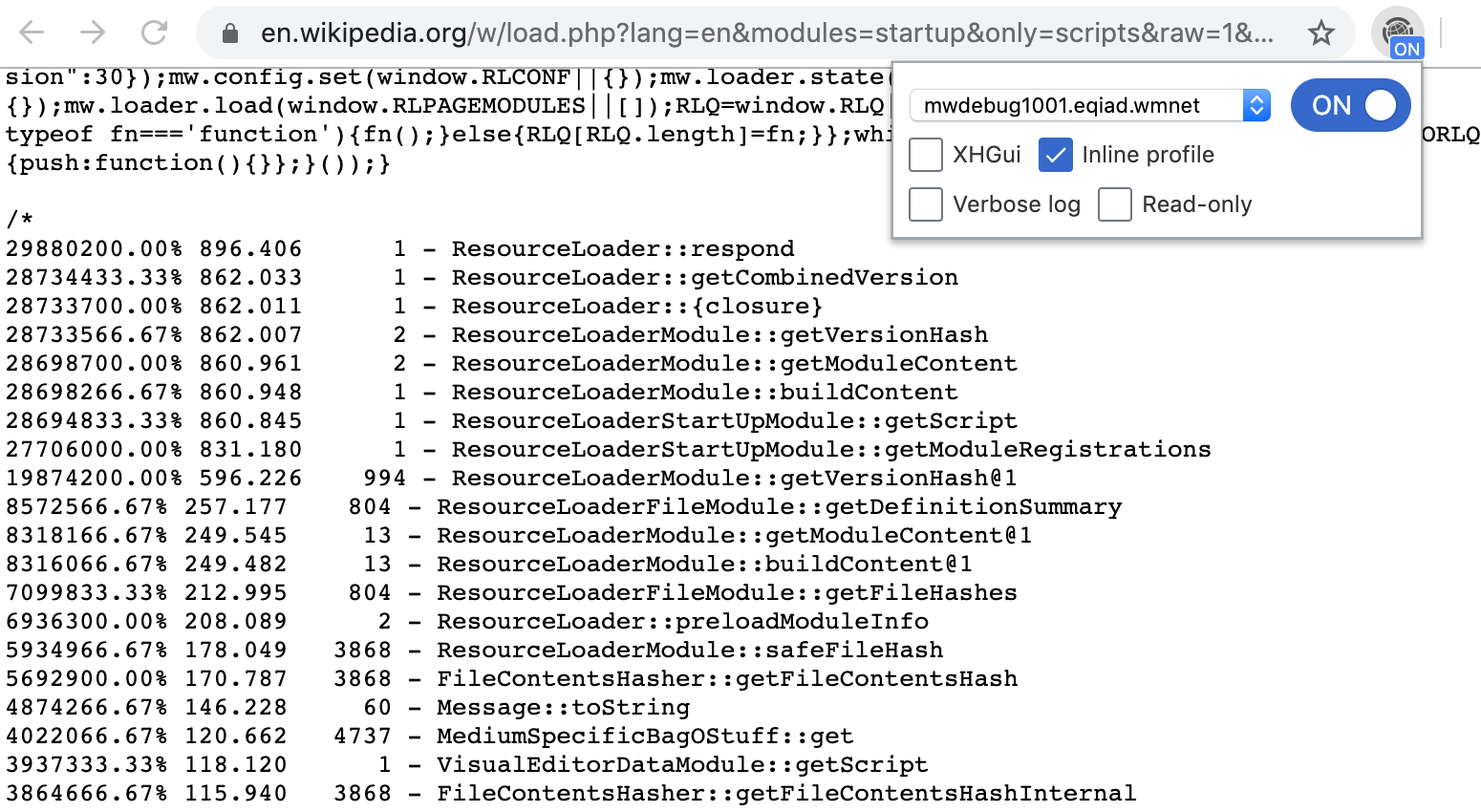
<p>I&#039;ve added a new &quot;Inline profile&quot; option. This is a quicker and more light-weight alternative to the &quot;XHGui&quot; profile option. It outputs the captured performance profile directly to your browser (as hidden comment at the end of the HTML or CSS/JS response).</p>

<p><div class="phabricator-remarkup-embed-layout-center"><a href="https://phab.wmfusercontent.org/file/data/trv25grxymwflyrbmknl/PHID-FILE-w6ipip3kc7kk2y6sx6vu/WikimediaDebug_v2_eg-rlstartup-inlineprof.png" class="phabricator-remarkup-embed-image" data-sigil="lightboxable" data-meta="0_5"><img src="https://phab.wmfusercontent.org/file/data/trv25grxymwflyrbmknl/PHID-FILE-w6ipip3kc7kk2y6sx6vu/WikimediaDebug_v2_eg-rlstartup-inlineprof.png" height="212" alt="WikimediaDebug v2 eg-rlstartup-inlineprof.png (850×1 px, 240 KB)" /></a></div></p>

<h6 class="remarkup-header">Beta Cluster support</h6>

<p>This week, I&#039;ve set up an XHGui server in the Beta Cluster. With this release, WikimediaDebug has reached feature parity between Beta Cluster and production.</p>

<p>It recognises whether the current tab is for the Beta Cluster or production, and adapts accordingly.</p>

<ul class="remarkup-list">
<li class="remarkup-list-item">The list of hostnames is omitted to avoid confusion (as there is no debug proxy in Beta).</li>
<li class="remarkup-list-item">The &quot;Find in Logstash&quot; link points to logstash-beta.wmflabs.org.</li>
<li class="remarkup-list-item">The &quot;Find in XHGui&quot; link points to performance-beta.wmflabs.org/xhgui/.</li>
</ul>

<h4 class="remarkup-header">§ 2. Features overview</h4>

<h6 class="remarkup-header">Staging changes</h6>

<p>The most common use of WikimediaDebug is to verify software changes during deployments (e.g. <a href="https://wikitech.wikimedia.org/wiki/SWAT_deploys" class="remarkup-link remarkup-link-ext" rel="noreferrer">SWAT</a>). When deploying changes, the <a href="https://wikitech.wikimedia.org/wiki/Scap" class="remarkup-link remarkup-link-ext" rel="noreferrer">Scap</a> deployment tool first syncs to an mw-debug host. The user then toggles on WikimediaDebug and selects the staging host.</p>

<p><div class="phabricator-remarkup-embed-layout-center"><a href="https://phab.wmfusercontent.org/file/data/p6hiciick7e7eoc5xmmp/PHID-FILE-i66soupmzco2xwsvvci4/WikimediaDebug_v2_backend.png" class="phabricator-remarkup-embed-image" data-sigil="lightboxable" data-meta="0_6"><img src="https://phab.wmfusercontent.org/file/data/p6hiciick7e7eoc5xmmp/PHID-FILE-i66soupmzco2xwsvvci4/WikimediaDebug_v2_backend.png" height="134" alt="WikimediaDebug v2 backend.png (269×610 px, 73 KB)" /></a></div></p>

<p>WikimediaDebug is now active and routes browser activity for WMF wikis to the staging host. This bypasses the CDN caching layers and load balancers normally involved with such requests.</p>

<h6 class="remarkup-header">Debug logging</h6>

<p>The MediaWiki software is instrumented with log messages throughout its source code. These indicate how the software behaves, which internal values it observes, and the decisions it makes along the way. In production we dispatch messages that carry the &quot;error&quot; severity to a central store for monitoring purposes.</p>

<p>When investigating a bug report, developers may try to reproduce the bug in their local environment with a verbose log. With WikimediaDebug, this can be done straight in production.</p>

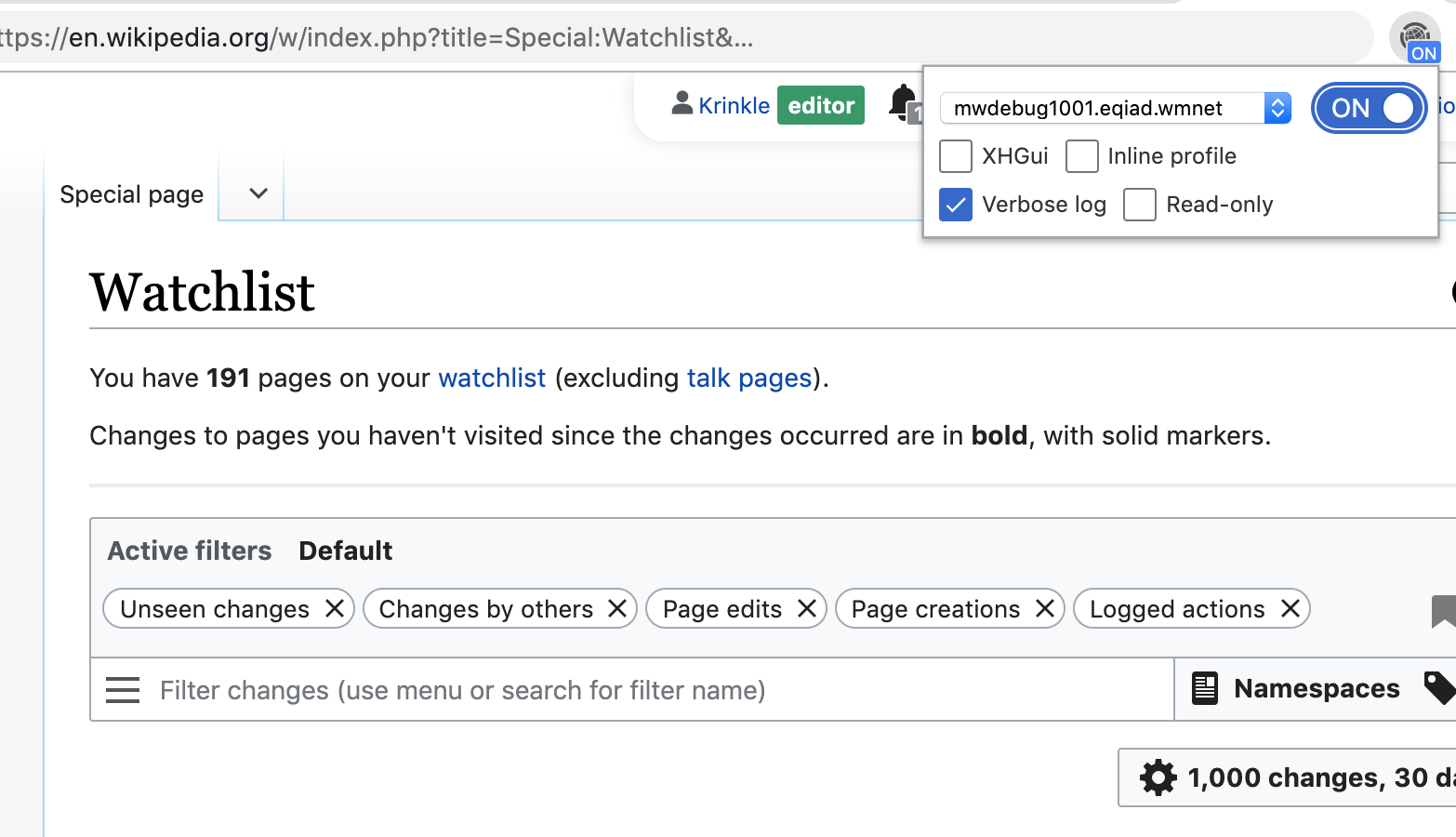
<p>The &quot;Verbose log&quot; option configures MediaWiki to dispatch <em>all</em> its log messages, from any channel or severity level. Below is an example where the Watchlist component is used with the verbose log enabled.</p>

<p><div class="phabricator-remarkup-embed-layout-center"><a href="https://phab.wmfusercontent.org/file/data/k3jxw7b5dfjwolx74amw/PHID-FILE-qtazl6okd74km5vefwjn/WikimediaDebug_v2_eg-watchlist-log.png" class="phabricator-remarkup-embed-image" data-sigil="lightboxable" data-meta="0_7"><img src="https://phab.wmfusercontent.org/file/data/k3jxw7b5dfjwolx74amw/PHID-FILE-qtazl6okd74km5vefwjn/WikimediaDebug_v2_eg-watchlist-log.png" height="300" alt="WikimediaDebug v2 eg-watchlist-log.png (900×1 px, 88 KB)" /></a></div></p>

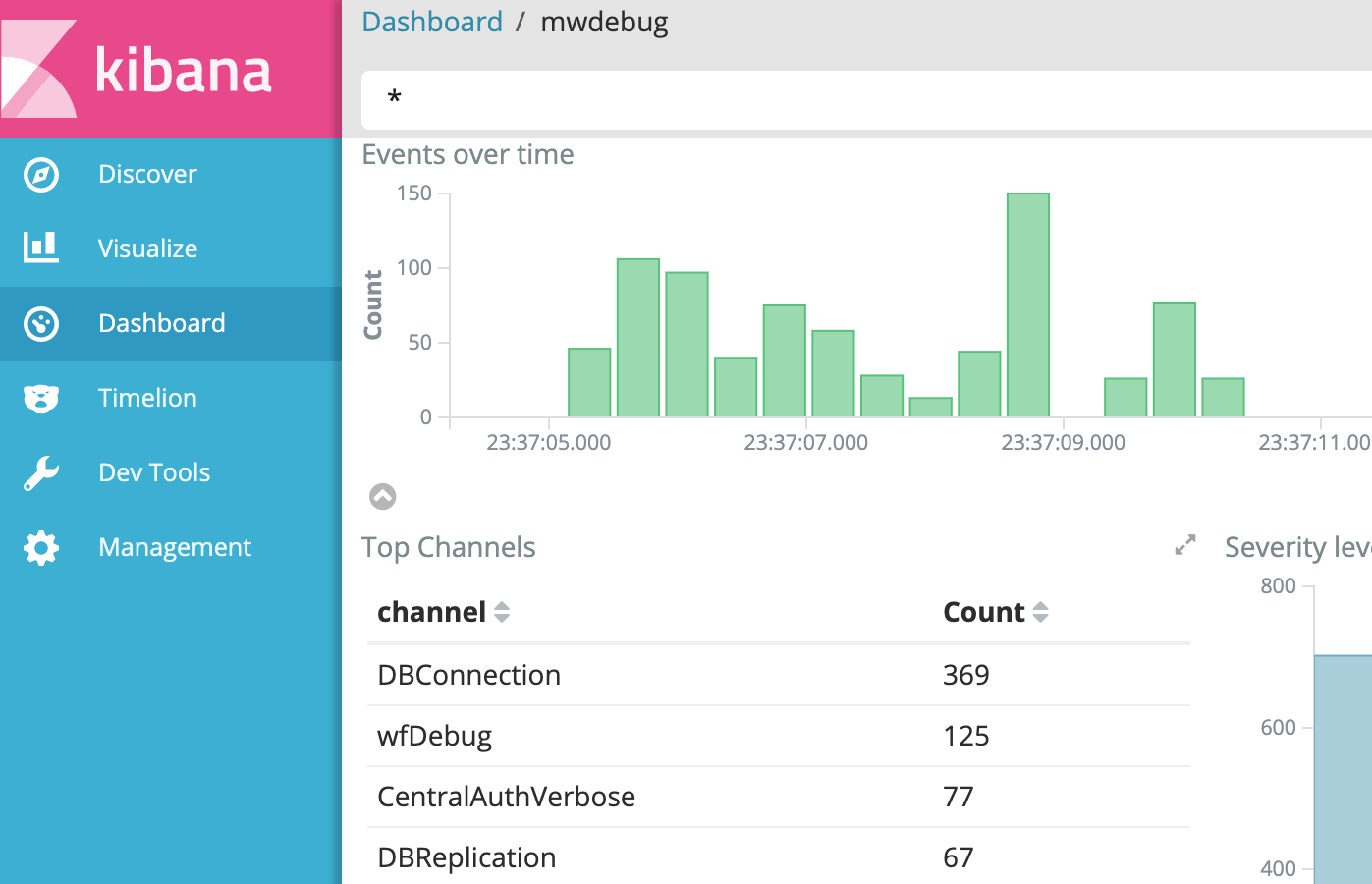
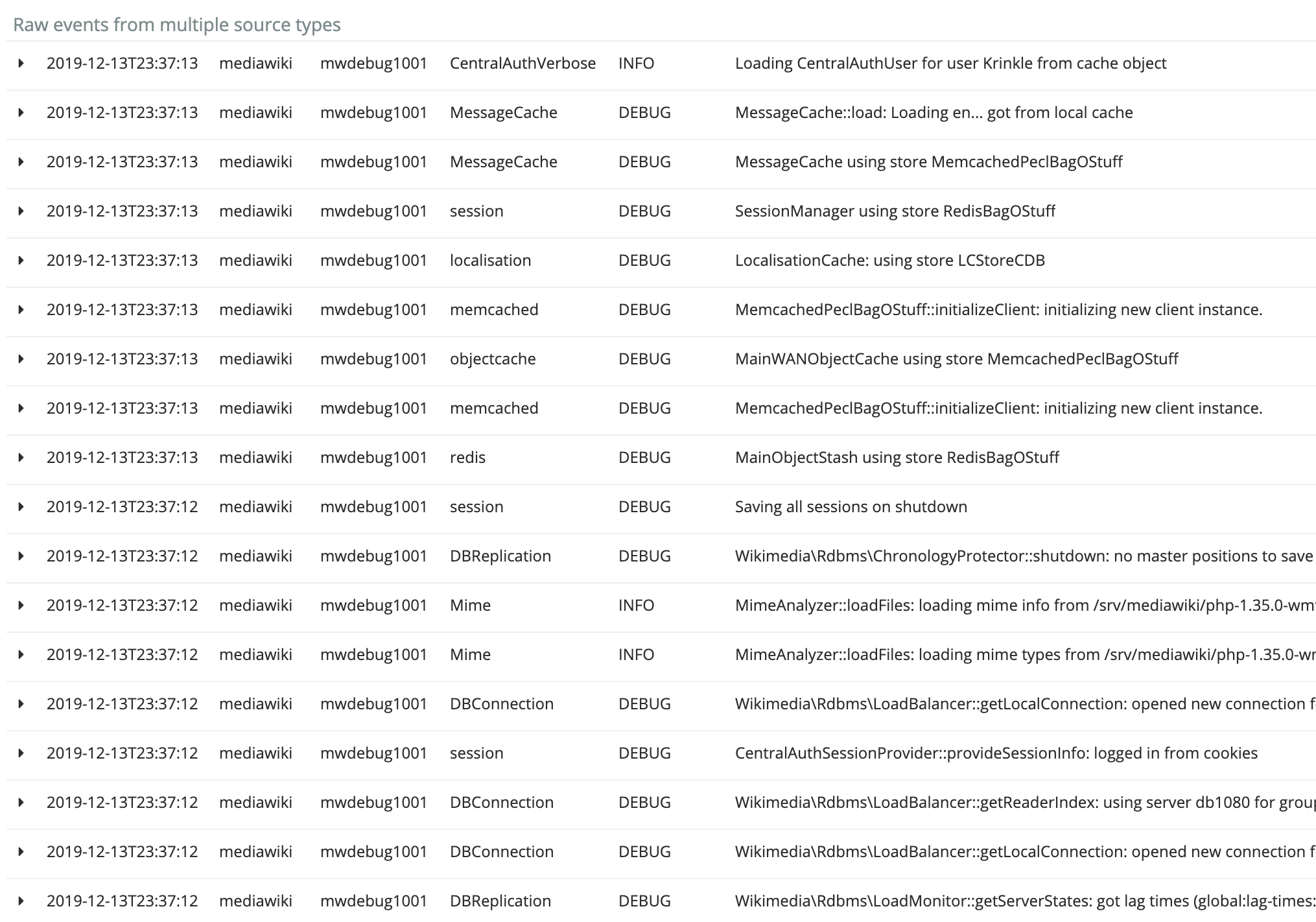
<p>One can then reproduce the bug (on the live site). The verbose log is automatically sent to Logstash, for access via the Kibana viewer at <a href="https://logstash.wikimedia.org/app/kibana#/dashboard/mwdebug1002" class="remarkup-link remarkup-link-ext" rel="noreferrer">logstash.wikimedia.org</a> (restricted link).</p>

<div class="remarkup-table-wrap"><table class="remarkup-table">
<tr><th>Aggregate graphs (Kibana)</th><th>Verbose log (Kibana)</th></tr>
<tr><td><div class="phabricator-remarkup-embed-layout-left"><a href="https://phab.wmfusercontent.org/file/data/sstwshgdp25qucapfoba/PHID-FILE-apm5gvl43cbucld5o6zh/WikimediaDebug_v2_eg-watchlist-kibana1.png" class="phabricator-remarkup-embed-image" data-sigil="lightboxable" data-meta="0_8"><img src="https://phab.wmfusercontent.org/file/data/sstwshgdp25qucapfoba/PHID-FILE-apm5gvl43cbucld5o6zh/WikimediaDebug_v2_eg-watchlist-kibana1.png" height="200" alt="WikimediaDebug v2 eg-watchlist-kibana1.png (900×1 px, 59 KB)" /></a></div></td><td><div class="phabricator-remarkup-embed-layout-left"><a href="https://phab.wmfusercontent.org/file/data/4ouxou7ikzzshaxwibi6/PHID-FILE-b5vdi7bjseqlxwwr3nas/WikimediaDebug_v2_eg-watchlist-kibana2.png" class="phabricator-remarkup-embed-image" data-sigil="lightboxable" data-meta="0_9"><img src="https://phab.wmfusercontent.org/file/data/56bxvbwljliducxe3jci/PHID-FILE-f24fwetykarkwysz7hag/preview-WikimediaDebug_v2_eg-watchlist-kibana2.png" width="220" height="154.10837438424" alt="WikimediaDebug v2 eg-watchlist-kibana2.png (1×2 px, 252 KB)" /></a></div></td></tr>
<tr></tr>
</table></div>


<h6 class="remarkup-header">Performance profiling</h6>

<p>The performance profiler shows where time is spent in a web request. This feature was originally implemented using the XHProf PHP extension (for PHP 5 and HHVM). XHProf is no longer actively developed, or packaged, for PHP 7. As part of the PHP 7 migration this year, we migrated to Tideways which provides similar functionality. (<a href="https://phabricator.wikimedia.org/T176370" class="phui-tag-view phui-tag-type-object " data-sigil="hovercard" data-meta="0_12"><span class="phui-tag-core-closed"><span class="phui-tag-core phui-tag-color-object">T176370</span></span></a>, <a href="https://phabricator.wikimedia.org/T206152" class="phui-tag-view phui-tag-type-object " data-sigil="hovercard" data-meta="0_13"><span class="phui-tag-core-closed"><span class="phui-tag-core phui-tag-color-object">T206152</span></span></a>)</p>

<p>The Tideways profiler intercepts the internals of the PHP engine, and tracks the duration of every subroutine call in the MediaWiki codebase, and its relation to other subroutines. This structure is known as a <strong>call tree</strong>, or <strong>call graph</strong>.</p>

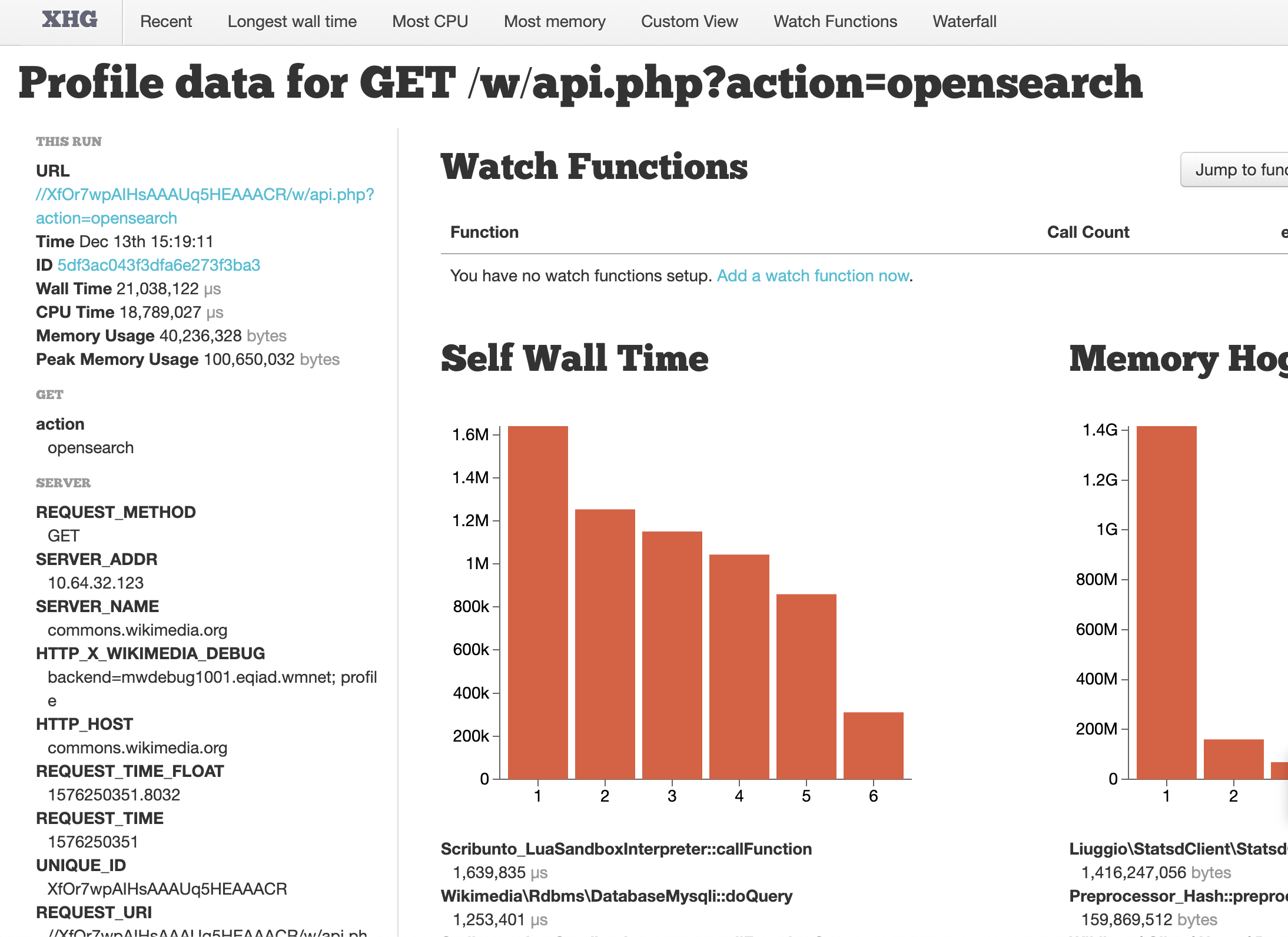
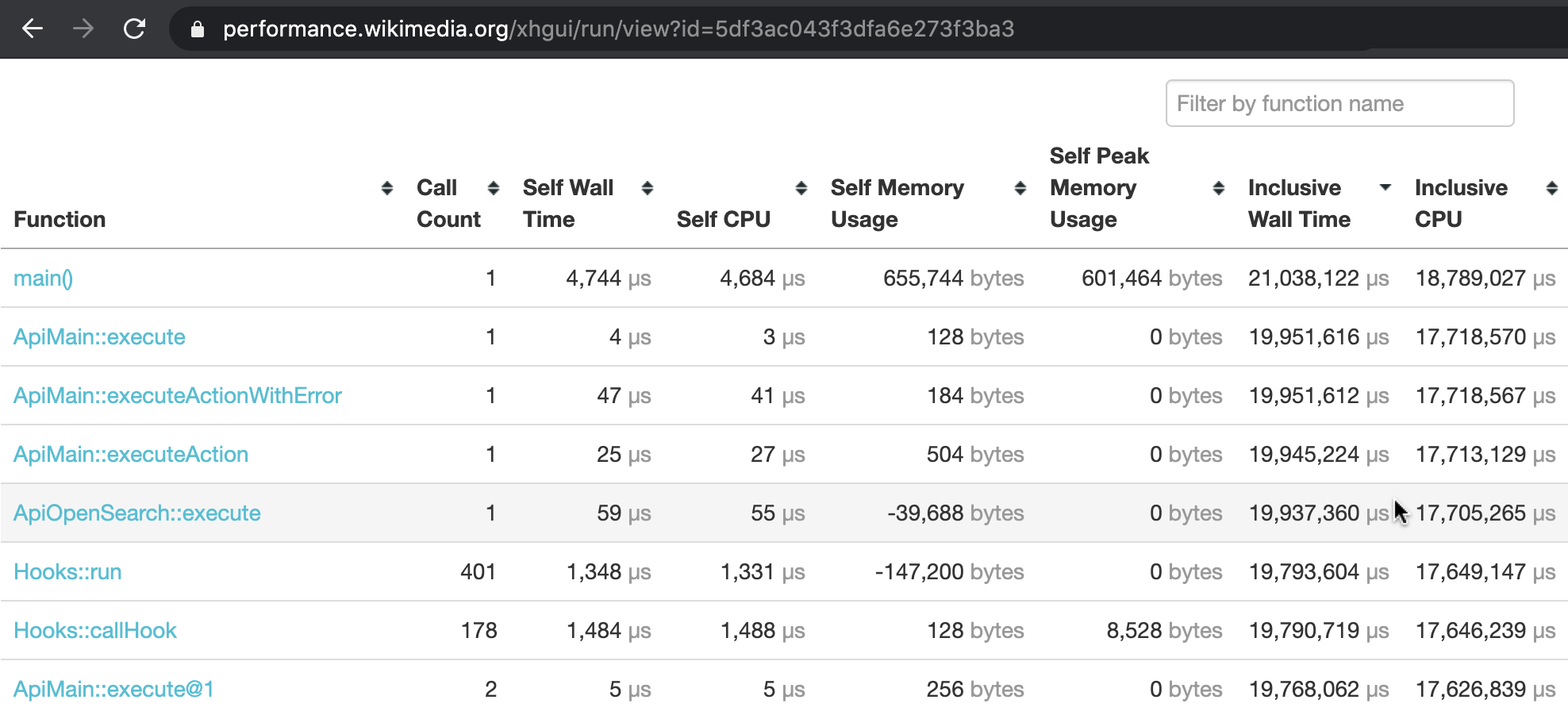
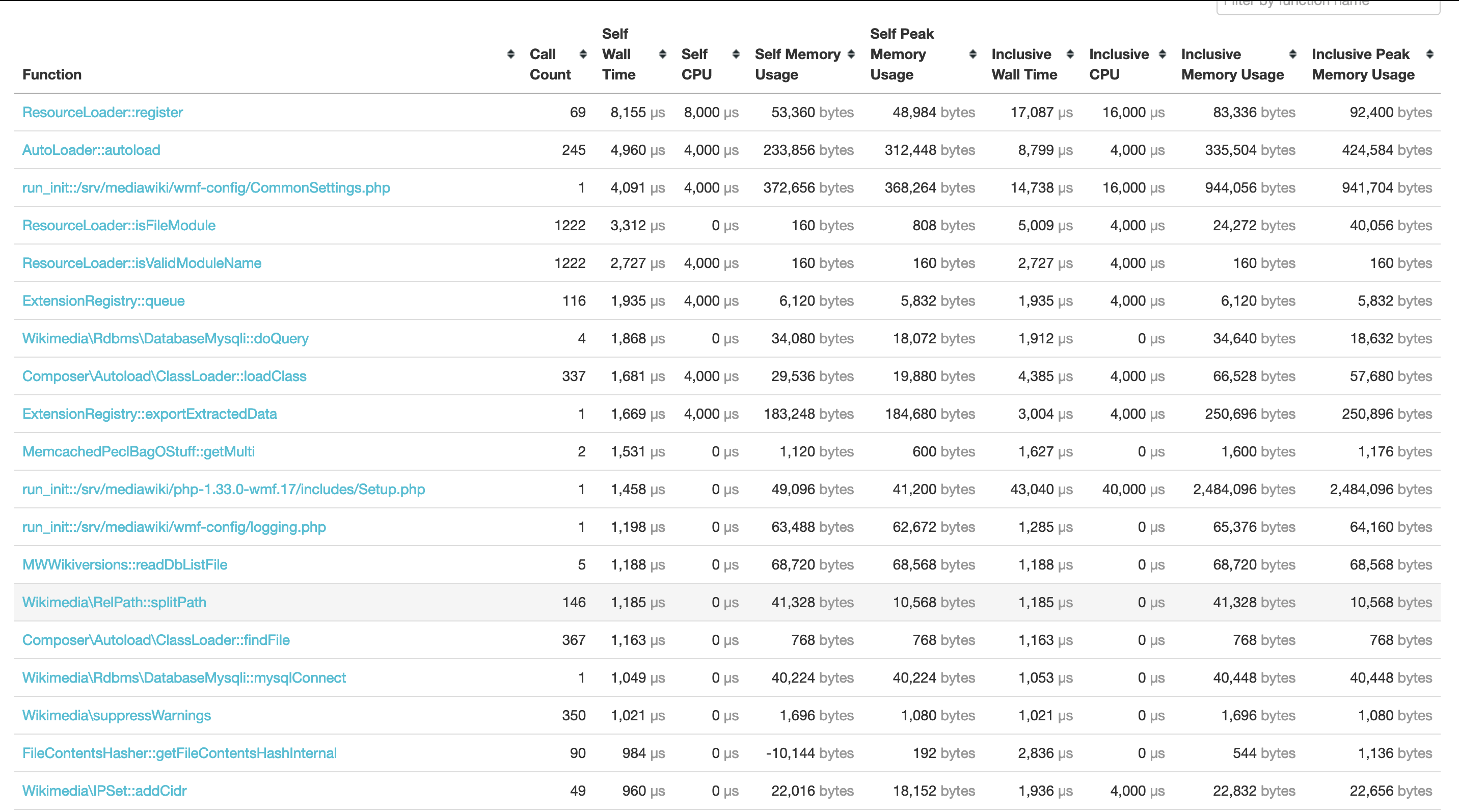
<p>The performance profile we capture with Tideways, is automatically sent to our XHGui installation at at <a href="https://performance.wikimedia.org/xhgui/run/view?id=5df3ac043f3dfa6e273f3ba3" class="remarkup-link remarkup-link-ext" rel="noreferrer">https://performance.wikimedia.org</a> (public). There, the request can be inspected in fine detail. In addition to a full call graph, it also monitors memory usage throughout the web request.</p>

<div class="remarkup-table-wrap"><table class="remarkup-table">
<tr><th>Most expensive functions (XHGui)</th><th>Call graph (XHGui)</th></tr>
<tr><td><div class="phabricator-remarkup-embed-layout-left"><a href="https://phab.wmfusercontent.org/file/data/ykg6aoxmeriifwvaarut/PHID-FILE-4n4emqq47bnszs2z3oyy/WikimediaDebug_v2_eg-opensearch-xhgui.png" class="phabricator-remarkup-embed-image" data-sigil="lightboxable" data-meta="0_10"><img src="https://phab.wmfusercontent.org/file/data/yzmnqt5xr72ao3gr4cav/PHID-FILE-xyvfi35opt6aehhmuzap/preview-WikimediaDebug_v2_eg-opensearch-xhgui.png" width="220" height="160.0731261426" alt="WikimediaDebug v2 eg-opensearch-xhgui.png (1×2 px, 253 KB)" /></a></div></td><td><div class="phabricator-remarkup-embed-layout-left"><a href="https://phab.wmfusercontent.org/file/data/gw24kstlj64a2rrb5ta7/PHID-FILE-ohyn6a2tfeydfz2ioda2/WikimediaDebug_v2_eg-opensearch-xhgui2.png" class="phabricator-remarkup-embed-image" data-sigil="lightboxable" data-meta="0_11"><img src="https://phab.wmfusercontent.org/file/data/gw24kstlj64a2rrb5ta7/PHID-FILE-ohyn6a2tfeydfz2ioda2/WikimediaDebug_v2_eg-opensearch-xhgui2.png" height="160" alt="WikimediaDebug v2 eg-opensearch-xhgui2.png (901×1 px, 103 KB)" /></a></div></td></tr>
<tr></tr>
</table></div>


<h4 class="remarkup-header">§ 3. How does it all work?</h4>

<h6 class="remarkup-header">Browser extension</h6>

<p>The browser extension is written using the WebExtensions API which Firefox and Chrome implement.</p>

<p><span class="remarkup-nav-sequence"><a href="https://addons.mozilla.org/en-US/firefox/addon/wikimedia-debug-header/" class="phui-tag-view phui-tag-type-shade phui-tag-grey phui-tag-shade phui-tag-icon-view " target="_blank" rel="noreferrer"><span class="phui-tag-core "><span class="visual-only phui-icon-view phui-font-fa fa-plus" data-meta="0_0" aria-hidden="true"></span>Add to Firefox</span></a></span>   <span class="remarkup-nav-sequence"><a href="https://chrome.google.com/webstore/detail/wikimediadebug/binmakecefompkjggiklgjenddjoifbb" class="phui-tag-view phui-tag-type-shade phui-tag-grey phui-tag-shade phui-tag-icon-view " target="_blank" rel="noreferrer"><span class="phui-tag-core "><span class="visual-only phui-icon-view phui-font-fa fa-plus" data-meta="0_1" aria-hidden="true"></span>Add to Chrome</span></a></span></p>

<p>You can find the <a href="https://github.com/wikimedia/WikimediaDebug" class="remarkup-link remarkup-link-ext" rel="noreferrer">source code on github.com/wikimedia/WikimediaDebug</a>. To learn more about how WebExtensions work,  refer to <a href="https://developer.mozilla.org/en-US/docs/Mozilla/Add-ons/WebExtensions" class="remarkup-link remarkup-link-ext" rel="noreferrer">MDN docs</a>, or <a href="https://developer.chrome.com/extensions" class="remarkup-link remarkup-link-ext" rel="noreferrer">Chrome docs</a>.</p>

<h6 class="remarkup-header">HTTP header</h6>

<p>When you activate WikimediaDebug, the browser is given one an extra HTTP header. This header is sent along with all web requests relating to WMF&#039;s wiki domains. Both those for production, and those belonging to the Beta Cluster. In other words, any web request for <tt class="remarkup-monospaced">*.wikipedia.org</tt>, <tt class="remarkup-monospaced">wikidata.org</tt>, <tt class="remarkup-monospaced">*.beta.wmflabs.org</tt>, etc.</p>

<p>The header is called <tt class="remarkup-monospaced">X-Wikimedia-Debug</tt>. In the edge traffic layers of Wikimedia, this header is used as signal to bypass the CDN cache. The request is then forwarded, past the load balancers, directly to the specified mw-debug server.</p>

<div class="remarkup-code-block" data-code-lang="text" data-sigil="remarkup-code-block"><div class="remarkup-code-header">Header Format</div><pre class="remarkup-code">X-Wikimedia-Debug: backend=&lt;servername&gt; [ ; log ] [ ; profile ] [ ; forceprofile ] [ ; readonly ]</pre></div>


<h6 class="remarkup-header">mediawiki-config</h6>

<p>This HTTP header is parsed by our MediaWiki configuration (<a href="https://gerrit.wikimedia.org/r/plugins/gitiles/operations/mediawiki-config/+/aaa3f017ef8e5212ae337f528b1602a8cdc0c6c5/wmf-config/profiler.php#10" class="remarkup-link remarkup-link-ext" rel="noreferrer">wmf/profiler.php</a>, and <a href="https://gerrit.wikimedia.org/r/plugins/gitiles/operations/mediawiki-config/+/67c0f4d005dd1ec47d34aa7133c43a6ade4794f6/wmf-config/logging.php#61" class="remarkup-link remarkup-link-ext" rel="noreferrer">wmf/logging.php</a>).</p>

<p>For example, when <tt class="remarkup-monospaced">profile</tt> is set (the XHGui option), profiler.php invokes Tideways to start collecting stack traces with CPU/memory information. It then schedules a shutdown callback in which it gathers this data, connects to the XHGui database, and inserts a new record. The record can then be viewed via <a href="https://performance.wikimedia.org/xhgui/" class="remarkup-link remarkup-link-ext" rel="noreferrer">performance.wikimedia.org</a>.</p>

<h4 class="remarkup-header">See also</h4>

<ul class="remarkup-list">
<li class="remarkup-list-item"><a href="https://wikitech.wikimedia.org/wiki/WikimediaDebug" class="remarkup-link remarkup-link-ext" rel="noreferrer">Documentation: How to use WikimediaDebug</a>.</li>
<li class="remarkup-list-item"><a href="https://gerrit.wikimedia.org/g/performance/WikimediaDebug/+/HEAD/CHANGELOG.md" class="remarkup-link remarkup-link-ext" rel="noreferrer">Change log: WikimediaDebug releases</a>.</li>
<li class="remarkup-list-item"><a href="https://github.com/perftools/xhgui" class="remarkup-link remarkup-link-ext" rel="noreferrer">GitHub: perftools/xhgui</a>.</li>
</ul>

<h5 class="remarkup-header">Further reading</h5>

<ul class="remarkup-list">
<li class="remarkup-list-item"><em><a href="https://phabricator.wikimedia.org/phame/post/view/143/debugging_production_with_x-wikimedia-debug/" class="remarkup-link" rel="noreferrer">How to debug in production with X-Wikimedia-Debug</a></em> (Feb 2019), by Kosta Harlan.</li>
<li class="remarkup-list-item"><em><a href="https://www.mail-archive.com/wikitech-l@lists.wikimedia.org/msg88740.html" class="remarkup-link remarkup-link-ext" rel="noreferrer">Inline callstack profiling - Now also on Beta Cluster</a></em> (Jan 2018), by Timo Tijhof.</li>
<li class="remarkup-list-item"><em><a href="https://www.mail-archive.com/wikitech-l@lists.wikimedia.org/msg84490.html" class="remarkup-link remarkup-link-ext" rel="noreferrer">Introducing X-Wikimedia-Debug, your new secret side-kick</a></em> (Mar 2016) by Ori Livneh.</li>
</ul>

<hr class="remarkup-hr" />

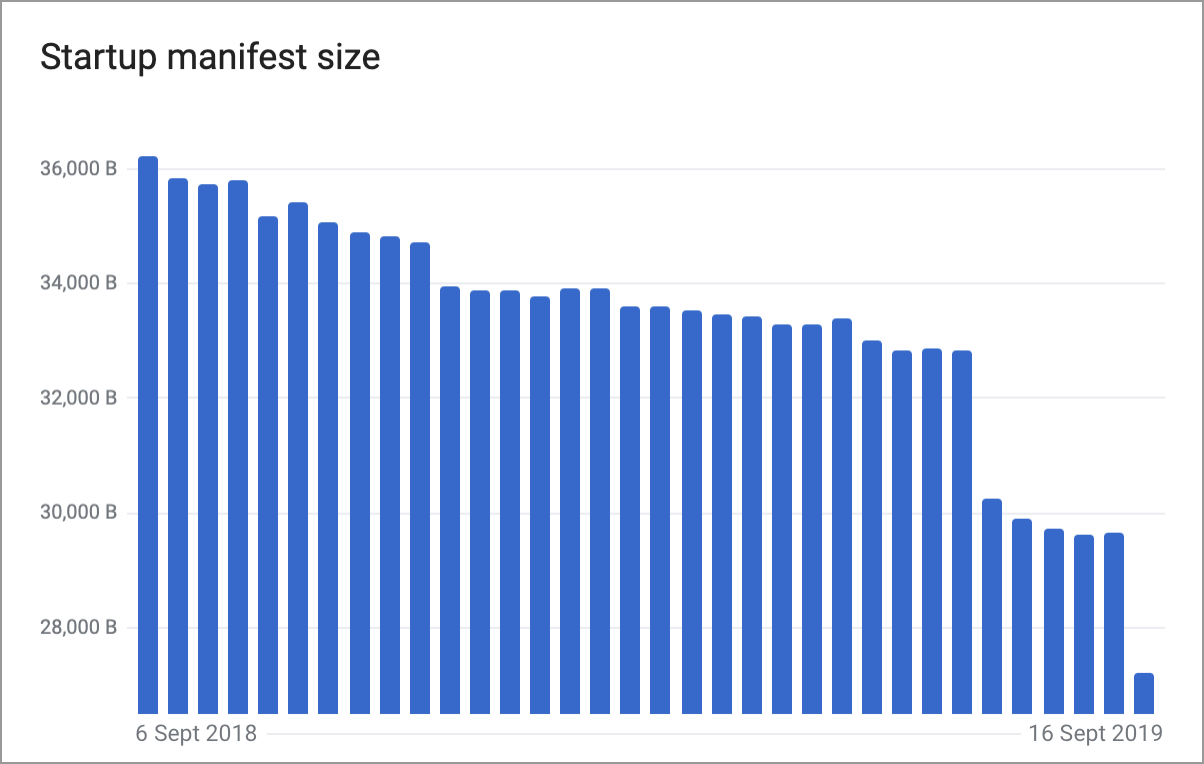
<p><span class="remarkup-nav-sequence"><a href="https://addons.mozilla.org/en-US/firefox/addon/wikimedia-debug-header/" class="phui-tag-view phui-tag-type-shade phui-tag-grey phui-tag-shade phui-tag-icon-view " target="_blank" rel="noreferrer"><span class="phui-tag-core "><span class="visual-only phui-icon-view phui-font-fa fa-plus" data-meta="0_2" aria-hidden="true"></span>Add WikimediaDebug to Firefox</span></a></span>   <span class="remarkup-nav-sequence"><a href="https://chrome.google.com/webstore/detail/wikimediadebug/binmakecefompkjggiklgjenddjoifbb" class="phui-tag-view phui-tag-type-shade phui-tag-grey phui-tag-shade phui-tag-icon-view " target="_blank" rel="noreferrer"><span class="phui-tag-core "><span class="visual-only phui-icon-view phui-font-fa fa-plus" data-meta="0_3" aria-hidden="true"></span>Add WikimediaDebug to Chrome</span></a></span></p></div></content></entry><entry><title>Wikipedia&#039;s JavaScript initialisation on a budget</title><link href="/phame/live/7/post/175/wikipedia_s_javascript_initialisation_on_a_budget/" /><id>https://phabricator.wikimedia.org/phame/post/view/175/</id><author><name>Krinkle (Timo Tijhof)</name></author><published>2019-09-18T22:46:41+00:00</published><updated>2022-05-13T09:36:05+00:00</updated><content type="xhtml"><div xmlns="http://www.w3.org/1999/xhtml"><p>This week saw the conclusion of a project that I&#039;ve been shepherding on and off since September of last year. The goal was for the initialisation of our asynchronous JavaScript pipeline (at the time, 36 kilobytes in size) to fit within a budget of 28 KB – the size of two 14 KB bursts of Internet packets.</p>

<p>In total, the year-long effort is saving 4.3 Terabytes a day of data bandwidth for our users&#039; page views.</p>

<p><div class="phabricator-remarkup-embed-layout-center"><a href="https://phab.wmfusercontent.org/file/data/t64rdovzxdi7lzxxxkh3/PHID-FILE-lwaqoruegcizfxzsza5m/wmchart.png" class="phabricator-remarkup-embed-image" data-sigil="lightboxable" data-meta="0_14"><img src="https://phab.wmfusercontent.org/file/data/t64rdovzxdi7lzxxxkh3/PHID-FILE-lwaqoruegcizfxzsza5m/wmchart.png" height="381" alt="wmchart.png (764×1 px, 31 KB)" /></a></div></p>

<p>The above graph shows the transfer size over time. Sizes are after compression (i.e. the net bandwidth cost as perceived from a browser).</p>

<hr class="remarkup-hr" />

<h5 class="remarkup-header">How we did it</h5>

<p>The startup manifest is a difficult payload to optimise. The vast majority of its code isn&#039;t functional logic that can be optimised by traditional means. Rather, it is almost entirely made of pure data. The data is auto-generated by ResourceLoader and represents the registry of module bundles. (<a href="https://www.mediawiki.org/wiki/ResourceLoader/Architecture" class="remarkup-link remarkup-link-ext" rel="noreferrer">ResourceLoader</a> is the delivery system Wikipedia uses for its JavaScript, CSS, interface text.)</p>

<p>This registry contains the metadata for all front-end features deployed on Wikipedia. It enumerates their name, currently deployed version, and their dependency relationships to other such bundles of loadable code.</p>

<p>I started by identifying code that was never used in practice (<a href="https://phabricator.wikimedia.org/T202154" class="phui-tag-view phui-tag-type-object " data-sigil="hovercard" data-meta="0_17"><span class="phui-tag-core-closed"><span class="phui-tag-core phui-tag-color-object">T202154</span></span></a>). This included picking up unfinished or forgotten software deprecations, and removing unused compatibility code for browsers that no longer passed our <a href="https://www.mediawiki.org/wiki/Compatibility#Browsers" class="remarkup-link remarkup-link-ext" rel="noreferrer">Grade A</a> feature-test. I also wrote a <a href="https://www.mediawiki.org/wiki/Wikimedia_Performance_Team/Page_load_performance" class="remarkup-link remarkup-link-ext" rel="noreferrer">document about Page load performance</a>. This document serves as reference material, enabling developers to understand the impact of various types of changes on one or more stages of the page load process.</p>

<h5 class="remarkup-header">Fewer modules</h5>

<p>Next was collaborating with the engineering teams here at Wikimedia Foundation and at Wikimedia Deutschland, to identify features that were using more modules than is necessary. For example, by bundling together parts of the same feature that are generally always downloaded together. Thus leading to fewer entry points to have metadata for in the ResourceLoader registry.</p>

<p>Some highlights:</p>

<ul class="remarkup-list">
<li class="remarkup-list-item">WMF Editing team: The WikiEditor extension now has 11 fewer modules. Another 31 modules were removed in UploadWizard. Thanks Ed Sanders, Bartosz Dziewoński, and James Forrester.</li>
<li class="remarkup-list-item">WMF Language team: Combined 24 modules of the ContentTranslation software. Thanks Santhosh Thottingal.</li>
<li class="remarkup-list-item">WMF Reading Web: Combined 25 modules in MobileFrontend. Thanks Stephen Niedzielski, and Jon Robson.</li>
<li class="remarkup-list-item">WMDE Community Wishlist Team: Removed 20 modules from the RevisionSlider and TwoColConflict features. Thanks Rosalie Perside, Jakob Warkotsch, and Amir Sarabadani.</li>
</ul>

<p>Last but not least, there was the Wikidata client for Wikipedia. This was an epic journey of its own (<a href="https://phabricator.wikimedia.org/T203696" class="phui-tag-view phui-tag-type-object " data-sigil="hovercard" data-meta="0_18"><span class="phui-tag-core-closed"><span class="phui-tag-core phui-tag-color-object">T203696</span></span></a>). This feature started out with a whopping 248 distinct modules registered on Wikipedia page views. The magnificent efforts of WMDE <strong>removed over 200 modules</strong>, bringing it down to 42 today.</p>

<p>The bar chart above shows small improvements throughout the year, all moving us closer to the goal. Two major drops stand out in particular. One is around two-thirds of the way, in the first week of August. This is when the aforementioned Wikidata improvement was deployed. The second drop is toward the end of the chart and happened this week – more about that below.</p>

<hr class="remarkup-hr" />

<h5 class="remarkup-header">Less metadata</h5>

<p>This week&#039;s improvement was achieved by two holistic changes that organised the data in a smarter way overall.</p>

<p>First – The <a href="https://www.mediawiki.org/wiki/Extension:EventLogging" class="remarkup-link remarkup-link-ext" rel="noreferrer">EventLogging</a> extension previously shipped its schema metadata as part the startup manifest. Roan Kattouw (Growth Team) refactored this mechanism to instead bundle the schema metadata together with the JavaScript code of the EventLogging client. This means the startup footprint of EventLogging was reduced by over 90%. That&#039;s 2KB less metadata in the critical path! It also means that going forward, the startup cost for EventLogging no longer grows with each new event instrumentation. This clever bundling is powered by ResourceLoader&#039;s new <a href="https://www.mediawiki.org/wiki/ResourceLoader/Package_modules" class="remarkup-link remarkup-link-ext" rel="noreferrer">Package files</a> feature. This feature was expedited in February 2019 in part because of its potential to reduce the number of modules in our registry. Package Files make it super easy to combine generated data with JavaScript code in a single module bundle.</p>

<p>Second – We shrunk the average size for each entry in the registry overall (<a href="https://phabricator.wikimedia.org/T229245" class="phui-tag-view phui-tag-type-object " data-sigil="hovercard" data-meta="0_19"><span class="phui-tag-core-closed"><span class="phui-tag-core phui-tag-color-object">T229245</span></span></a>). The startup manifest contains two pieces of data for each module: Its name, and its version ID. This version ID previously required 7 bytes of data. After thinking through the <a href="https://en.wikipedia.org/wiki/Birthday_problem" class="remarkup-link remarkup-link-ext" rel="noreferrer">Birthday mathematics problem</a> in context of ResourceLoader, we decided that the probability spectrum for our version IDs can be safely reduced from 78 billion down to &quot;only&quot; 60 million. For more details see <a href="https://github.com/wikimedia/mediawiki/commit/9f516f1d3b6ab6a4f1bb7e385c93e4d9bccb46d7#diff-57e85f8b8063990fa5b0e2d2f0d25f8e" class="remarkup-link remarkup-link-ext" rel="noreferrer">the code comments</a>, but in summary it means we&#039;re saving 2 bytes for each of the 1100 modules still in the registry. Thus reducing the payload by another 2-3 KB.</p>

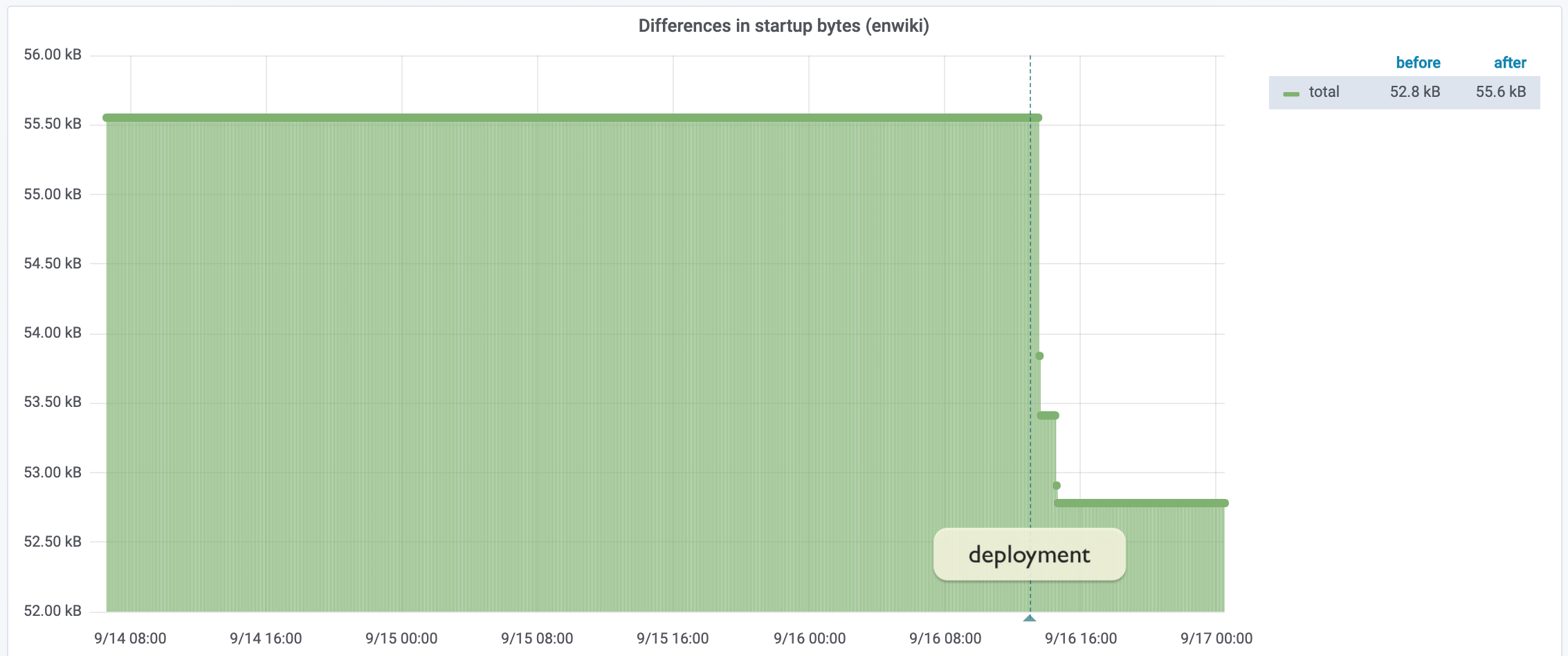
<p>Below is a close-up for the last few days (this is from synthetic monitoring, plotting the raw/uncompressed size):</p>

<p><div class="phabricator-remarkup-embed-layout-center"><a href="https://phab.wmfusercontent.org/file/data/roxbunjvadg5paakhayk/PHID-FILE-75m4l6c7okba4astrjnk/grafana-wmf22.png" class="phabricator-remarkup-embed-image" data-sigil="lightboxable" data-meta="0_15"><img src="https://phab.wmfusercontent.org/file/data/roxbunjvadg5paakhayk/PHID-FILE-75m4l6c7okba4astrjnk/grafana-wmf22.png" height="237" alt="grafana-wmf22.png (948×2 px, 88 KB)" /></a></div></p>

<p>The change was detected in ResourceLoader&#039;s synthetic monitoring. The above is captured from the <a href="https://grafana.wikimedia.org/d/BvWJlaDWk/startup-manifest-size?orgId=1&amp;from=1568439360000&amp;to=1568680200000" class="remarkup-link remarkup-link-ext" rel="noreferrer">Startup manifest size dashboard</a> on our public Grafana instance, showing a <span class="visual-only phui-icon-view phui-font-fa fa-arrow-circle-down green" data-meta="0_20" aria-hidden="true"></span> <strong>2.8KB</strong> decrease in the uncompressed data stream.</p>

<p>With this week&#039;s deployment, we&#039;ve completed the goal of shrinking the startup manifest to under 28 KB. This cross-departmental and cross-organisational project reduced the startup manifest by <span class="visual-only phui-icon-view phui-font-fa fa-arrow-circle-down green" data-meta="0_21" aria-hidden="true"></span> <strong>9 KB</strong> overall (net bandwidth, after compression); From 36.2 kilobytes one year ago, down to 27.2 KB today.</p>

<p>We have around 363,000 page views a minute in total on Wikipedia and sister projects. That&#039;s 21.8M an hour, or 523 million every day (<a href="https://stats.wikimedia.org/v2/#/all-projects/reading/total-page-views/normal|bar|2-year|agent~user|monthly" class="remarkup-link remarkup-link-ext" rel="noreferrer">User pageview stats</a>). This week&#039;s deployment saves around 1.4 Terabytes a day. In total, the year-long effort is saving 4.3 Terabytes a day of bandwidth on our users&#039; page views.</p>

<hr class="remarkup-hr" />

<h5 class="remarkup-header">What&#039;s next</h5>

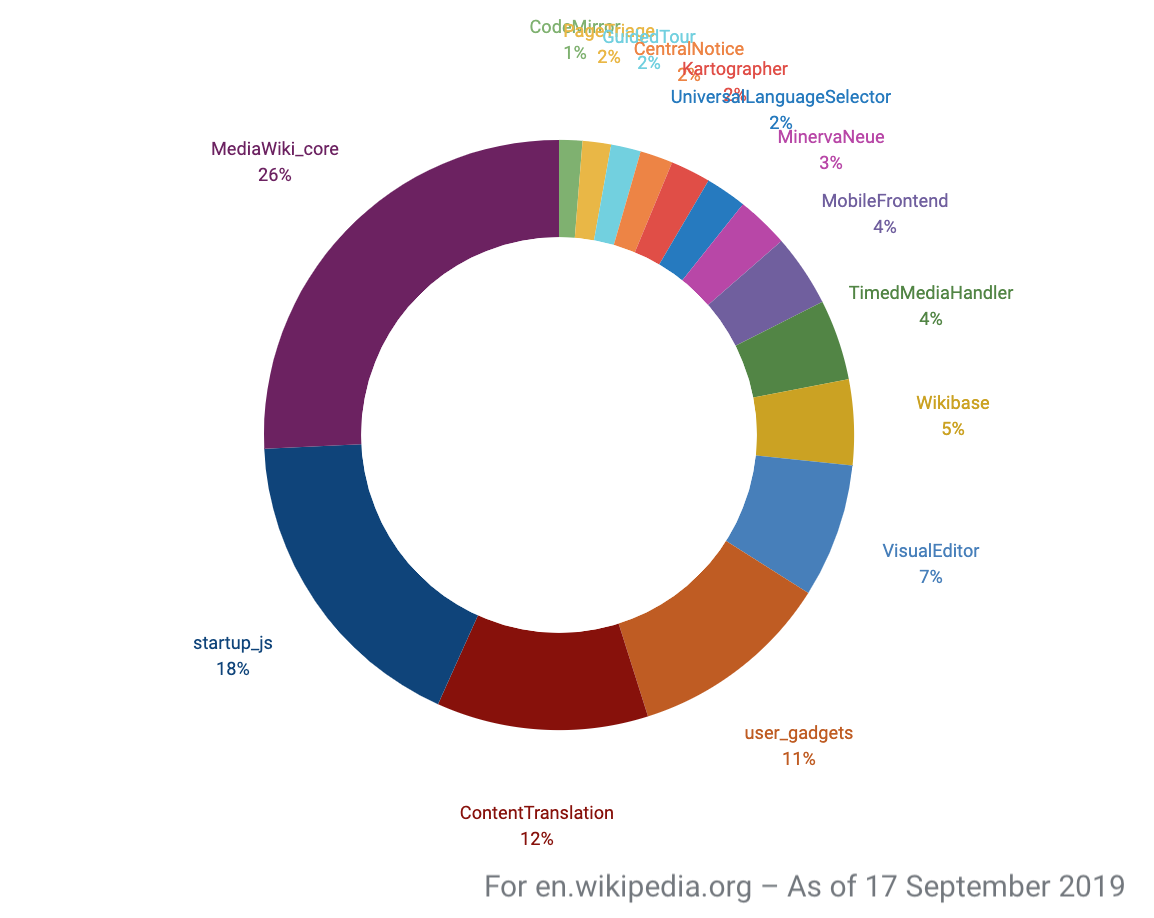
<p><div class="phabricator-remarkup-embed-layout-right phabricator-remarkup-embed-float-right"><a href="https://phab.wmfusercontent.org/file/data/kln5kmacx5ea26d2gpen/PHID-FILE-sz3amx35jppvpc4lvopq/grafana-wmf22-pie.png" class="phabricator-remarkup-embed-image" data-sigil="lightboxable" data-meta="0_16"><img src="https://phab.wmfusercontent.org/file/data/kln5kmacx5ea26d2gpen/PHID-FILE-sz3amx35jppvpc4lvopq/grafana-wmf22-pie.png" height="153" alt="grafana-wmf22-pie.png (918×1 px, 68 KB)" /></a></div></p>

<p>It&#039;s great to celebrate that Wikipedia&#039;s startup payload now neatly fits into the target budget of 28 KB – chosen as the lowest multiple of 14KB we can fit within subsequent <a href="https://tylercipriani.com/blog/2016/09/25/the-14kb-in-the-tcp-initial-window/" class="remarkup-link remarkup-link-ext" rel="noreferrer">bursts of Internet packets</a> to a web browser.</p>

<p>The challenge going forward will be to keep us there. Over the past year I&#039;ve kept a very close eye (<a href="https://docs.google.com/document/d/1SESOADAH9phJTeLo4lqipAjYUMaLpGsQTAUqdgyZb4U/edit" class="remarkup-link remarkup-link-ext" rel="noreferrer">spreadsheet</a>) on the startup manifest — to verify our progress, and to identify potential regressions. I&#039;ve since automated this laborious process through a public <a href="https://grafana.wikimedia.org/d/BvWJlaDWk/startup-manifest-size" class="remarkup-link remarkup-link-ext" rel="noreferrer">Grafana dashboard</a>.</p>

<p>We still have many more opportunities on that dashboard to improve bundling of our features, and (for Performance Team) to make it even easier to implement such bundling. I hope these on-going improvements will come in handy whilst we work on finding room in our performance budget for upcoming features.</p>

<p>– Timo Tijhof</p>

<hr class="remarkup-hr" />

<p><em>Further reading:</em></p>

<ul class="remarkup-list">
<li class="remarkup-list-item"><a href="https://performance.wikimedia.org/" class="remarkup-link remarkup-link-ext" rel="noreferrer">Metrics &amp; Perf reports</a>, on performance.wikimedia.org</li>
<li class="remarkup-list-item"><a href="https://www.mediawiki.org/wiki/ResourceLoader/Architecture" class="remarkup-link remarkup-link-ext" rel="noreferrer">ResourceLoader Architecture</a>, on mediawiki.org.</li>
<li class="remarkup-list-item"><a href="https://tylercipriani.com/blog/2016/09/25/the-14kb-in-the-tcp-initial-window/" class="remarkup-link remarkup-link-ext" rel="noreferrer">The 14KB Initial Window</a>, by Tyler Cipriani</li>
</ul></div></content></entry><entry><title>Tracking down slow event handlers with Event Timing</title><link href="/phame/live/7/post/168/tracking_down_slow_event_handlers_with_event_timing/" /><id>https://phabricator.wikimedia.org/phame/post/view/168/</id><author><name>Gilles (Gilles Dubuc)</name></author><published>2019-06-19T15:17:49+00:00</published><updated>2019-06-20T17:57:51+00:00</updated><content type="xhtml"><div xmlns="http://www.w3.org/1999/xhtml"><p>We&#039;re taking part in the ongoing <a href="https://github.com/WICG/event-timing" class="remarkup-link remarkup-link-ext" rel="noreferrer">Event Timing</a> <a href="https://www.chromium.org/blink/origin-trials" class="remarkup-link remarkup-link-ext" rel="noreferrer">Chrome origin trial</a>, in order to experiment with that API early and give feedback to its designers. The goal of this upcoming API is to surface slow events. This is an area of web performance that hasn&#039;t gotten a lot of attention before, but one that can be very frustrating for users. Essentially, when slow events occur, users are trying to interact with the page and it&#039;s being unresponsive. Not a desirable user experience.</p>

<h2 class="remarkup-header">Slow event handlers</h2>

<p>Two phases of an event&#039;s lifecycle can take too long: its queueing time and its event handler time. When queueing time is long, it&#039;s an indication that the browser is busy with something else. Most likely, things that the <a href="https://developer.mozilla.org/en-US/docs/Web/API/Long_Tasks_API" class="remarkup-link remarkup-link-ext" rel="noreferrer">Long Tasks API</a> would capture.</p>

<p>What we focused on in our trial were events whose handlers were slow. Since Wikipedia doesn&#039;t run any 3rd-party code, if an event handler is slow, it&#039;s <em>our fault</em>. And hopefully we can do something about it.</p>

<p>In order to determine whether slow events are happening on our page, we set up a PerformanceObserver listening to Event Timing entries:</p>

<div class="remarkup-code-block" data-code-lang="js" data-sigil="remarkup-code-block"><pre class="remarkup-code"><span></span><span class="kd">function</span> <span class="nx">setupEventTimingObserver</span><span class="p">()</span> <span class="p">{</span>
  <span class="kd">var</span> <span class="nx">observer</span><span class="p">;</span>

  <span class="k">if</span> <span class="p">(</span> <span class="o">!</span><span class="nb">window</span><span class="p">.</span><span class="nx">PerformanceObserver</span> <span class="p">)</span> <span class="p">{</span>
    <span class="k">return</span><span class="p">;</span>
  <span class="p">}</span>

  <span class="nx">observer</span> <span class="o">=</span> <span class="k">new</span> <span class="nx">PerformanceObserver</span><span class="p">(</span> <span class="nx">observeEventTiming</span> <span class="p">);</span>

  <span class="k">try</span> <span class="p">{</span>
    <span class="nx">observer</span><span class="p">.</span><span class="nx">observe</span><span class="p">(</span> <span class="p">{</span> <span class="nx">entryTypes</span><span class="o">:</span> <span class="p">[</span> <span class="s1">&#39;event&#39;</span> <span class="p">],</span> <span class="nx">buffered</span><span class="o">:</span> <span class="kc">true</span> <span class="p">}</span> <span class="p">);</span>
  <span class="p">}</span> <span class="k">catch</span> <span class="p">(</span> <span class="nx">e</span> <span class="p">)</span> <span class="p">{</span>
    <span class="c1">// If EventTiming isn&#39;t available, this errors because we try subscribing to an invalid entryType</span>
  <span class="p">}</span>
<span class="p">}</span></pre></div>

<p>Then, in the entries this observer collects, we&#039;re interested in these properties:</p>

<div class="remarkup-code-block" data-code-lang="js" data-sigil="remarkup-code-block"><pre class="remarkup-code"><span></span><span class="c1">// The time the first event handler started to execute.</span>
<span class="c1">// |startTime| if no event handlers executed.</span>
<span class="nx">readonly</span> <span class="nx">attribute</span> <span class="nx">DOMHighResTimeStamp</span> <span class="nx">processingStart</span><span class="p">;</span>
<span class="c1">// The time the last event handler finished executing.</span>
<span class="c1">// |startTime| if no event handlers executed.</span>
<span class="nx">readonly</span> <span class="nx">attribute</span> <span class="nx">DOMHighResTimeStamp</span> <span class="nx">processingEnd</span><span class="p">;</span></pre></div>

<p>The event handler duration is simply the delta between these PerformanceEventTiming object properties (processingEnd - processingStart).</p>

<p>Great! Now we know when event handlers take a while to run, and we know the event type (eg. click, mousemove, etc.). But how can we figure out which part of our UX these events came from?</p>

<h2 class="remarkup-header">Cross-referencing with regular events</h2>

<p>Our workaround to only knowing about an event type and its timing information is to listen to events of interest (in our case, clicks) on the whole document. If you capture all events, you&#039;re bound to run into the slow ones...</p>

<div class="remarkup-code-block" data-code-lang="js" data-sigil="remarkup-code-block"><pre class="remarkup-code"><span></span><span class="nx">$</span><span class="p">(</span> <span class="nb">document</span> <span class="p">).</span><span class="nx">on</span><span class="p">(</span> <span class="s1">&#39;click&#39;</span><span class="p">,</span> <span class="kd">function</span> <span class="nx">listener</span><span class="p">(</span> <span class="nx">e</span> <span class="p">)</span> <span class="p">{</span>
  <span class="c1">// do something with the event</span>
<span class="p">}</span></pre></div>

<p>How can we cross-reference them? Well, conveniently, an event&#039;s timeStamp property is identical to the corresponding PerformanceEventTiming startTime property. By cross-referencing types and timestamps, we can figure out which events in the document were slow. And we can get actionable information, such as the event&#039;s target.</p>

<p>Now we&#039;re all set, we can collect events with slow handlers and figure out which user interaction they came from. By walking up the DOM tree from the target, we can figure out exactly what users interacted with, that triggered a slow event handler.</p>

<h2 class="remarkup-header">What we&#039;ve found</h2>

<p>Using this technique and deploying it to production on 2 Wikipedias (Russian and Spanish), we quickly identified 3 very frequent slow click handlers experienced frequently by real users on Wikipedia. Those are taking more than 50ms thousands of times per day for users of those wikis:</p>

<p><a href="/T226023" class="phui-tag-view phui-tag-type-object " data-sigil="hovercard" data-meta="0_22"><span class="phui-tag-core phui-tag-color-object">T226023: Media Viewer detach/shutdown can be expensive</span></a><br />
<a href="/T226025" class="phui-tag-view phui-tag-type-object " data-sigil="hovercard" data-meta="0_23"><span class="phui-tag-core-closed"><span class="phui-tag-core phui-tag-color-object">T226025: Expensive viewport size access in Reference Drawers</span></span></a><br />
<a href="/T225946" class="phui-tag-view phui-tag-type-object " data-sigil="hovercard" data-meta="0_24"><span class="phui-tag-core-closed"><span class="phui-tag-core phui-tag-color-object">T225946: [SPIKE 8hrs] Determine remedy for MobileFrontend lazy-loading images performance issues</span></span></a></p>

<p>Two of those issues are caused by expensive javascript calls causing style recalculation and layout. A common performance pitfall, because those calls are quite innocent-looking. Paul Irish has put together <a href="https://gist.github.com/paulirish/5d52fb081b3570c81e3a" class="remarkup-link remarkup-link-ext" rel="noreferrer">this very handy list of JS features</a> that trigger that problem.</p>

<p>Hopefully we should be able to replace the offending code with CSS-only solution, or at the very least mitigate their reliance on these expensive calls, so that users can always have a responsive experience when they click on those UI elements.</p>

<p>Beyond these top 3 issues, the Event Timing API is surfacing a very long tail of small performance problems in corners of our UX that are worth improving. It&#039;s shedding light on a lot of different potential sources of user frustration.</p>

<h2 class="remarkup-header">Feedback</h2>

<p>By doing this work, it became self-evident that having the event target directly in the Event Timing API would be very convenient. It would let us avoid the overhead of listening to all events that might be slow and remove the cross-referencing effort. This is why we joined <a href="https://github.com/WICG/event-timing/issues/9" class="remarkup-link remarkup-link-ext" rel="noreferrer">Nic Jansma&#039;s request to have more context in the API</a>. This is precisely what origin trials are for, and we are glad to have been able to express our operational needs early, which should hopefully contribute to the final design of that new browser API.</p>

<p>The Event Timing API origin trial <a href="https://developers.chrome.com/origintrials/#/view_trial/-1621295865853378559" class="remarkup-link remarkup-link-ext" rel="noreferrer">runs until July 24 on Chrome 68-75</a>, so you can already give it a spin in production and see if you find slow events on your own site!</p></div></content></entry><entry><title>Performance perception: correlation to RUM metrics</title><link href="/phame/live/7/post/167/performance_perception_correlation_to_rum_metrics/" /><id>https://phabricator.wikimedia.org/phame/post/view/167/</id><author><name>Gilles (Gilles Dubuc)</name></author><published>2019-06-17T11:56:27+00:00</published><updated>2019-06-18T10:12:24+00:00</updated><content type="xhtml"><div xmlns="http://www.w3.org/1999/xhtml"><p>When we set out to ask Wikipedia visitors their opinion of page load performance, our main hope was to answer an age-old question: which RUM metric matters the most to users? And more interestingly, which ones matter the most to our users on our content.</p>

<p>Now that we have a lot of user input with our micro survey running for over a year, we can look at which classic RUM metrics correlate the best to users&#039; perception of the page load performance.</p>

<p><div class="phabricator-remarkup-embed-layout-left"><a href="https://phab.wmfusercontent.org/file/data/v2ltezjennyw5ewt4g2c/PHID-FILE-jjzmc37rcos3fixkqbtr/800px-Barack_Obama_through_a_magnifying_glass.jpg" class="phabricator-remarkup-embed-image-full" data-sigil="lightboxable" data-meta="0_25"><img src="https://phab.wmfusercontent.org/file/data/v2ltezjennyw5ewt4g2c/PHID-FILE-jjzmc37rcos3fixkqbtr/800px-Barack_Obama_through_a_magnifying_glass.jpg" height="533" width="800" loading="lazy" alt="800px-Barack_Obama_through_a_magnifying_glass.jpg (533×800 px, 90 KB)" /></a></div></p>

<h2 class="remarkup-header">Methodology</h2>

<p>We collect user responses from <a href="https://phabricator.wikimedia.org/phame/post/view/161/performance_perception_how_satisfied_are_wikipedia_users/" class="remarkup-link" rel="noreferrer">an in-page micro survey asking them if the page load was fast enough</a>. We map their responses to 1 for positive answers, -1 for negative answers and we discard neutral &quot;I don&#039;t know&quot; answers. We only look at records where a given RUM metric is present, and for time-based metrics, only if the value is lower than 30 seconds. Beyond that point we know for certain that the experience was terrible or that there was an issue with metric collection.</p>

<h2 class="remarkup-header">Results</h2>

<div class="remarkup-table-wrap"><table class="remarkup-table">
<tr><td><strong>Metric</strong></td><td><strong><a href="https://en.wikipedia.org/wiki/Pearson_correlation_coefficient" class="remarkup-link remarkup-link-ext" rel="noreferrer">Pearson coefficient</a></strong></td><td><strong>Sample size</strong></td></tr>
<tr><td>domInteractive</td><td>-0.149</td><td>1,709,435</td></tr>
<tr><td>firstContentfulPaint</td><td>-0.144</td><td>985,662</td></tr>
<tr><td>firstPaint</td><td>-0.143</td><td>1,057,157</td></tr>
<tr><td>domComplete</td><td>-0.142</td><td>1,703,476</td></tr>
<tr><td>loadEventEnd</td><td>-0.142</td><td>1,703,441</td></tr>
<tr><td>loadEventStart</td><td>-0.142</td><td>1,703,388</td></tr>
<tr><td>top thumbnail (<a href="https://github.com/WICG/element-timing" class="remarkup-link remarkup-link-ext" rel="noreferrer">Element Timing for Images</a> origin trial)</td><td>-0.138</td><td>28,070</td></tr>
<tr><td>responseStart</td><td>-0.131</td><td>1,705,859</td></tr>
<tr><td>RUMSpeedIndex</td><td>-0.129</td><td>1,319,177</td></tr>
<tr><td>secureConnectionStart</td><td>-0.128</td><td>942,602</td></tr>
<tr><td>requestStart</td><td>-0.120</td><td>1,694,865</td></tr>
<tr><td>connectEnd</td><td>-0.119</td><td>1,596,297</td></tr>
<tr><td>redirecting</td><td>-0.109</td><td>33,056</td></tr>
<tr><td>domainLookupEnd - domainLookupStart</td><td>-0.0965</td><td>670,932</td></tr>
<tr><td>connectStart</td><td>-0.096</td><td>1,595,544</td></tr>
<tr><td>netinfoEffectiveConnectionType</td><td>0.0845</td><td>1,301,435</td></tr>
<tr><td>deviceMemory</td><td>0.0663</td><td>1,286,609</td></tr>
<tr><td>fetchStart</td><td>-0.0521</td><td>1,444,012</td></tr>
<tr><td>unloadEventEnd - unloadEventStart</td><td>-0.03089</td><td>29,854</td></tr>
<tr><td>cpu benchmark score</td><td>-0.00615</td><td>1,696,239</td></tr>
<tr><td>transferSize</td><td>-0.00208</td><td>1,358,990</td></tr>
<tr></tr>
</table></div>

<p>Pearson correlation factors can go from 1 to -1, meaning that even our &quot;best&quot; correlations are actually the<em> least terrible ones</em>. Overall RUM metric correlation is quite poor and an indication that they only represent a small part of what constitutes the perceived performance of a page load.</p>

<h2 class="remarkup-header">Analysis</h2>

<p>There is a clear pattern of environmental properties having the worst correlation. Effective connection type, device memory, available CPU, page transfer size. This might suggest that users are aware of their device, network quality and page size (small vs big article in Wikipedia&#039;s case) and adjust their expectations to those factors.</p>

<p>As for actual RUM metrics, it&#039;s interesting to see that the top ones are not just the paint metrics, but also domInteractive. The reason they are so close to each other is probably that in Wikipedia&#039;s case there are very close metrics in general, due to the absence of 3rd-party assets on our pages.</p>

<h2 class="remarkup-header">Conclusion</h2>

<p>Thanks to this real-world opinion data, we can make a better educated guess about which RUM metric(s) matter the most to us. It also shows how sub-par existing RUM metrics are in general. We encourage the development on new metrics that capture other aspects of performance than the initial page loader/render, as this part seems well covered already, with seemingly very little difference in terms of correlation to perceived performance between them, at least in our case.</p>

<p>The performance perception micro survey will keep running and will allow us to benchmark future APIs. Which we intend to do with our ongoing <a href="https://github.com/WICG/layout-instability/blob/master/README.md" class="remarkup-link remarkup-link-ext" rel="noreferrer">Layout Instability API</a> origin trial, for example, once <a href="https://bugs.chromium.org/p/chromium/issues/detail?id=958795#c_ts1556814267" class="remarkup-link remarkup-link-ext" rel="noreferrer">the</a> <a href="https://bugs.chromium.org/p/chromium/issues/detail?id=958832#c4" class="remarkup-link remarkup-link-ext" rel="noreferrer">fixes</a> of the bugs we discovered during the trial have been rolled out.</p></div></content></entry><entry><title>Performance perception: the effect of late-loading banners</title><link href="/phame/live/7/post/165/performance_perception_the_effect_of_late-loading_banners/" /><id>https://phabricator.wikimedia.org/phame/post/view/165/</id><author><name>Gilles (Gilles Dubuc)</name></author><published>2019-06-13T14:12:40+00:00</published><updated>2019-09-21T01:42:51+00:00</updated><content type="xhtml"><div xmlns="http://www.w3.org/1999/xhtml"><p>Unlike most websites, Wikipedia and its sister projects are ad-free. This is actually one of the reasons why our performance is so good. We don&#039;t have to deal with slow and invasive third-parties.</p>

<p>However, while we don&#039;t have ads, we do display announcement and fundraising banners frequently at the top of wikis. Here&#039;s an example:</p>

<p><div class="phabricator-remarkup-embed-layout-left"><a href="https://phab.wmfusercontent.org/file/data/h7rltcibzloqaefilauv/PHID-FILE-ybtpbiyemdiopfnlbubp/foo.gif" class="phabricator-remarkup-embed-image-full" data-sigil="lightboxable" data-meta="0_26"><img src="https://phab.wmfusercontent.org/file/data/h7rltcibzloqaefilauv/PHID-FILE-ybtpbiyemdiopfnlbubp/foo.gif" height="260" width="1126" loading="lazy" alt="foo.gif (260×1 px, 154 KB)" /></a></div></p>

<p>Those are driven by JS and as a result always appear after the initial page render. Worse, they push down content when they appear. This is a long-standing technical debt issue that we hope to tackle one day. One of the most obvious issues we deal with that may impact performance perception. How big is the impact? With <a href="https://phabricator.wikimedia.org/phame/post/view/161/performance_perception_how_satisfied_are_wikipedia_users/" class="remarkup-link" rel="noreferrer">our performance perception micro survey</a> asking our visitors about page performance, we can finally find out.</p>

<h2 class="remarkup-header">Perception distribution</h2>

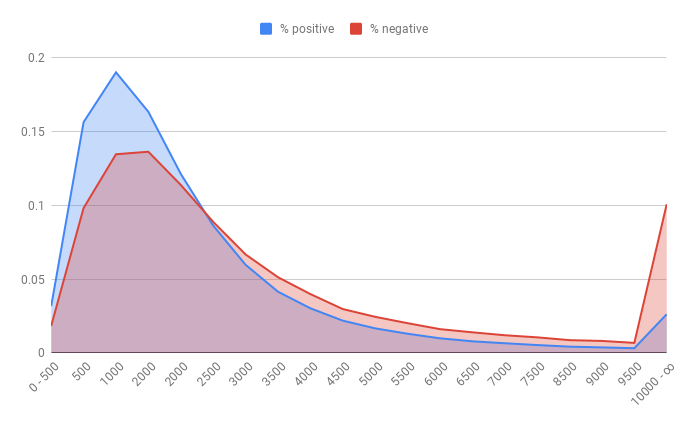
<p>We can look at the distribution (Y axis) of positive and negative survey answers based on when the banner was injected into the DOM, in milliseconds (X axis).</p>

<p><div class="phabricator-remarkup-embed-layout-left"><a href="https://phab.wmfusercontent.org/file/data/sthim7y5wh3qyc7xphks/PHID-FILE-dlgpcagzm3kyynjnindb/chart_%282%29.png" class="phabricator-remarkup-embed-image-full" data-sigil="lightboxable" data-meta="0_27"><img src="https://phab.wmfusercontent.org/file/data/sthim7y5wh3qyc7xphks/PHID-FILE-dlgpcagzm3kyynjnindb/chart_%282%29.png" height="425" width="688" loading="lazy" alt="chart (2).png (425×688 px, 21 KB)" /></a></div></p>

<p>We see the obvious pattern that positive answers to the micro-survey question (did this page load fast enough?) are more likely if the banner appeared quickly. However, by looking at the data globally like this, we can&#039;t separate the banner&#039;s slowness from the page&#039;s. After all, if your internet connection and device are slow, both the page itself and the banner will be slow, and users might be responding based on the page, ignoring the banner. This distribution might be near identical to the same being done for page load time, regardless of a banner being present or not.</p>

<h2 class="remarkup-header">Banner vs no banner</h2>

<p>A simple way to look at this problem is to check the ratio of micro-survey responses for pageviews where a banner was present vs pageviews where there was no banner. Banner campaigns tend to run for specific periods, targeting certain geographies, meaning that a lot of visits don&#039;t have a banner displayed at all. Both samples sizes should be enough to draw conclusions.</p>

<div class="remarkup-table-wrap"><table class="remarkup-table">
<tr><td><strong>Corpus</strong></td><td><strong>User satisfaction ratio</strong></td><td><strong>Sample size</strong></td></tr>
<tr><td>No banner or answered before banner</td><td>86.64%</td><td>1,111,542</td></tr>
<tr><td>Banner and answered after banner</td><td>87.8%</td><td>311,332</td></tr>
<tr></tr>
</table></div>

<p><em>For the banner case, we didn&#039;t collect whether the banner was in the user&#039;s viewport (i.e. was it seen?).</em></p>

<p>What is going on? It would seem that users are slightly more or equally satisfied of the page performance when a banner is injected. It would suggest that our late-loading banners aren&#039;t affecting page performance perception. This sounds too good to be true. We&#039;re probably looking at data too globally, including all outliers. One of our team&#039;s best practices when findings that are to good to be true appear is to keep digging to try to disprove it. Let&#039;s zoom in on more specific data.</p>

<h2 class="remarkup-header">Slow vs fast banners</h2>

<p>Let&#039;s look at &quot;fast&quot; pageloads, where <strong>loadEventEnd is under a second</strong>. That event happens when the whole page has fully loaded, including all the images.</p>

<div class="remarkup-table-wrap"><table class="remarkup-table">
<tr><td><strong>Corpus</strong></td><td><strong>User satisfaction ratio</strong></td><td><strong>Sample size</strong></td></tr>
<tr><td>Banner injected into DOM before loadEventEnd</td><td>92.66%</td><td>4,761</td></tr>
<tr><td>Banner injected into DOM less than 500ms after loadEventEnd</td><td>92.03%</td><td>67,588</td></tr>
<tr><td>Banner injected into DOM between 2 and 5 seconds after loadEventEnd</td><td>85.33%</td><td>859</td></tr>
<tr></tr>
</table></div>

<p>We can see that the effect on user performance satisfaction starts being quite dramatic as soon as the banner is really late compared to the speed of the main page load.</p>

<p>What if the main pageload is slow? Are users more tolerant of a banner that takes 2-5 seconds to appear? Let&#039;s look at &quot;slow&quot; pageloads, where <strong>loadEventEnd is between 5 and 10 seconds</strong>:</p>

<div class="remarkup-table-wrap"><table class="remarkup-table">
<tr><td><strong>Corpus</strong></td><td><strong>User satisfaction ratio</strong></td><td><strong>Sample size</strong></td></tr>
<tr><td>Banner injected into DOM before loadEventEnd</td><td>79.13%</td><td>3019</td></tr>
<tr><td>Banner injected into DOM less than 500ms after loadEventEnd</td><td>78.45%</td><td>2488</td></tr>
<tr><td>Banner injected into DOM between 2 and 5 seconds after loadEventEnd</td><td>76.17%</td><td>2480</td></tr>
<tr></tr>
</table></div>

<p>While there is a loss of satisfaction, it&#039;s not as dramatic as for fast pages. This makes sense, as users experiencing slow page loads probably have a higher tolerance to slowness in general.</p>

<h2 class="remarkup-header">Slicing it further</h2>

<p>We&#039;ve established that even for a really slow pageload, the impact of a slow late-loading banner is already visible at 2-5 seconds. If it happens within 500ms after loadEventEnd, the impact isn&#039;t that big (less than 1% satisfaction drop). Let&#039;s look at the timespan after loadEventEnd in more detail for fast pageloads (&lt; 1s loadEventEnd) in order to find out where things start to really take a turn for the worse.</p>

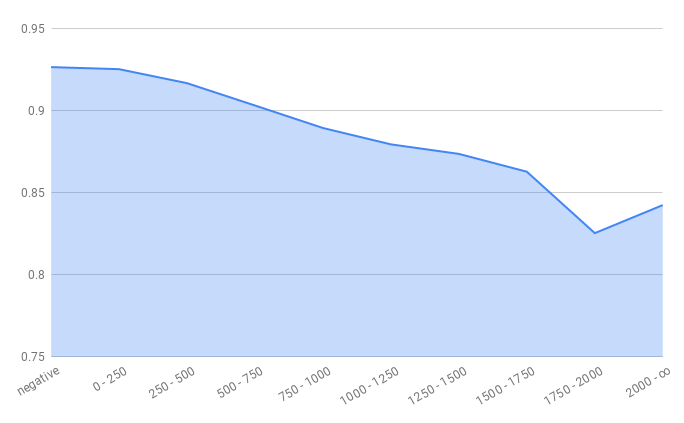
<p>Here&#039;s the user page performance satisfaction ratio, based on how long after loadEventEnd the banner was injected into the DOM:</p>

<p><div class="phabricator-remarkup-embed-layout-left"><a href="https://phab.wmfusercontent.org/file/data/xhud2m7k5exdisty6smr/PHID-FILE-2gpmhvlgbv2oq24hv7s5/chart_%281%29.png" class="phabricator-remarkup-embed-image-full" data-sigil="lightboxable" data-meta="0_28"><img src="https://phab.wmfusercontent.org/file/data/xhud2m7k5exdisty6smr/PHID-FILE-2gpmhvlgbv2oq24hv7s5/chart_%281%29.png" height="423" width="684" loading="lazy" alt="chart (1).png (423×684 px, 11 KB)" /></a></div></p>

<h2 class="remarkup-header">Conclusion</h2>

<p>The reason why the issues caused by late-loading banners when looking at data globally is probably because most of the time banners load fast. But when they happen after loadEventEnd, users start to be quite unforgiving, with the performance satisfaction ratio dropping rapidly. For users with an otherwise fast experience, we can&#039;t afford for banners to be injected more than 500ms after loadEvendEnd if we want to maintain a 90% satisfaction ratio.</p>

<p>Of course, we would like to change our architecture so that banners are rendered server-side, which would get rid of the issue entirely,. But in the meantime loadEventEnd + 500ms seems like a good performance budget we should aim for if we want to mitigate the user impact of our current architectural limitations.</p></div></content></entry><entry><title>Performance perception: how satisfied are Wikipedia users?</title><link href="/phame/live/7/post/161/performance_perception_how_satisfied_are_wikipedia_users/" /><id>https://phabricator.wikimedia.org/phame/post/view/161/</id><author><name>Gilles (Gilles Dubuc)</name></author><published>2019-05-29T17:17:24+00:00</published><updated>2019-06-07T19:47:01+00:00</updated><content type="xhtml"><div xmlns="http://www.w3.org/1999/xhtml"><p>We&#039;ve recently published <a href="https://nonsns.github.io/paper/rossi19www.pdf" class="remarkup-link remarkup-link-ext" rel="noreferrer">research on performance perception</a> that we did last year. The micro survey used in this study is still running on multiple Wikipedia languages and gives us insights into perceived performance.</p>

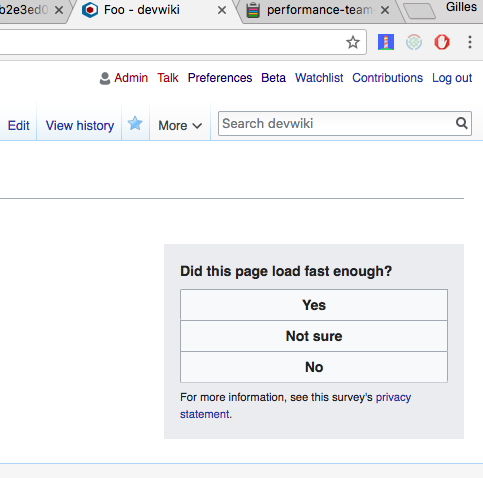
<p>The micro survey simply asks users on Wikipedia articles, in their own language, if they think that the current page loaded fast enough:</p>

<p><div class="phabricator-remarkup-embed-layout-left"><a href="https://phab.wmfusercontent.org/file/data/5grwxhtohaoc5v4jpgll/PHID-FILE-2e4d2pvggo7ujfqaelm5/Capture_d_e%CC%81cran_2018-04-30_10.09.02.png" class="phabricator-remarkup-embed-image-full" data-sigil="lightboxable" data-meta="0_29"><img src="https://phab.wmfusercontent.org/file/data/5grwxhtohaoc5v4jpgll/PHID-FILE-2e4d2pvggo7ujfqaelm5/Capture_d_e%CC%81cran_2018-04-30_10.09.02.png" height="478" width="483" loading="lazy" alt="Capture_d_écran_2018-04-30_10.09.02.png (478×483 px, 46 KB)" /></a></div></p>

<p>Let&#039;s look at the results on Spanish and Russian Wikipedias, where we&#039;re collecting the most data. We have collected more than 1.1 million survey responses on Spanish Wikipedia and close to 1 million on Russian Wikipedia so far. The survey is displayed to a small fraction of our visitors.</p>

<h2 class="remarkup-header">How satisfied are our visitors with our page load performance?</h2>

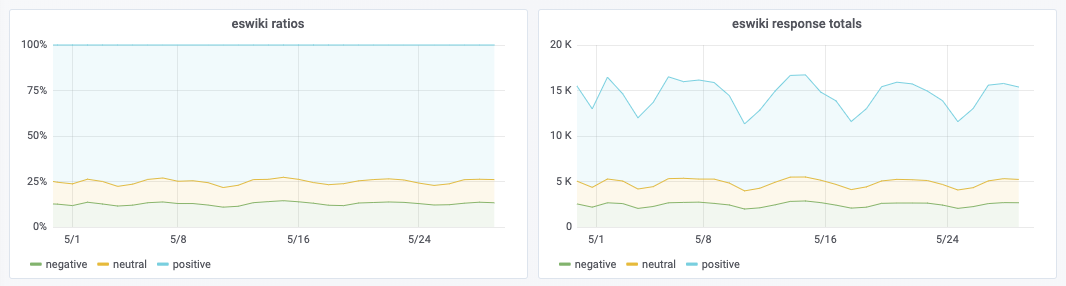
<p><div class="phabricator-remarkup-embed-layout-left"><a href="https://phab.wmfusercontent.org/file/data/krenxmalrgkvstwz2ut4/PHID-FILE-76j4csitzmafhou7s5ey/Capture_d_e%CC%81cran_2019-05-29_19.00.21.png" class="phabricator-remarkup-embed-image-full" data-sigil="lightboxable" data-meta="0_30"><img src="https://phab.wmfusercontent.org/file/data/krenxmalrgkvstwz2ut4/PHID-FILE-76j4csitzmafhou7s5ey/Capture_d_e%CC%81cran_2019-05-29_19.00.21.png" height="286" width="1066" loading="lazy" alt="Capture d&#039;écran 2019-05-29 19.00.21.png (286×1 px, 50 KB)" /></a></div></p>

<p>Ignoring neutral responses (&quot;I&#039;m not sure&quot;), we see that consistently across wikis <strong>between 85 and 90%</strong> of visitors find that the page loaded fast enough. That&#039;s an excellent score, one that we can be proud of. And it makes sense, considering that Wikipedia is one of the fastest websites on the Web.</p>
<p>Now, a very interesting finding is that this satisfaction ratio varies quite a bit depending on whether you&#039;re logged into the website, or if like most Wikipedia visitors, you&#039;re logged out:</p>

<div class="remarkup-table-wrap"><table class="remarkup-table">
<tr><td>wiki</td><td>status</td><td>sample size</td><td>satisfaction ratio</td></tr>
<tr><td>spanish</td><td>logged in</td><td>1,500</td><td>89.70%</td></tr>
<tr><td>spanish</td><td>logged out</td><td>1,109,205</td><td>85.82%</td></tr>
<tr><td>russian</td><td>logged in</td><td>7,093</td><td>92.28%</td></tr>
<tr><td>russian</td><td>logged out</td><td>885,926</td><td>85.82%</td></tr>
<tr></tr>
</table></div>

<p>It appears that logged-in users are consistently more satisfied about our performance than logged-out visitors.</p>

<h2 class="remarkup-header">The contributor performance penalty</h2>

<div class="remarkup-table-wrap"><table class="remarkup-table">
<tr><td><div class="phabricator-remarkup-embed-layout-left"><a href="https://phab.wmfusercontent.org/file/data/xfdc63jooffy27ddedl4/PHID-FILE-e26jtvv637iic4bwnvay/1280px-Editing_Wikipedia_at_Prima_Vista_writing_marathon.jpg" class="phabricator-remarkup-embed-image-full" data-sigil="lightboxable" data-meta="0_31"><img src="https://phab.wmfusercontent.org/file/data/xfdc63jooffy27ddedl4/PHID-FILE-e26jtvv637iic4bwnvay/1280px-Editing_Wikipedia_at_Prima_Vista_writing_marathon.jpg" height="851" width="1280" loading="lazy" alt="Andres Apevalov — Press team of Prima Vista Literature Festival, CC BY-SA 4.0" /></a></div></td></tr>
<tr><td><em>Andres Apevalov — Press team of Prima Vista Literature Festival, CC BY-SA 4.0</em></td></tr>
<tr></tr>
</table></div>

<p>What&#039;s very surprising about logged-in users being more satisfied is that we know for a fact that the logged-in experience is slower. Because our logged-in users have to reach our master datacenter in the US, instead of hitting the cache point of presence closest to them. This is a long-standing technical limitation of our architecture. An issue <a href="https://phabricator.wikimedia.org/T106099" class="remarkup-link" rel="noreferrer">we intend to resolve</a> one day.</p>

<p>Why could they possibly be happier, then?</p>

<h2 class="remarkup-header">The Spanish paradox</h2>

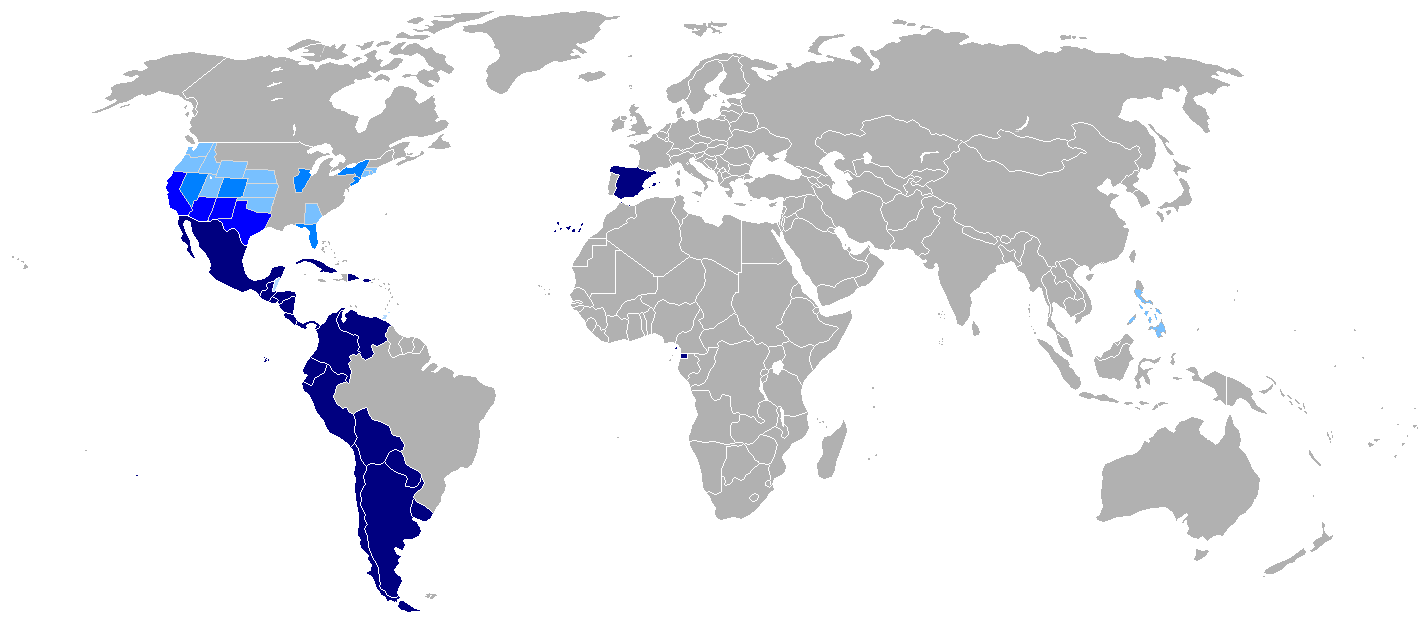
<p><div class="phabricator-remarkup-embed-layout-left"><a href="https://phab.wmfusercontent.org/file/data/zlilpbemv5hwiprroesz/PHID-FILE-h67czkdrprudvhtn22lt/Map-Hispanophone_World.png" class="phabricator-remarkup-embed-image-full" data-sigil="lightboxable" data-meta="0_32"><img src="https://phab.wmfusercontent.org/file/data/zlilpbemv5hwiprroesz/PHID-FILE-h67czkdrprudvhtn22lt/Map-Hispanophone_World.png" height="628" width="1427" loading="lazy" alt="Map-Hispanophone_World.png (628×1 px, 32 KB)" /></a></div></p>

<p>Spanish Wikipedia, at first glance, seems to contradict this phenomenon of slower page loads for logged-in users. Looking at the desktop site only (to rule out differences in the mobile/desktop mix):</p>

<div class="remarkup-table-wrap"><table class="remarkup-table">
<tr><td>wiki</td><td>status</td><td>median loadEventEnd</td></tr>
<tr><td>spanish</td><td>logged in</td><td>1400.5</td></tr>
<tr><td>spanish</td><td>logged out</td><td>1834</td></tr>
<tr><td>russian</td><td>logged in</td><td>1356</td></tr>
<tr><td>russian</td><td>logged out</td><td>1075</td></tr>
<tr></tr>
</table></div>

<p>The reason why - contrary to what we see on other wikis and at a global scale - Spanish Wikipedia page loads seem faster for logged-in users, is that Spanish Wikipedia traffic has a very peculiar geographic distribution. Logged-in users are much more likely to be based in Spain (30.04%) than in latin american countries than their logged-out counterparts (22.3%). Since internet connectivity tends to be faster in Spain, this ratio difference explains why the logged-in experience appears to be faster - but isn&#039;t - when looking at RUM data at the website level.</p>

<p>This is a very common pitfall of RUM data, where seemingly contradicting results can emerge depending on how you slice the data. RUM data has to be studied from many angles before drawing conclusions.</p>

<h2 class="remarkup-header">Caching differences</h2>

<p>Looking at the <a href="https://www.w3.org/TR/navigation-timing-2/" class="remarkup-link remarkup-link-ext" rel="noreferrer">Navigation Timing</a> data we collect for survey respondants, we see that for logged-in users the median connect time on Spanish Wikipedia is 0 and for logged-out users it&#039;s 144ms. This means that logged-in users view a lot of pages and the survey mostly ends up being displayed on their nth viewed page, where n is more than 1, because their browser is already connected to our domain. Whereas for a lot of logged-out users, we capture their first page load, with a higher probability of a cold cache. This means that logged-in users, despite having a (potential) latency penalty of connecting to the US, tend to have more cached assets, particularly the JS and CSS needed by the page. This doesn&#039;t fully compensate the performance penalty of connecting to a potentially distant datacenter, but it might reduce the variability of performance between page loads.</p>

<p>In order to further confirm this theory, in the future we could try to record information about how much of the JS and CSS was already available in the browser cache and the time the page load happened. This is not information we currently collect. Such data would allow us to confirm whether or not satisfaction is correlated to how well cached dependencies are, regardless of the user&#039;s logged-in/logged-out status.</p>

<h2 class="remarkup-header">Brand affinity?</h2>

<p><div class="phabricator-remarkup-embed-layout-left"><a href="https://phab.wmfusercontent.org/file/data/rt4m234s7qlaibvwrp4j/PHID-FILE-57fa25fd5b474nnidabs/Wikilove2.png" class="phabricator-remarkup-embed-image" data-sigil="lightboxable" data-meta="0_33"><img src="https://phab.wmfusercontent.org/file/data/4zcgdgs5vxmug4asq7ib/PHID-FILE-yc5bxg6zewhgqc7ytzff/preview-Wikilove2.png" width="220" height="165" alt="Wikilove2.png (600×800 px, 290 KB)" /></a></div></p>

<p>Becoming a Wikipedia contributor - and therefore, logging in - requires a certain affinity to the Wikipedia project. It&#039;s possible, as a result, that logged-in users have a more favourable view of Wikipedia than logged-out users on average. And that positive outlook might influence how they judge the performance of the website.</p>

<p>This is a theory <a href="https://phabricator.wikimedia.org/T224253" class="remarkup-link" rel="noreferrer">we will explore in the future</a> by asking more questions in the micro survey, in order to determine whether or not the user who responds has a positive view of our website in general. This would allow us to quantify how large the effect of brand affinity might be on performance perception.</p></div></content></entry><entry><title>Evaluating Element Timing for Images</title><link href="/phame/live/7/post/157/evaluating_element_timing_for_images/" /><id>https://phabricator.wikimedia.org/phame/post/view/157/</id><author><name>Peter (Peter Hedenskog)</name></author><published>2019-04-10T08:24:30+00:00</published><updated>2019-04-24T11:45:53+00:00</updated><content type="xhtml"><div xmlns="http://www.w3.org/1999/xhtml"><p>In the search for a better user experience metric, we have tried out the upcoming <a href="https://github.com/WICG/element-timing" class="remarkup-link remarkup-link-ext" rel="noreferrer">Element Timing for Images API</a> in Chrome.</p>

<h3 class="remarkup-header">Background</h3>

<p>One of the tasks we in the <a href="https://www.mediawiki.org/wiki/Wikimedia_Performance_Team" class="remarkup-link remarkup-link-ext" rel="noreferrer">performance team</a> have been struggling with is finding better metrics that can tell us more about the user experience than the technical metrics we usually get out of browsers.</p>

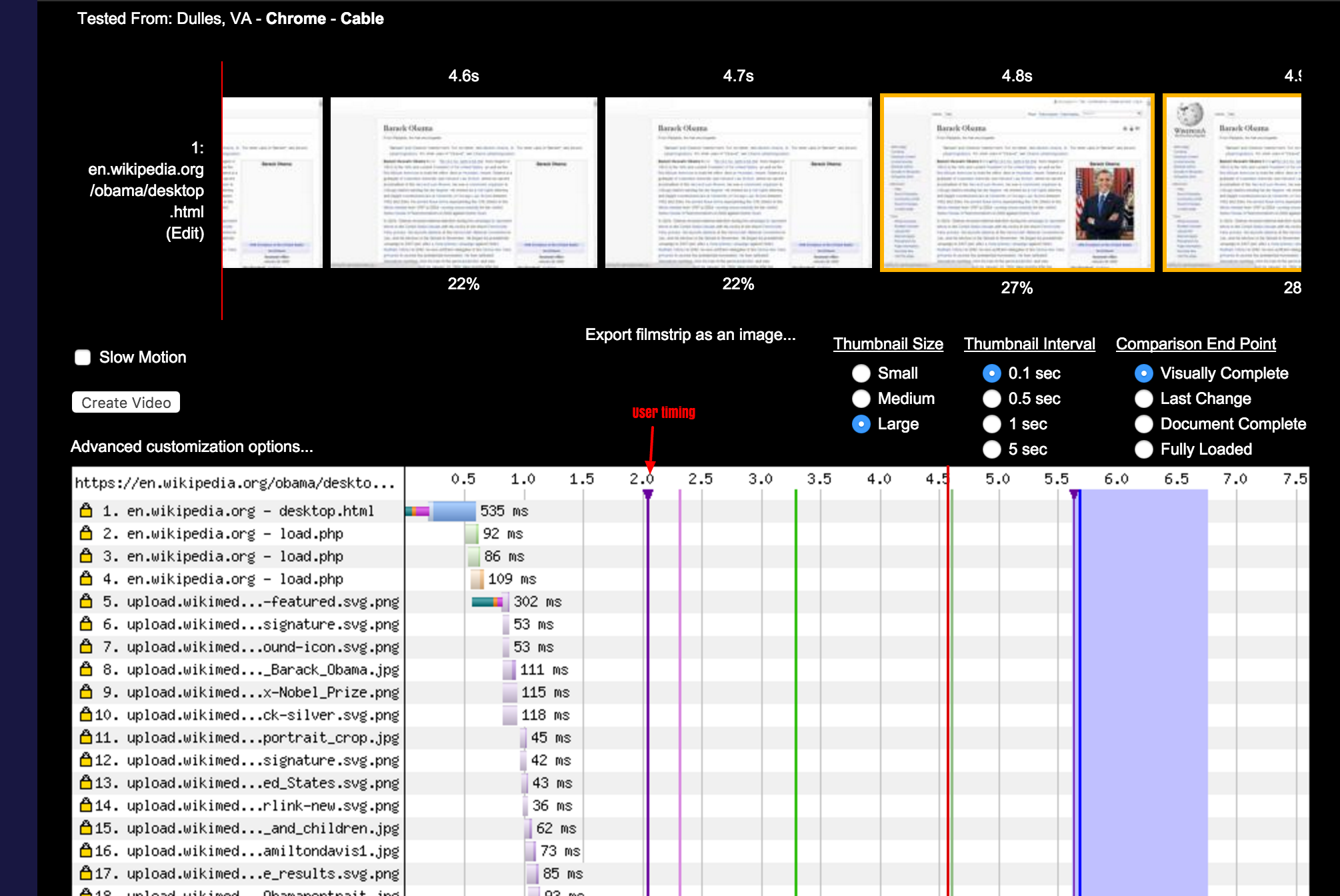
<p>We started out 2015 trying to find a way to know when images are displayed for the user. We tried out the latest patterns at that moment in <a href="https://phabricator.wikimedia.org/T115600" class="phui-tag-view phui-tag-type-object " data-sigil="hovercard" data-meta="0_36"><span class="phui-tag-core-closed"><span class="phui-tag-core phui-tag-color-object">T115600</span></span></a>. We used our <a href="https://github.com/WPO-Foundation/webpagetest" class="remarkup-link remarkup-link-ext" rel="noreferrer">WebPageTest</a> instance to record a video of the browser loading the <a href="https://en.wikipedia.org/wiki/Barack_Obama" class="remarkup-link remarkup-link-ext" rel="noreferrer">Obama</a> page, and followed state of the art technology at that moment using a User Timing mark to fire when the image was displayed.</p>

<p>The results were very disappointing. The mark was at 2.0 seconds, but as you can see in the screenshot, the image was displayed at 4.8 seconds. It was off by 2.8 seconds :(  We did multiple tests and we got the same result multiple times. We tried the state-of-the-art technique people where talking about and it was clearly completely wrong. This taught us the important lesson the reliability of new RUM metrics we decide to collect need to be verified in synthetic testing using a video recording of the browser.</p>

<p><div class="phabricator-remarkup-embed-layout-center"><a href="https://phab.wmfusercontent.org/file/data/h7q4uupe2qbeypcgvwtj/PHID-FILE-dkdnyjeaskt7jvb22vc5/wpt-chrome.png" class="phabricator-remarkup-embed-image" data-sigil="lightboxable" data-meta="0_34"><img src="https://phab.wmfusercontent.org/file/data/h7q4uupe2qbeypcgvwtj/PHID-FILE-dkdnyjeaskt7jvb22vc5/wpt-chrome.png" width="600" alt="wpt-chrome.png (1×2 px, 575 KB)" /></a></div></p>

<p>The next attempt to measure when images appear was when WebPageTest added support for visual element metrics (meaning analyzing a video and getting metrics for specific elements), but that only helps us with synthetic testing. We also want better metrics collected directly from our users.</p>

<h3 class="remarkup-header">Element timings</h3>

<p><a href="https://phabricator.wikimedia.org/p/Gilles/" class="phui-tag-view phui-tag-type-person " data-sigil="hovercard" data-meta="0_38"><span class="phui-tag-core phui-tag-color-person"><span class="phui-tag-dot phui-tag-color-grey"></span>@Gilles</span></a> has been working on enabling <a href="https://github.com/GoogleChrome/OriginTrials/blob/gh-pages/explainer.md" class="remarkup-link remarkup-link-ext" rel="noreferrer">origin trials for Chrome</a> for us to verify the effectiveness and usefulness of upcoming performance APIs. Recently we enabled the <a href="https://developers.chrome.com/origintrials/#/view_trial/3954160472831295489" class="remarkup-link remarkup-link-ext" rel="noreferrer">Trial for Element Timing for Images</a> on <a href="https://ru.wikipedia.org/wiki/%D0%97%D0%B0%D0%B3%D0%BB%D0%B0%D0%B2%D0%BD%D0%B0%D1%8F_%D1%81%D1%82%D1%80%D0%B0%D0%BD%D0%B8%D1%86%D0%B0" class="remarkup-link remarkup-link-ext" rel="noreferrer">Russian Wikipedia</a>. The goal of this API is to report exactly what we had been looking for: when an image is actually displayed to the user.</p>

<p>Let&#039;s verify the accuracy of this new metric and see if it works better than old approximations marked with user timings.</p>

<h3 class="remarkup-header">Evaluating element timings</h3>

<p>Using <a href="https://github.com/sitespeedio/browsertime" class="remarkup-link remarkup-link-ext" rel="noreferrer">Browsertime</a> we record a video of the screen and run some extra JavaScript to collect the new metric. Then we compare the metric we get from JavaScript with the one we get from the video.</p>

<p><div class="phabricator-remarkup-embed-layout-center"><a href="https://phab.wmfusercontent.org/file/data/wyijfr5okp6xbtc76bsv/PHID-FILE-iu5wohvndppjuxa2ywr5/thumbnail-image.jpg" class="phabricator-remarkup-embed-image" data-sigil="lightboxable" data-meta="0_35"><img src="https://phab.wmfusercontent.org/file/data/wyijfr5okp6xbtc76bsv/PHID-FILE-iu5wohvndppjuxa2ywr5/thumbnail-image.jpg" width="600" alt="thumbnail-image.jpg (638×1 px, 121 KB)" /></a></div></p>

<p>The first large image in an article is named <strong>thumbnail-high</strong>, so we know which one to use. The following JavaScript snippet is what allows us to get the Element Timing metric just for that element:</p>

<div class="remarkup-code-block" data-code-lang="js" data-sigil="remarkup-code-block"><pre class="remarkup-code"><span></span><span class="p">(</span><span class="kd">function</span><span class="p">()</span> <span class="p">{</span>
    <span class="kr">const</span> <span class="nx">elements</span> <span class="o">=</span> <span class="nx">performance</span><span class="p">.</span><span class="nx">getEntriesByType</span><span class="p">(</span><span class="s1">&#39;element&#39;</span><span class="p">);</span>
    <span class="k">for</span> <span class="p">(</span><span class="kd">let</span> <span class="nx">element</span> <span class="k">of</span> <span class="nx">elements</span><span class="p">)</span> <span class="p">{</span>
        <span class="k">if</span> <span class="p">(</span><span class="nx">element</span><span class="p">.</span><span class="nx">name</span> <span class="o">===</span> <span class="s1">&#39;thumbnail-high&#39;</span><span class="p">)</span> <span class="p">{</span>
            <span class="k">return</span> <span class="nx">element</span><span class="p">.</span><span class="nx">startTime</span><span class="p">;</span>
        <span class="p">}</span>
    <span class="p">}</span>
<span class="p">})();</span></pre></div>

<p>This is passed to Browsertime, which runs it after the page has loaded. Visual Elements are enabled, which analyses the video and gives us a timing corresponding to when the largest image within the viewport is displayed (which for most articles, is the thumbnail-high image).</p>

<div class="remarkup-code-block" data-code-lang="console" data-sigil="remarkup-code-block"><pre class="remarkup-code"><span class="gp">$ docker run --rm -v &quot;$(pwd)&quot;:/browsertime sitespeedio/browsertime:4.6.0 --script thumbnail-high.js https://ru.wikipedia.org/wiki/Древесные_стрижи -n 11 --visualElements</span></pre></div>

<p>This was run on two different connectivity types and 11 times in a row. Then we keep the median for both metrics and we get the following:</p>

<div class="remarkup-table-wrap"><table class="remarkup-table">
<tr><td><strong>URL</strong></td><td><strong>Connectivity</strong></td><td><strong>Largest Image from video </strong>(ms)</td><td> <strong>Element Timing</strong> (ms)</td></tr>
<tr><td><a href="https://ru.wikipedia.org/wiki/Древесные_стрижи" class="remarkup-link remarkup-link-ext" rel="noreferrer">https://ru.wikipedia.org/wiki/Древесные_стрижи</a></td><td>cable</td><td>1100</td><td>1097 </td></tr>
<tr><td><a href="https://ru.wikipedia.org/wiki/Древесные_стрижи" class="remarkup-link remarkup-link-ext" rel="noreferrer">https://ru.wikipedia.org/wiki/Древесные_стрижи</a></td><td>3g</td><td>1567</td><td>1536</td></tr>
<tr></tr>
</table></div>

<p>The video recording performed by browsertime is done at 30 frames per second. Which means each frame lasts 1000/30 = 33.333ms. This indicates that the differences seen between Element Timing and the video analytics are within one frame. Element Timing might very well be the more accurate one, since it&#039;s not constrained by the video recording&#039;s 30fps cadence.</p>

<p>That looks really promising and very accurate, particularly compared to old workarounds. We tested a couple more URLs that you can see in <a href="https://phabricator.wikimedia.org/T219231" class="phui-tag-view phui-tag-type-object " data-sigil="hovercard" data-meta="0_37"><span class="phui-tag-core-closed"><span class="phui-tag-core phui-tag-color-object">T219231</span></span></a> and they showed the same result.</p>

<p>For our content, it looks like the Element Timing API finally provides a way for us to know accurately when images are really displayed to users!</p></div></content></entry><entry><title>Autonomous Systems performance report</title><link href="/phame/live/7/post/154/autonomous_systems_performance_report/" /><id>https://phabricator.wikimedia.org/phame/post/view/154/</id><author><name>Gilles (Gilles Dubuc)</name></author><published>2019-03-27T11:07:06+00:00</published><updated>2019-04-02T06:49:04+00:00</updated><content type="xhtml"><div xmlns="http://www.w3.org/1999/xhtml"><p>Today we&#039;re publishing <a href="https://performance.wikimedia.org/asreport/" class="remarkup-link remarkup-link-ext" rel="noreferrer">our first report</a> of the performance experienced by visitors of Wikimedia websites, focused on the <a href="https://en.wikipedia.org/wiki/Autonomous_system_(Internet)" class="remarkup-link remarkup-link-ext" rel="noreferrer">Autonomous Systems</a> visitors are connecting from.</p>

<p><a href="https://performance.wikimedia.org/asreport/" class="remarkup-link remarkup-link-ext" rel="noreferrer">This report</a> will be updated monthly, with historical data made available. The goal is to watch the evolution of these metrics over time, allowing us to identify improvements and potential pain points.</p>

<p>In order to make a fair assessment of the autonomous systems&#039; performance, real user metrics collected from web browsers are normalised, in order to avoid differences such as average device power for a given network&#039;s users potentially skewing the results. For example, an ISP with more expensive data plans might have users with more expensive, better performing devices on average. This is way we compare data points only for similar effective device CPU power between providers. We also separate the mobile and desktop experiences, because they serve different content, with a notable difference in the median page weight, which directly impacts performance metrics. We wouldn&#039;t want the mobile/desktop mix of a given provider to influence the results.</p>

<p>If you look at the report, you might wonder why some autonomous systems&#039; underlying mobile networks show up under &quot;desktop&quot; and some wired internet providers appear under &quot;mobile&quot;. The explanation is that the internet providers either sell home internet devices that are effectively mobile network modems, resulting in people using their desktop computers (and as a result, the desktop websites) over a mobile network. Or the providers have mobile device users automatically connect to the same provider&#039;s WiFi routers when users are in reach of one.</p>

<p>One caveat about this report is that in countries that are physically large, like the United States, the country-wide aggregation in no way reflects important regional differences there might be for a given network. The main reason why we can&#039;t look at smaller regions is that we have simply no way of knowing where mobile users are connecting from, short of collecting geolocation data. Since we care deeply about our user&#039;s privacy and their experience, it doesn&#039;t feel appropriate at this time to ask users for their precise location in order to generate this type of finer-grained data. Such a scheme would also suffer from self-selection bias. There&#039;s already a lot of work to be done with the data aggregated at the national level!</p>

<p>We hope that this public report will help network operators understand their customers&#039; real performance characteristics when it comes to browsing one of the web&#039;s largest websites. We are welcoming of peering requests networks might want to propose, should they seek to improve their connectivity to our datacenters.</p></div></content></entry><entry><title>Debugging production with X-Wikimedia-Debug</title><link href="/phame/live/7/post/143/debugging_production_with_x-wikimedia-debug/" /><id>https://phabricator.wikimedia.org/phame/post/view/143/</id><author><name>kostajh (Kosta Harlan)</name></author><published>2019-02-20T16:15:05+00:00</published><updated>2019-03-29T20:31:42+00:00</updated><content type="xhtml"><div xmlns="http://www.w3.org/1999/xhtml"><p>In February 2018, a user reported that <a href="https://phabricator.wikimedia.org/T187861" class="remarkup-link" rel="noreferrer">some topics created by users on Flow discussion boards were not appearing in the Recent Changes feeds</a>, including EventStreams and the IRC-RC feed. Various automated patrol systems rely on EventStreams, so the bug meant a number of edits bypassed those systems on Flow-enabled wikis.</p>

<p>When approaching a bug like this, there are typically three things I do:</p>

<ol class="remarkup-list">
<li class="remarkup-list-item">Determine the steps to reproduce the bug. That was already done by the task author (thank you <a href="https://phabricator.wikimedia.org/p/Rxy/" class="phui-tag-view phui-tag-type-person " data-sigil="hovercard" data-meta="0_41"><span class="phui-tag-core phui-tag-color-person">@Rxy</span></a>!) and then confirmed by other contributors to the task (h/t <a href="https://phabricator.wikimedia.org/p/Krinkle/" class="phui-tag-view phui-tag-type-person " data-sigil="hovercard" data-meta="0_42"><span class="phui-tag-core phui-tag-color-person">@Krinkle</span></a>, <a href="https://phabricator.wikimedia.org/p/Etonkovidova/" class="phui-tag-view phui-tag-type-person " data-sigil="hovercard" data-meta="0_43"><span class="phui-tag-core phui-tag-color-person">@Etonkovidova</span></a>)</li>
<li class="remarkup-list-item">Attempt to reproduce the issue locally and set breakpoints in code to understand why the problem occurs</li>
<li class="remarkup-list-item">Check the production logs to look for any messages related to the bug report</li>
</ol>

<p>Unfortunately the problem was not reproducible in the MediaWiki Vagrant development environment. Nor were there any relevant messages in the logs. Since reproducing the issue locally wasn&#039;t possible, <a href="https://gerrit.wikimedia.org/r/c/mediawiki/extensions/Flow/+/460928" class="remarkup-link remarkup-link-ext" rel="noreferrer">we merged some diagnostic code</a> but still had nothing. Early on, <a href="https://phabricator.wikimedia.org/p/SBisson/" class="phui-tag-view phui-tag-type-person " data-sigil="hovercard" data-meta="0_44"><span class="phui-tag-core phui-tag-color-person">@SBisson</span></a>  <a href="https://phabricator.wikimedia.org/T187861#4135959" class="remarkup-link" rel="noreferrer">suggested a hypothesis</a> about the code path involved in emitting the event:</p>

<div class="remarkup-code-block" data-code-lang="text" data-sigil="remarkup-code-block"><pre class="remarkup-code">if ( user is trusted ) 
  return true
else
  let&#039;s load the revision from replica, return true based on the the status of the revision
  oh it doesn&#039;t exist (yet), return false</pre></div>

<p>But we could not reproduce this, nor could we identify exactly where this might occur since the code paths for this functionality had many points where execution could stop silently.</p>

<h4 class="remarkup-header">Enter X-Wikimedia-Debug</h4>

<p>One of the useful tools in our stack is the <a href="https://wikitech.wikimedia.org/wiki/X-Wikimedia-Debug" class="remarkup-link remarkup-link-ext" rel="noreferrer">X-Wikimedia-Debug header</a>. I knew about this header (and its <a href="https://wikitech.wikimedia.org/wiki/X-Wikimedia-Debug#Browser_extensions" class="remarkup-link remarkup-link-ext" rel="noreferrer">browser extensions</a>) from verifying changes that were being <a href="https://wikitech.wikimedia.org/wiki/SWAT_deploys" class="remarkup-link remarkup-link-ext" rel="noreferrer">SWAT&#039;ed into production</a> but I had not thought to use it for tracking down a production bug.</p>

<p>I was using the browser extension with the &quot;Log&quot; checkbox ticked (and still not finding anything useful in Logstash to help isolate this bug) when I realized that I could also profile the problematic request. When you check the box to <a href="https://wikitech.wikimedia.org/wiki/X-Wikimedia-Debug#Request_profiling" class="remarkup-link remarkup-link-ext" rel="noreferrer">profile a request</a>, XHProf will profile the code that&#039;s executed and make the result available for viewing via <a href="https://performance.wikimedia.org/xhgui/" class="remarkup-link remarkup-link-ext" rel="noreferrer">XHGui</a>.</p>

<p><div class="phabricator-remarkup-embed-layout-center"><a href="https://phab.wmfusercontent.org/file/data/eg4kieypr7tyyjag36fc/PHID-FILE-m3p7wqwuuf4vemmdxx3u/profile-log.png" class="phabricator-remarkup-embed-image" data-sigil="lightboxable" data-meta="0_39"><img src="https://phab.wmfusercontent.org/file/data/eg4kieypr7tyyjag36fc/PHID-FILE-m3p7wqwuuf4vemmdxx3u/profile-log.png" height="174" alt="profile-log.png (348×1 px, 78 KB)" /></a></div></p>

<p>Typically you do this to understand performance bottlenecks in your code, as get a complete list of all functions executed during the request, along with the time and memory usage associated with each function.</p>

<p><div class="phabricator-remarkup-embed-layout-center"><a href="https://phab.wmfusercontent.org/file/data/hnrrgafhjfewmrlk4wms/PHID-FILE-c4vgueq2eh5dnhl4edpy/func-list.png" class="phabricator-remarkup-embed-image" data-sigil="lightboxable" data-meta="0_40"><img src="https://phab.wmfusercontent.org/file/data/hnrrgafhjfewmrlk4wms/PHID-FILE-c4vgueq2eh5dnhl4edpy/func-list.png" height="200" alt="func-list.png (1×2 px, 589 KB)" /></a></div></p>

<p>I followed the steps to reproduce and then switched on the &quot;Profile&quot; option before posting a new topic on an empty Flow board. Now, I had a profiled request which provided me with information on all the methods called, including which method called another (click on a method call to see its parent and children method calls). From here I could follow the path traversed by Flow&#039;s event emitting code, and see exactly where the code execution halted.</p>

<h4 class="remarkup-header">Reproducing the bug locally</h4>

<p>With this knowledge, I went back to my local environment, this time using <a href="https://www.mediawiki.org/wiki/MediaWiki-Docker-Dev" class="remarkup-link remarkup-link-ext" rel="noreferrer">MediaWiki-Docker-Dev</a>, which has database replication set up as part of its stack (MediaWiki Vagrant does not). I set some breakpoints in the code I suspected was causing the problem, and then found that in RevisionActionPermissions.php#isBoardAllowed(), we had this code:</p>

<div class="remarkup-code-block" data-code-lang="php" data-sigil="remarkup-code-block"><pre class="remarkup-code"><span class="nv">$allowed</span> <span class="o">=</span> <span class="nv">$this</span><span class="o">-&gt;</span><span class="na" data-symbol-name="user">user</span><span class="o">-&gt;</span><span class="na" data-symbol-name="isAllowedAny">isAllowedAny</span><span class="o">(</span> <span class="o">...(</span><span class="k">array</span><span class="o">)</span><span class="nv">$permissions</span> <span class="o">);</span>
<span class="k">if</span> <span class="o">(</span> <span class="nv">$allowed</span> <span class="o">)</span> <span class="o">{</span>
 <span class="no"> </span> <span class="no"> return</span> <span class="kc">true</span><span class="o">;</span>
<span class="o">}</span>
<span class="k">return</span> <span class="o">!</span><span class="nv">$workflow</span><span class="o">-&gt;</span><span class="na" data-symbol-name="isDeleted">isDeleted</span><span class="o">();</span></pre></div>

<p>For a new topic on a blank flow board, <tt class="remarkup-monospaced">$permissions</tt> is <tt class="remarkup-monospaced">deletedtext</tt>, which would return true for privileged users. But for unprivileged users, Flow would check <tt class="remarkup-monospaced">!$workflow-&gt;isDeleted();</tt>, and this evaluated as false because the code was querying the database replica, and the title did not exist there yet.</p>

<p>The <a href="https://gerrit.wikimedia.org/r/c/mediawiki/extensions/Flow/+/469623" class="remarkup-link remarkup-link-ext" rel="noreferrer">submitted solution</a> was to patch <tt class="remarkup-monospaced">isDeleted()</tt> to query the master DB when in the context of a POST request, since we know the title would exist in the master DB. With this patch in place, events were once again emitted properly and the bug was fixed.</p>

<h4 class="remarkup-header">Conclusion</h4>

<p>A few of my conclusions from this experience:</p>

<ul class="remarkup-list">
<li class="remarkup-list-item">If you&#039;re having difficulty tracking down the code path, consider using the profiler in the X-Wikimedia-Debug browser extension</li>
<li class="remarkup-list-item">Diagnostic code is helpful (even if it didn&#039;t pinpoint the problem here) and debug level logging should be considered instead of silent returns</li>
<li class="remarkup-list-item">Having database replication in your local development environment can help catch issues while developing and when attempting to reproduce a production issue. One can use the MediaWiki-Docker-Dev environment for this, and see also <a href="https://www.mediawiki.org/wiki/MediaWiki-Docker-Dev" class="remarkup-link remarkup-link-ext" rel="noreferrer">how to adjust its database replication lag</a>.</li>
</ul>

<p>Kosta Harlan<br />
Senior Software Engineer<br />
<a href="https://www.mediawiki.org/wiki/Growth" class="remarkup-link remarkup-link-ext" rel="noreferrer">Growth Team</a></p>

<hr class="remarkup-hr" />

<p><em>Learn more about the <a href="https://wikitech.wikimedia.org/wiki/X-Wikimedia-Debug" class="remarkup-link remarkup-link-ext" rel="noreferrer">X-Wikimedia-Debug header</a> and <a href="https://wikitech.wikimedia.org/wiki/X-Wikimedia-Debug#Browser_extensions" class="remarkup-link remarkup-link-ext" rel="noreferrer">browser extension</a> on Wikitech.</em></p></div></content></entry><entry><title>Magic Numbers</title><link href="/phame/live/7/post/142/magic_numbers/" /><id>https://phabricator.wikimedia.org/phame/post/view/142/</id><author><name>Gilles (Gilles Dubuc)</name></author><published>2019-01-24T10:40:32+00:00</published><updated>2019-02-06T22:11:20+00:00</updated><content type="xhtml"><div xmlns="http://www.w3.org/1999/xhtml"><p><em><a href="https://calendar.perfplanet.com/2018/magic-numbers/" class="remarkup-link remarkup-link-ext" rel="noreferrer">Previously posted</a> on the <a href="https://calendar.perfplanet.com/2018/" class="remarkup-link remarkup-link-ext" rel="noreferrer">2018 Performance Calendar</a></em></p>

<p>Guidelines like <a href="https://developers.google.com/web/fundamentals/performance/rail#ux" class="remarkup-link remarkup-link-ext" rel="noreferrer">RAIL</a> are popular in the web performance community. They often define time limits that must be respected, like 100ms for what feels instantaneous, or 1000ms for the limit of acceptable response time.</p>

<p>Prominent people in the performance community keep telling us that <a href="https://youtu.be/XvZ7-Uh0R4Q?t=1350" class="remarkup-link remarkup-link-ext" rel="noreferrer">there&#039;s a lot of science behind those numbers</a>.</p>

<p>I&#039;ve always been skeptical of that claim, and earlier last year I set out to find out if there&#039;s any merit to those numbers by doing <a href="https://www.mediawiki.org/wiki/Wikimedia_Performance_Team/Perceived_Performance" class="remarkup-link remarkup-link-ext" rel="noreferrer">an extensive literature
review of web performance perception academic research</a>. Here are some of the findings from that project.</p>

<h2 class="remarkup-header">Following the citation trail</h2>

<p>If you follow paper citations, some classic papers keep showing up as references. And in the world of web performance, two<br />
papers get cited a lot more than any other.</p>

<p><a href="http://yusufarslan.net/sites/yusufarslan.net/files/upload/content/Miller1968.pdf" class="remarkup-link remarkup-link-ext" rel="noreferrer">Response Time in Man-Computer Conversational Transactions</a> by Miller, 1968 and <a href="https://www.nngroup.com/articles/response-times-3-important-limits/" class="remarkup-link remarkup-link-ext" rel="noreferrer">Response Times: The 3 Important Limits</a> by Nielsen, 1993/2014.</p>

<p>Nielsen essentially takes some of the numbers from the Miller paper, brushes the dust of off them since they were pre-web and presents them in a simpler fashion that everyone understands, stating that they apply to the web. What Nielsen doesn&#039;t do, however, is prove that those numbers are true with research of any kind. Jakob Nielsen is simply stating these limits as facts, but no <em>science</em> has been done to prove that they are true. And ever since, the entire web community has believed what a self-proclaimed expert said on the matter and turned it into guidelines. Surely, if an authoritative-looking man with glasses who holds a PhD in HCI states something very insistingly, it must be true.</p>

<div class="remarkup-table-wrap"><table class="remarkup-table">
<tr><td><div class="phabricator-remarkup-embed-layout-left"><a href="https://phab.wmfusercontent.org/file/data/xcdaaw7hhktmg6snovig/PHID-FILE-44alr6dd3ujcprc44p7w/640px-Jakob_Nielsen_1.jpg" class="phabricator-remarkup-embed-image-full" data-sigil="lightboxable" data-meta="0_45"><img src="https://phab.wmfusercontent.org/file/data/xcdaaw7hhktmg6snovig/PHID-FILE-44alr6dd3ujcprc44p7w/640px-Jakob_Nielsen_1.jpg" height="480" width="640" loading="lazy" alt="640px-Jakob_Nielsen_1.jpg (480×640 px, 66 KB)" /></a></div></td></tr>
<tr><td><strong>Trust me, I know things! </strong></td></tr>
<tr></tr>
</table></div>

<p>What about the Miller paper? After all, if Nielsen insists that those principles are an absolute truth that hasn&#039;t changed in 50 years, maybe it&#039;s because Miller&#039;s research was so compelling to start with? I think everyone who believes that the numbers found in RAIL and similar guidleines are real should <a href="http://yusufarslan.net/sites/yusufarslan.net/files/upload/content/Miller1968.pdf" class="remarkup-link remarkup-link-ext" rel="noreferrer">read the Miller paper</a>, the origin of these pervasive magic numbers. Not only Miller doesn&#039;t back up any magic number stated with any research of any kind - it&#039;s really just a giant subjective essay - it contains gems that Nielsen didn&#039;t seem to find useful to include in his cleaned up version of it:</p>

<blockquote><p>If he has made an error that the system can detect, he should be allowed to complete his segment of thought hefore he is interrupted or told he is locked out. After two seconds and before four seconds following completion of keying in his &quot;thought&quot; he should be informed of his error and either &quot;told&quot; to try again, or told of the error he made.<br />
Comment: It is rude (i.e., disturbing) to be interrupted in mid-thought. The annoyance of the interruption makes it more difficult to get back to the train of thought. The two-second pause enables the user to get his sense of completion following which an error indication is more acceptable.</p></blockquote>

<p>Miller advocates to intentionally delay errors by a whole 2 seconds, in order to avoid disturbing the user&#039;s train of thought. If it sounds silly and dated, it&#039;s because it is, just like the rest of Miller&#039;s paper. Like Nielsen&#039;s, it means well, but pulls magic numbers out of thin air. Not a single experiment was conducted, not a single human being studied or surveyed in the making of these magic numbers. No research data to verify the claims.</p>

<h2 class="remarkup-header">What happens when you do real science</h2>

<p><em>Are 100 ms Fast Enough? Characterizing Latency Perception Thresholds in Mouse-Based Interaction</em> by Forch, Franke, Rauh, Krems 2017 looked into one of the most popular magic numbers from the Miller/Nielsen playbook: 100ms as the treshold for what feels instantaneous. Here&#039;s the key result of that study:</p>

<blockquote><p>The latency perception thresholds’ range was 34–137 ms with a mean of 65 ms (Median = 54 ms) and a standard deviation of 30 ms.</p></blockquote>

<p>This is quite different than the 100ms universal treshold we keep hearing about. The study goes on to show that subjects with a habit of playing action video games tend to have a lower threshold than others. Showing that cultural difference can affect that limit.</p>

<div class="remarkup-table-wrap"><table class="remarkup-table">
<tr><td><div class="phabricator-remarkup-embed-layout-left"><a href="https://phab.wmfusercontent.org/file/data/vgr2frve4n6o6s7cz2ya/PHID-FILE-kgk4c2fbfq6zomyl73yo/402px-Zan_Zig_performing_with_rabbit_and_roses%2C_magician_poster%2C_1899.jpg" class="phabricator-remarkup-embed-image-full" data-sigil="lightboxable" data-meta="0_46"><img src="https://phab.wmfusercontent.org/file/data/vgr2frve4n6o6s7cz2ya/PHID-FILE-kgk4c2fbfq6zomyl73yo/402px-Zan_Zig_performing_with_rabbit_and_roses%2C_magician_poster%2C_1899.jpg" height="600" width="402" loading="lazy" alt="402px-Zan_Zig_performing_with_rabbit_and_roses,_magician_poster,_1899.jpg (600×402 px, 58 KB)" /></a></div></td></tr>
<tr><td><strong>Googler revealing the next iteration of RAIL guidelines</strong></td></tr>
<tr></tr>
</table></div>

<p>When you think about it, it does make sense that the real threshold is a range that depends on demographics, and that there&#039;s no reason there should be a universal threshold that happens to be a round number. It would be all too magical, wouldn&#039;t it?</p>

<h2 class="remarkup-header">Proving universal facts about mankind based on students down the hall</h2>

<div class="remarkup-table-wrap"><table class="remarkup-table">
<tr><td><div class="phabricator-remarkup-embed-layout-left"><a href="https://phab.wmfusercontent.org/file/data/lzs3s6vcro7phkgtaci4/PHID-FILE-ls4nwkge4hfjsdfl6dk2/Student_in_Class_%283618969705%29.jpg" class="phabricator-remarkup-embed-image-full" data-sigil="lightboxable" data-meta="0_47"><img src="https://phab.wmfusercontent.org/file/data/lzs3s6vcro7phkgtaci4/PHID-FILE-ls4nwkge4hfjsdfl6dk2/Student_in_Class_%283618969705%29.jpg" height="417" width="640" loading="lazy" alt="Student_in_Class_(3618969705).jpg (417×640 px, 81 KB)" /></a></div></td></tr>
<tr><td><strong>Can you spot the person younger than 19 or older than 36?</strong></td></tr>
<tr></tr>
</table></div>

<p>A major weakness in a lot of papers doing real science I&#039;ve reviewed, however, is that when actual research on people is done, it&#039;s usually on a group that lacks diversity. It&#039;s often whoever scientists have easy access to. Typically students from the same university. They&#039;re subjects that are educated, proficient with technology use and often with a monetary incentive to participate, which obviously skews the results. And yet, after performing a study on a dozen paid students, these research papers will often claim to have proven a universal truth about all human beings.This is actually true of the study I quoted earlier about the 100ms threshold, with the minor difference of students earning credits rather than money. Here&#039;s their description of study participants:</p>

<blockquote><p>Twenty students (10 female, age 19–36 years, M = 23.45, SD = 3.32) which were recruited via the local psychology student mailing list took part in the experiment. All participants had normal or corrected-to-normal vision and normally used their right hand for handling computer mice. Participants signed an informed consent sheet at the beginning of the experiment and received partial course credit for participation.</p></blockquote>

<p>Another very common weakness of studies I&#039;ve found is that they&#039;re often performed in labs using fake browsers, predetermined browsing scenarios, or by having people watch videos of page loads. All of which are very disconnected from the real experience of browsing the web.Overall we should remain skeptical of studies&#039; results when their experimental setup was questionable in those ways. While the 100ms study disproved the 100ms universality myth with just 20 people, it remains insufficient to prove that the different numbers that emerged were any more universal.</p>

<h2 class="remarkup-header">Everything sucks, now what?</h2>

<p>Beyond magic numbers, <a href="https://www.mediawiki.org/wiki/Wikimedia_Performance_Team/Perceived_Performance" class="remarkup-link remarkup-link-ext" rel="noreferrer">my literature review</a> revealed that very little real science has been done about web performance perception in general.</p>

<p>It is disappointing to find out that we don&#039;t know much about web performance from a scientific perspective. <a href="https://wpostats.com/" class="remarkup-link remarkup-link-ext" rel="noreferrer">WPO stats</a> might contain a lot of compelling-looking case studies, but the detailed data behind those is rarely, if ever, shared. And they&#039;re usually about how performance improvements may drive sales, without answering fundamental questions about whether things feel fast to users. Additionally, when performance improvements don&#039;t result in sales or traffic increases, they don&#039;t become a case study or something people announce proudly, which results in a self-selecting bias of industry stories of that nature.</p>

<p>My reaction to these disappointing findings from the literature review was to start working on original research of my own, on real Wikipedia users, as part of my work as a member of the <a href="https://www.mediawiki.org/wiki/Wikimedia_Performance_Team" class="remarkup-link remarkup-link-ext" rel="noreferrer">Wikimedia Performance Team</a>. The first results of which will be published early next year. I encourage the web performance community to do the same. The lack of science is a solvable problem, anyone can do original research and publish the data alongside the findings, so we can all make progress together on understanding how people truly perceive performance. And maybe we&#039;ll be able to come up with new guidelines based on numbers backed by science.</p>

<p><em>Photo credit: Doc Searls, Tulane Public Relations CC-BY-SA 2.0</em></p></div></content></entry><entry><title>Why performance matters</title><link href="/phame/live/7/post/131/why_performance_matters/" /><id>https://phabricator.wikimedia.org/phame/post/view/131/</id><author><name>Imarlier (Ian Marlier)</name></author><published>2018-12-12T16:21:17+00:00</published><updated>2019-01-13T01:19:13+00:00</updated><content type="xhtml"><div xmlns="http://www.w3.org/1999/xhtml"><p>There are practical reasons that web performance matters.  From a user perspective, a site that’s slow results in frustration, annoyance, and ultimately a preference for alternatives.  From the perspective of a site operator, frustrated users are users who aren’t going to return, and that makes it more difficult to accomplish your mission (be it commercial or public service).  Optimizations keep people happy, keep them coming back, and keep them engaged[1].</p>

<p>But, there’s a far more important reason to care about performance, especially for an organization like Wikimedia: improving performance is an essential step toward equity of access.</p>

<p>There are a multitude of factors that influence how quickly a web site loads.  Many of these are universal to every user: the software itself, the operational environment in which that software runs, the network that carries the bits from the server.  Improvement in any of these areas benefits every consumer of the site.</p>

<p>This doesn’t account for the large number of factors that are user specific.  Among the factors that can significantly influence how quickly a web page loads for a given user are geography (a user who lives further away from the servers that host a web site will typically have slower access than a user who is closer); the network between the server and the user (a network that is less developed may be slower, or more susceptible to congestion); the user’s connection (mobile data is slower than wired broadband in most cases); and the user’s actual device (an old computer will load pages more slowly than a new one).</p>

<p>The common thread between these factors is that they correlate to socioeconomic and social factors, rather than technical ones.  Wealthier people, in more developed countries, have a significantly easier time accessing the vast resources of the Internet than others.  If an increasingly networked world is going to result in a more equal human society, we need to make thoughtful interventions, including interventions focused on performance.</p>

<p><strong>Geography</strong><br />
The correspondence of geography to socioeconomic factors manifests primarily in where servers are located.  Data centers, by and large, are located in wealthier parts of wealthier countries -- places where physical and network security guarantees are high, infrastructure is reliable, and trained staff are easy to hire.  This is a sensible decision by those who build and operate these facilities, but it has the unintended consequence of slowing web performance for anyone who isn’t located in a wealthier part of a wealthy country.</p>

<p><strong>Backbone Networks</strong><br />
<a href="https://en.wikipedia.org/wiki/Internet_backbone" class="remarkup-link remarkup-link-ext" rel="noreferrer">Backbone networks</a> are the networks that carry traffic from servers to end users -- the highways that collectively make up the “information superhighway”.  And like highways, not all are equal.  Massive cables <a href="https://blogs.voanews.com/all-about-america/2015/09/30/detailed-map-reveals-hidden-backbone-of-us-internet/" class="remarkup-link remarkup-link-ext" rel="noreferrer">connect cities like San Francisco, Seattle, and New York</a>; many other cities, even ones that are quite large, are served by second or third order spurs off of these primary lines.  Dozens of cables <a href="https://www.submarinecablemap.com/" class="remarkup-link remarkup-link-ext" rel="noreferrer">traverse the North Atlantic and North Pacific</a>; only a small handful cross any oceans South of the equator.  Interior network maps are hard to come by, but in most of the world we know that smaller towns and sometimes even smaller cities are simply not connected to the Internet at all.</p>

<p><strong>Last-mile connectivity</strong><br />
Last-mile connectivity is the way that engineers talk about the way that your computer or smartphone connects to the network.  Cable internet is one form of last-mile connectivity; so is 4G cellular, or DSL.  In most of the world, the last mile is the biggest bottleneck in network traffic.  It’s more likely than not that the last mile is the slowest part of the entire journey from the server to your computer, regardless of where you are in the world.</p>

<p>However, depending on where in the world you are, “slowest” can have very different meanings.  <a href="https://en.wikipedia.org/wiki/List_of_countries_by_number_of_broadband_Internet_subscriptions" class="remarkup-link remarkup-link-ext" rel="noreferrer">In many countries, only a tiny fraction of the population has any access to high-speed internet</a>, whether wired or wireless.  Less than 1% in Ethiopia; about 2.5% of the population in Nicaragua; 15% in Libya.  Even in India, considered by many to be a key cog in the modern Internet economy, less than 25% of the population has high speed data access.  Meanwhile, in Japan, the average individual has <em><strong>2</strong></em> broadband subscriptions.  In much of Western Europe, too, the rate of broadband penetration approaches or exceeds 100%.</p>

<p><strong>Device quality</strong><br />
The final factor that corresponds with development and socioeconomic status is device quality.  Stated simply, computers are expensive, whether those computers are placed on a desk or carried in a pocket.  Recent trends in software development have pushed more computation down the wire to the client.  This, in turn, means that <a href="https://phabricator.wikimedia.org/phame/live/7/post/109/mobile_web_performance_the_importance_of_the_device/" class="remarkup-link" rel="noreferrer">the performance difference for a site when run on a high-end versus a low-end device can be quite significant</a>, and in some cases it’s not even possible to access sites on devices that are underpowered[2].</p>

<hr class="remarkup-hr" />

<p>Though there is no single change that we can make that will address all of these factors, addressing each of them is core to serving the mission of the Wikimedia Foundation, and of the Wikimedia movement as a whole.</p>

<p>One ongoing element of this work is research to understand the actual factors that influence user perception of performance, and the way that user satisfaction is impacted when a page loads slowly.  This allows us to make data-driven decisions about where to spend our time and our energy.</p>

<p>We’ve shown that <a href="https://blog.wikimedia.org/2018/04/24/new-data-center-singapore/" class="remarkup-link remarkup-link-ext" rel="noreferrer">expanding our cache footprint can help to minimize the effects of geography</a>.  This gives us a way to address the imbalances that result from immutable physics.</p>

<p>We’re not in a position to address inequality of backbone or last-mile network infrastructure -- that’s something best left to telecom companies, governments, or non-profit organizations that have chosen that as their work.  What we can do is to minimize the effects of these disparities by reducing the number of bytes that need to go down the wire in order to display a page, by exploring technologies like peer-to-peer distribution to eliminate them altogether, or by increasing usage of offline content that can be downloaded in bulk using public high-speed connections.</p>

<p>Finally, we can aggressively work to lower the compute cost of each page that we serve, so that the cost or the age of a user’s device doesn’t impact their ability to read, learn, and contribute to the world of free knowledge.</p>

<p>Performance engineering matters, in other words, because it gives us a way to eliminate technological divides that are otherwise difficult, expensive, or even impossible to address at a systemic level.</p>

<hr class="remarkup-hr" />

<p>[1] <a href="http://engineroom.ft.com/2016/04/04/a-faster-ft-com/" class="remarkup-link remarkup-link-ext" rel="noreferrer">http://engineroom.ft.com/2016/04/04/a-faster-ft-com/</a> is a great breakdown of the implications of performance on content consumption, based on the experience of the Financial Times as they were developing a new website.  <a href="https://medium.com/@vikigreen/impact-of-slow-page-load-time-on-website-performance-40d5c9ce568a" class="remarkup-link remarkup-link-ext" rel="noreferrer">https://medium.com/@vikigreen/impact-of-slow-page-load-time-on-website-performance-40d5c9ce568a</a> aggregates a number of different studies that illustrate the financial implications of slow page-load performance for commercial websites.</p>

<p>[2] A number of years ago, Chris Zacharias, formerly an engineer at Youtube, published <a href="http://blog.chriszacharias.com/page-weight-matters" class="remarkup-link remarkup-link-ext" rel="noreferrer">an anecdote about the creation of a very lightweight video display page</a>.  When they launched it to a subset of traffic, the result was that measured page performance <em>got worse</em>, a surprising result when the page was significantly smaller.  In the end it turned out that this happened because it was suddenly possible to load the player on low-powered devices and in less-connected geographies -- previously those data hadn’t been included at all because Youtube was entirely inaccessible at any speed.</p></div></content></entry><entry><title>Perf Matters at Wikipedia in 2015</title><link href="/phame/live/7/post/124/perf_matters_at_wikipedia_in_2015/" /><id>https://phabricator.wikimedia.org/phame/post/view/124/</id><author><name>Krinkle (Timo Tijhof)</name></author><published>2019-02-14T16:05:00+00:00</published><updated>2020-12-31T00:33:26+00:00</updated><content type="xhtml"><div xmlns="http://www.w3.org/1999/xhtml"><h3 class="remarkup-header">Hello, WANObjectCache</h3>

<p>This year we achieved another milestone in our multi-year effort to prepare Wikipedia for serving traffic from <a href="https://www.mediawiki.org/wiki/Requests_for_comment/Master-slave_datacenter_strategy_for_MediaWiki" class="remarkup-link remarkup-link-ext" rel="noreferrer">multiple data centres</a>.</p>

<p>The MediaWiki application that powers Wikipedia relies heavily on object caching. We use Memcached as horizontally scaled key-value store, and we’d like to keep the cache local to each data centre. This minimises dependencies between data centres, and makes better use of storage capacity (based on local needs).</p>

<p>Aaron Schulz devised a strategy that makes MediaWiki caching compatible with the requirements of a multi-DC architecture. Previously, when source data changed, MediaWiki would recompute and replace the cache value. Now, MediaWiki <a href="https://github.com/wikimedia/mediawiki/blob/1.32.0/includes/libs/objectcache/WANObjectCache.php#L583-L614" class="remarkup-link remarkup-link-ext" rel="noreferrer">broadcasts “purge” events</a> for cache keys. Each data centre receives these and sets a “tombstone”, a marker lasting a few seconds that limits any set-value operations for that key to a miniscule time-to-live. This makes it tolerable for recache-on-miss logic to recompute the cache value using local replica databases, even though they might have several seconds of replication lag. Heartbeats are used to detect the replication lag of the databases involved during any re-computation of a cache value. When that lag is more than a few seconds (a large portion of the tombstone period), the corresponding cache set-value operation automatically uses a low time-to-live. This means that large amounts of replication lag are tolerated.</p>

<p>This and other aspects of <a href="https://doc.wikimedia.org/mediawiki-core/1.30.0/php/classWANObjectCache.html#details" class="remarkup-link remarkup-link-ext" rel="noreferrer">WANObjectCache’s design</a> allow MediaWiki to trust that cached values are not substantially more stale, than a local replica database; provided that cross-DC broadcasting of tiny in-memory tombstones is not disrupted.</p>

<hr class="remarkup-hr" />

<h3 class="remarkup-header">First paint time now under 900ms</h3>

<p>In July we set out a goal: improve page load performance so our median first paint time would go down from approximately 1.5 seconds to under a second – and stay under it!</p>

<p><div class="phabricator-remarkup-embed-layout-right phabricator-remarkup-embed-float-right"><a href="https://phab.wmfusercontent.org/file/data/aubuhmyuf36jr5feucds/PHID-FILE-3grypqxwgck7qxhia5fx/firstpaint_graphite.png" class="phabricator-remarkup-embed-image" data-sigil="lightboxable" data-meta="0_48"><img src="https://phab.wmfusercontent.org/file/data/aubuhmyuf36jr5feucds/PHID-FILE-3grypqxwgck7qxhia5fx/firstpaint_graphite.png" height="180" alt="firstpaint_graphite.png (556×800 px, 45 KB)" /></a></div> I identified synchronous scripts as the single-biggest task blocking the browser, between the start of a page navigation and the first visual change seen by Wikipedia readers. We had used async scripts before, but <a href="https://phabricator.wikimedia.org/T107399" class="remarkup-link" rel="noreferrer">converting these last two scripts</a> to be asynchronous was easier said than done.</p>

<p>There were <a href="https://phabricator.wikimedia.org/T107399" class="remarkup-link" rel="noreferrer">several blockers</a> to this change. Including the use of embedded scripts by interactive features. These were partly migrated to CSS-only solutions. For the other features, we introduced the notion of “delayed inline scripts”. Embedded scripts now <a href="https://github.com/wikimedia/mediawiki/blob/1.31.0/includes/resourceloader/ResourceLoader.php#L1494-L1514" class="remarkup-link remarkup-link-ext" rel="noreferrer">wrap their code</a> in a closure and add it to an array. After the module loader arrives, we <a href="https://github.com/wikimedia/mediawiki/blob/1.31.0/resources/src/startup.js#L136-L144" class="remarkup-link remarkup-link-ext" rel="noreferrer">process the closures</a> from the array and execute the code within.</p>

<p>Another major blocker was the subset of community-developed gadgets that didn’t yet use the module loader (introduced in 2011). These legacy scripts assumed a global scope for variables, and depended on browser behaviour specific to serially loaded, synchronous, scripts. Between July 2015 and August 2015, I worked with the community to develop a migration guide. And, after a short deprecation period, the legacy loader was removed.</p>

<p><div class="phabricator-remarkup-embed-layout-center"><a href="https://phab.wmfusercontent.org/file/data/m6hllri46kc7s52hh4t2/PHID-FILE-by3iiutxbxn3k3jca522/firstpaint_coalweb.png" class="phabricator-remarkup-embed-image" data-sigil="lightboxable" data-meta="0_49"><img src="https://phab.wmfusercontent.org/file/data/m6hllri46kc7s52hh4t2/PHID-FILE-by3iiutxbxn3k3jca522/firstpaint_coalweb.png" height="211" alt="Line graph that plots the firstPaint metric for August 2015. The line drops from approximately one and a half seconds to 890 milliseconds." /></a></div></p>

<hr class="remarkup-hr" />

<h3 class="remarkup-header">Hello, WebPageTest</h3>

<p>Previously, we only collected performance metrics for Wikipedia from sampled real-user page loads. This is super and helps detect trends, regressions, and other changes at large. But, to truly understand the characteristics of what made a page load a certain way, we need synthetic testing as well.</p>

<p>Synthetic testing offers frame-by-frame video captures, waterfall graphs, performance timelines, and above-the-fold visual progression. We can run these automatically (e.g. every hour) for many urls, on many different browsers and devices, and from different geo locations. These tests allow us to <a href="https://phabricator.wikimedia.org/T109666" class="remarkup-link" rel="noreferrer">understand the performance</a>, and analyse it. We can then compare runs over any period of time, and across different factors. It also gives us snapshots of how pages were built at a certain point in time.</p>

<p>The results are automatically recorded into a database every hour, and we use Grafana to <a href="https://grafana.wikimedia.org/d/000000210/webpagetest?orgId=1" class="remarkup-link remarkup-link-ext" rel="noreferrer">visualise the data</a>.</p>

<p>In 2015 Peter built out the synthetic testing infrastructure for Wikimedia, from scratch. We use the open-source WebPageTest software. To read more about its operation, <a href="https://wikitech.wikimedia.org/wiki/Performance/WebPageTest" class="remarkup-link remarkup-link-ext" rel="noreferrer">check Wikitech</a>.</p>

<p><div class="phabricator-remarkup-embed-layout-center"><a href="https://phab.wmfusercontent.org/file/data/x4afkxbbf27r3xrtwt6a/PHID-FILE-nsod5j3be2d2hupk3esu/webpagetest.png" class="phabricator-remarkup-embed-image" data-sigil="lightboxable" data-meta="0_50"><img src="https://phab.wmfusercontent.org/file/data/x4afkxbbf27r3xrtwt6a/PHID-FILE-nsod5j3be2d2hupk3esu/webpagetest.png" height="269" alt="webpagetest.png (1×2 px, 219 KB)" /></a></div></p>

<hr class="remarkup-hr" />

<h3 class="remarkup-header">The journey to Thumbor begins</h3>

<p>Gilles <a href="https://phabricator.wikimedia.org/T110858" class="remarkup-link" rel="noreferrer">evaluated various thumbnailing services</a> for MediaWiki. The open-source Thumbor software came out as the most promising candidate.</p>

<p>Gilles implemented support for Thumbor in the MediaWiki-Vagrant development environment.</p>

<p>To read more about our journey to Thumbor, read <a href="https://phabricator.wikimedia.org/phame/live/7/post/55/the_journey_to_thumbor_part_1_rationale/" class="remarkup-link" rel="noreferrer">The Journey to Thumbor (part 1)</a>.</p>

<hr class="remarkup-hr" />

<h3 class="remarkup-header">Save timing reduced by 50%</h3>

<p>Save timing is one of the key performance metrics for Wikipedia. It measures the time from when a user presses “Publish changes” when editing – until the user’s browser starts to receive a response. During this time, many things happen. MediaWiki parses the wiki-markup into HTML, which can involve page macros, sub-queries, templates, and other parser extensions. These inputs must be saved to a database. There may also be some cascading updates, such as the page’s membership in a category. And last but not least, there is the network latency between user’s device and our data centres.</p>

<p>This year saw a 50% reduction in save timing. At the beginning of the year, median save timing was 2.0 seconds (<a href="https://commons.wikimedia.org/w/index.php?title=File:Wikimedia_Foundation_Quarterly_Report,_FY_2014-15_Q3_(January-March).pdf&amp;page=3" class="remarkup-link remarkup-link-ext" rel="noreferrer">quarterly report</a>). By June, it was down to 1.6 seconds (<a href="https://commons.wikimedia.org/w/index.php?title=File:Wikimedia_Foundation_Quarterly_Report,_FY_2014-15_Q4_(April-June).pdf&amp;page=3" class="remarkup-link remarkup-link-ext" rel="noreferrer">report</a>), and in September 2015, we reached 1.0 seconds! (<a href="https://commons.wikimedia.org/w/index.php?title=File:Wikimedia_Foundation_Quarterly_Report,_FY_2015-16_Q1_(July-September).pdf&amp;page=3" class="remarkup-link remarkup-link-ext" rel="noreferrer">report</a>)</p>

<p><div class="phabricator-remarkup-embed-layout-center"><a href="https://phab.wmfusercontent.org/file/data/xzmcd2m6kfhqarahqmaj/PHID-FILE-6nnof7qhci64wqnltzy4/savetiming_2s-1_6s-1s_from_May_to_June.png" class="phabricator-remarkup-embed-image" data-sigil="lightboxable" data-meta="0_51"><img src="https://phab.wmfusercontent.org/file/data/xzmcd2m6kfhqarahqmaj/PHID-FILE-6nnof7qhci64wqnltzy4/savetiming_2s-1_6s-1s_from_May_to_June.png" height="278" alt="Line graph of the median save timing metric, over 2015. Showing a drop from two seconds to one and a half in May, and another drop in June, gradually going further down to one second." /></a></div></p>

<p>The effort to reduce save timing was led by Aaron Schulz. The impact that followed was the result of hundreds of changes <a href="https://github.com/wikimedia/mediawiki/graphs/contributors?from=2015-01-01&amp;to=2016-01-01&amp;type=c" class="remarkup-link remarkup-link-ext" rel="noreferrer">to MediaWiki core</a> and <a href="https://gerrit.wikimedia.org/r/#/q/owner:%22Aaron+Schulz+%253Caschulz%2540wikimedia.org%253E%22+branch:master+before:2016-01-02+after:2014-12-30+projects:mediawiki" class="remarkup-link remarkup-link-ext" rel="noreferrer">to extensions</a>.</p>

<h4 class="remarkup-header">Deferring tasks to post-send</h4>

<p>Many of these changes involved deferring work to happen post-send. That is, after the server sends the HTTP response to the user and closes the main database transaction. Examples of tasks that now happen post-send are: cascading updates, emitting “recent changes” objects to the database and to pub-sub feeds, and doing automatic user rights promotions for the editing user based on their current age and total edit count.</p>

<p>Aaron also implemented the “async write” feature in the multi-backend object cache interface. MediaWiki uses this for storing the parser cache HTML in both Memcached (tier 1) and MySQL (tier 2). The second write now happens post-send.</p>

<p>By re-ordering these tasks to occur post-send, the server can send a response back to the user sooner.</p>

<h4 class="remarkup-header">Working <em>with</em> the database, instead of against it</h4>

<p>A major category of changes were improvements to database queries. For example, reducing lock contention in SQL, refactoring code in a way that reduces the amount of work done between two write queries in the same transaction, splitting large queries into smaller ones, and avoiding use of database master connections whenever possible.</p>

<p>These optimisations reduced chances of queries being stalled, and allow them to complete more quickly.</p>

<h4 class="remarkup-header">Avoid synchronous cache re-computations</h4>

<p>The aforementioned work on WANObjectCache also helped a lot. Whenever we converted a feature to use this interface, we reduced the amount of blocking cache computation that happened mid-request. WANObjectCache also performs probabilistic preemptive refreshes of near-expiring values, which can prevent cache stampedes.</p>

<h4 class="remarkup-header">Profiling can be expensive</h4>

<p>We <a href="https://gerrit.wikimedia.org/r/#/c/mediawiki/extensions/AbuseFilter/+/211951/" class="remarkup-link remarkup-link-ext" rel="noreferrer">disabled</a> the performance profiler of the AbuseFilter extension in production. AbuseFilter allows privileged users to write rules that may prevent edits based on certain heuristics. Its profiler would record how long the rules took to inspect an edit, allowing users to optimise them. The way the profiler worked, though, added a significant slow down to the editing process. Work began later in 2016 to create a new profiler, which has since completed.</p>

<h4 class="remarkup-header">And more</h4>

<p><div class="phabricator-remarkup-embed-layout-right phabricator-remarkup-embed-float-right"><a href="https://phab.wmfusercontent.org/file/data/pysti4uli7xcvlcxp27s/PHID-FILE-j2vyfqsirr3i2mhqngsw/savetiming_1_1s-1_0s_September_stretch.png" class="phabricator-remarkup-embed-image" data-sigil="lightboxable" data-meta="0_52"><img src="https://phab.wmfusercontent.org/file/data/md23w2zfu4bkiwqw4sbs/PHID-FILE-o5j5cuk4d5q5h7g27dgc/preview-savetiming_1_1s-1_0s_September_stretch.png" width="220" height="70.559921414538" alt="savetiming 1_1s-1_0s September stretch.png (653×2 px, 23 KB)" /></a></div> Lots of small things. Including the fixing of the User object cache which existed but wasn’t working. And avoid caching values in Memcached if computing them is faster than the Memcached latency required to fetch it!</p>

<p>We also improved latency of file operations by switching more LBYL-style coding patterns to EAFP-style code. Rather than checking whether a file exists, is readable, and then checking when it was last modified – do only the latter and handle any errors. This is both faster and more correct (due to <a href="https://en.wikipedia.org/wiki/Time_of_check_to_time_of_use" class="remarkup-link remarkup-link-ext" rel="noreferrer">LBYL race conditions</a>).</p>

<hr class="remarkup-hr" />

<h3 class="remarkup-header">So long, Sajax!</h3>

<p>Sajax was a library for invoking a subroutine on the server, and receiving its return value as JSON from client-side JavaScript. In March 2006, it was adopted in MediaWiki to power the autocomplete feature of the search input field.</p>

<p>The Sajax library had a utility for creating an XMLHttpRequest object in a cross-browser-compatible way. MediaWiki <a href="https://www.mail-archive.com/wikitech-l@lists.wikimedia.org/msg63136.html" class="remarkup-link remarkup-link-ext" rel="noreferrer">deprecated Sajax</a> in favour of jQuery.ajax and the MediaWiki API. Yet, years later in 2015, this tiny part of Sajax remained popular in  Wikimedia&#039;s ecosystem of community-developed gadgets.</p>

<p>The legacy library was loaded by default on all Wikipedia page views for nearly a decade. During a performance inspection this year, Ori Livneh <a href="https://phabricator.wikimedia.org/T55120#1502017" class="remarkup-link" rel="noreferrer">decided</a> it was <a href="https://www.mail-archive.com/wikitech-l@lists.wikimedia.org/msg80733.html" class="remarkup-link remarkup-link-ext" rel="noreferrer">high time</a> to <a href="https://gerrit.wikimedia.org/r/#/c/mediawiki/core/+/228768/" class="remarkup-link remarkup-link-ext" rel="noreferrer">finish</a> this migration. <a href="https://www.mail-archive.com/wikitech-l@lists.wikimedia.org/msg82007.html" class="remarkup-link remarkup-link-ext" rel="noreferrer">Goodbye</a> Sajax!</p>

<hr class="remarkup-hr" />

<h4 class="remarkup-header">Further reading</h4>

<p>This year also saw the switch to <a href="https://blog.wikimedia.org/2015/06/12/securing-wikimedia-sites-with-https/" class="remarkup-link remarkup-link-ext" rel="noreferrer">encrypt all Wikimedia traffic with TLS by default</a>.</p>

<p>Mentioned tasks: <a href="https://phabricator.wikimedia.org/T107399" class="phui-tag-view phui-tag-type-object " data-sigil="hovercard" data-meta="0_53"><span class="phui-tag-core-closed"><span class="phui-tag-core phui-tag-color-object">T107399</span></span></a>, <a href="https://phabricator.wikimedia.org/T105391" class="phui-tag-view phui-tag-type-object " data-sigil="hovercard" data-meta="0_54"><span class="phui-tag-core-closed"><span class="phui-tag-core phui-tag-color-object">T105391</span></span></a>, <a href="https://phabricator.wikimedia.org/T109666" class="phui-tag-view phui-tag-type-object " data-sigil="hovercard" data-meta="0_55"><span class="phui-tag-core-closed"><span class="phui-tag-core phui-tag-color-object">T109666</span></span></a>, <a href="https://phabricator.wikimedia.org/T110858" class="phui-tag-view phui-tag-type-object " data-sigil="hovercard" data-meta="0_56"><span class="phui-tag-core-closed"><span class="phui-tag-core phui-tag-color-object">T110858</span></span></a>, <a href="https://phabricator.wikimedia.org/T55120" class="phui-tag-view phui-tag-type-object " data-sigil="hovercard" data-meta="0_57"><span class="phui-tag-core-closed"><span class="phui-tag-core phui-tag-color-object">T55120</span></span></a>.</p></div></content></entry><entry><title>Machine learning: how to undersample the wrong way</title><link href="/phame/live/7/post/123/machine_learning_how_to_undersample_the_wrong_way/" /><id>https://phabricator.wikimedia.org/phame/post/view/123/</id><author><name>Gilles (Gilles Dubuc)</name></author><published>2018-10-15T13:37:07+00:00</published><updated>2018-11-07T10:47:40+00:00</updated><content type="xhtml"><div xmlns="http://www.w3.org/1999/xhtml"><p>For the past couple of months, <a href="https://meta.wikimedia.org/wiki/Research:Study_of_performance_perception_on_Wikimedia_projects" class="remarkup-link remarkup-link-ext" rel="noreferrer">in collaboration with researchers</a>, I&#039;ve been applying machine learning to <a href="https://en.wikipedia.org/wiki/Real_user_monitoring" class="remarkup-link remarkup-link-ext" rel="noreferrer">RUM</a> metrics in order to model the <a href="https://commons.wikimedia.org/wiki/File:Wikimedia_performance_perception_survey_screenshot_in_English.png" class="remarkup-link remarkup-link-ext" rel="noreferrer">microsurvey</a> we&#039;ve been running since June on some wikis. The goal being to gain some insight into which RUM metrics matter most to real users.</p>

<p><div class="phabricator-remarkup-embed-layout-left"><a href="https://phab.wmfusercontent.org/file/data/o2wt32xdvip2omdva2pn/PHID-FILE-d6gjnnuwpmwhq7u7tivx/Sans_titre.png" class="phabricator-remarkup-embed-image" data-sigil="lightboxable" data-meta="0_58"><img src="https://phab.wmfusercontent.org/file/data/fq4bnxkssnxhjauoqfdy/PHID-FILE-6jsaqxbsex5dlircqpfg/preview-Sans_titre.png" width="220" height="142.00668896321" alt="Sans titre.png (193×299 px, 16 KB)" /></a></div></p>

<p>Having never done any machine learning before, I did a few rookie mistakes. In this post I&#039;ll explain the biggest one, which led us to believe for some time that we had built a very well-performing model.</p>

<h2 class="remarkup-header">Class imbalance</h2>

<p>The survey we&#039;re collecting user feedback with has a big <a href="http://www.chioka.in/class-imbalance-problem/" class="remarkup-link remarkup-link-ext" rel="noreferrer">class imbalance</a> issue when it comes to machine learning. A lot more people are happy about the performance than people who are unhappy (a good problem to have, for sure!). In order to build a machine learning model that works, we used a common strategy to address this: <a href="https://en.wikipedia.org/wiki/Oversampling_and_undersampling_in_data_analysis" class="remarkup-link remarkup-link-ext" rel="noreferrer">undersampling</a>. The idea is that in a binary classification, if you have too many of one of the two values, you just discard the excess data for that type.</p>

<p>Sounds simple, right? in Python/pandas it looks something like this:</p>

<div class="remarkup-code-block" data-code-lang="python" data-sigil="remarkup-code-block"><pre class="remarkup-code"><span class="n">dataset</span><span class="o">.</span><span class="n">sort_values</span><span class="p">(</span><span class="n">by</span><span class="o">=</span><span class="p">[</span><span class="n">column_prefix</span> <span class="o">+</span> <span class="s">&#039;response&#039;</span><span class="p">],</span> <span class="n">inplace</span><span class="o">=</span><span class="bp">True</span><span class="p">)</span>
<span class="n">negative_responses_count</span> <span class="o">=</span> <span class="n">dataset</span><span class="p">[</span><span class="n">column_prefix</span> <span class="o">+</span> <span class="s">&#039;response&#039;</span><span class="p">]</span><span class="o">.</span><span class="n">value_counts</span><span class="p">()[</span><span class="o">-</span><span class="mi">1</span><span class="p">]</span>
<span class="n">dataset</span> <span class="o">=</span> <span class="n">dataset</span><span class="o">.</span><span class="n">head</span><span class="p">(</span><span class="n">n</span><span class="o">=</span><span class="nb">int</span><span class="p">(</span><span class="n">negative_responses_count</span><span class="p">)</span> <span class="o">*</span> <span class="mi">2</span><span class="p">)</span></pre></div>

<p>Essentially we sort by value, with the ones we have the least values for at the top, then we used head() to get the first N records, where N is twice the amount of negative survey responses. With this, we should end up with exactly the same amount of rows for each value (negative and positive response). So far so good.</p>

<p>Then we apply our machine learning algorithm to the dataset (for example, for a binary classification of this kind, random forest is a good choice). At first the results were poor, and then we added a basic feature we forgot to include: time. Time of day, day of the week, day of the year, etc. When adding these, things started to work incredibly well! Surely we discovered something groundbreaking about seasonality/time-dependence in this data. Or...</p>

<h2 class="remarkup-header">I&#039;ve made a huge mistake</h2>

<p>A critical mistake was made in the above code snippet. The original dataset has chronological records. When we sort by &quot;response&quot; value, this chronological order remains, within the context of each sorted section of the dataset.</p>

<p>We have to perform undersampling because we have too many positive survey responses over the full timespan. We start by keeping <strong>all</strong> the negative responses, which happen <strong>over the full timespan</strong>. But we only keep the first N positive responses... which, due to the chronological ordering of records, come from<strong> a much shorter timespan</strong>. In the same dataset we end up with rows that contain negative responses ranging for example from June 1st to October 1st. And positive responses only ranging from June 1st to June 15th, for instance.</p>

<p>The reason why the model started giving excellent results when we introduced time as a feature, is that it basically detected the date discrepancy in our dataset! It&#039;s pretty easy to guess that a response is likely positive if you look at its date. If the date is later than June 15th, everything in our dataset is negative responses... Our machine learning model just started excelling at detecting our mistake :)</p>

<h2 class="remarkup-header">A simple solution</h2>

<p>The workaround for this issue is simply to pick N positive responses at random over the whole timespan when undersampling, to make sure that the dataset is consistent:</p>

<div class="remarkup-code-block" data-code-lang="python" data-sigil="remarkup-code-block"><pre class="remarkup-code"><span class="n">dataset</span><span class="o">.</span><span class="n">sort_values</span><span class="p">(</span><span class="n">by</span><span class="o">=</span><span class="p">[</span><span class="n">column_prefix</span> <span class="o">+</span> <span class="s">&#039;response&#039;</span><span class="p">],</span> <span class="n">inplace</span><span class="o">=</span><span class="bp">True</span><span class="p">)</span>
<span class="n">negative_responses</span> <span class="o">=</span> <span class="n">dataset</span><span class="o">.</span><span class="n">head</span><span class="p">(</span><span class="n">n</span><span class="o">=</span><span class="nb">int</span><span class="p">(</span><span class="n">negative_responses_count</span><span class="p">))</span>
<span class="n">positive_responses</span> <span class="o">=</span> <span class="n">dataset</span><span class="o">.</span><span class="n">tail</span><span class="p">(</span><span class="n">n</span><span class="o">=</span><span class="nb">int</span><span class="p">(</span><span class="n">dataset</span><span class="o">.</span><span class="n">shape</span><span class="p">[</span><span class="mi">0</span><span class="p">]</span> <span class="o">-</span> <span class="n">negative_responses_count</span><span class="p">))</span>
<span class="n">positive_responses</span> <span class="o">=</span> <span class="n">shuffle</span><span class="p">(</span><span class="n">positive_responses</span><span class="p">)</span><span class="o">.</span><span class="n">head</span><span class="p">(</span><span class="n">n</span><span class="o">=</span><span class="nb">int</span><span class="p">(</span><span class="n">negative_responses_count</span><span class="p">))</span>
<span class="n">dataset</span> <span class="o">=</span> <span class="n">pandas</span><span class="o">.</span><span class="n">concat</span><span class="p">([</span><span class="n">negative_responses</span><span class="p">,</span> <span class="n">positive_responses</span><span class="p">])</span></pre></div>

<p>This way we ensure that we&#039;re not introducing a time imbalance when working around our class imbalance.</p></div></content></entry><entry><title>Best friends forever</title><link href="/phame/live/7/post/122/best_friends_forever/" /><id>https://phabricator.wikimedia.org/phame/post/view/122/</id><author><name>Peter (Peter Hedenskog)</name></author><published>2018-10-03T09:43:53+00:00</published><updated>2018-11-04T13:38:57+00:00</updated><content type="xhtml"><div xmlns="http://www.w3.org/1999/xhtml"><p>We use both <a href="https://phabricator.wikimedia.org/phame/post/view/117/performance_testing_in_a_controlled_lab_environment_-_the_metrics/" class="remarkup-link" rel="noreferrer">synthetic</a> and <a href="https://phabricator.wikimedia.org/phame/post/view/83/measuring_wikipedia_page_load_times/" class="remarkup-link" rel="noreferrer">RUM</a> testing for Wikipedia. These two ways of testing performance are best friends and help us verify regressions. Today, we will look at two regressions where it helped us to get metrics both ways.</p>

<p>In our synthetic lab environment, we update the browser version in a controlled way. When there’s a new browser release, we wait for a new Docker container with the latest version. We stop the current tests, update the Docker container and restart the tests and look at the metrics that we graph in Grafana. That way, we can check whether a new browser version introduced a regression.</p>

<p>Our users’ browsers usually upgrade slowly. The browser vendors usually push the browser to a percentage of users first, and then give the green light to update all of them. When we collect performance metrics, we also collect browser names and versions. That way we can see when users pick up a new browser version and if that version has any impact on our metrics. The adoption of new versions by real users takes time, and when we see a regression in our synthetic testing, it can take a couple of weeks until we see the same effect in our user metrics.</p>

<h3 class="remarkup-header">Chrome 67</h3>

<p>When we pushed Chrome 67 we noticed a regression in our first visual change synthetic testing (<a href="https://phabricator.wikimedia.org/T196242" class="phui-tag-view phui-tag-type-object " data-sigil="hovercard" data-meta="0_74"><span class="phui-tag-core-closed"><span class="phui-tag-core phui-tag-color-object">T196242</span></span></a>).</p>

<p>Here you can see what it looked like for our test of <a href="https://en.wikipedia.org/wiki/Facebook" class="remarkup-link remarkup-link-ext" rel="noreferrer">https://en.wikipedia.org/wiki/Facebook</a>. The blue vertical line is when we pushed the new browser version.</p>

<p><div class="phabricator-remarkup-embed-layout-center"><a href="https://phab.wmfusercontent.org/file/data/v22h2kkeskdwuodpvqpn/PHID-FILE-vsca4xvj6voxftkio33p/aa.png" class="phabricator-remarkup-embed-image" data-sigil="lightboxable" data-meta="0_59"><img src="https://phab.wmfusercontent.org/file/data/v22h2kkeskdwuodpvqpn/PHID-FILE-vsca4xvj6voxftkio33p/aa.png" width="600" alt="aa.png (744×1 px, 101 KB)" /></a></div></p>

<p>Most of the pages we test were affected, but not all of them.  For our tests of the &quot;Barack Obama&quot; English Wikipedia article, it was hard to spot any change at all.</p>

<p><div class="phabricator-remarkup-embed-layout-center"><a href="https://phab.wmfusercontent.org/file/data/p3dfuapz4bx6tknv6viv/PHID-FILE-3ypsos646xt7v23lfflk/bb.png" class="phabricator-remarkup-embed-image" data-sigil="lightboxable" data-meta="0_60"><img src="https://phab.wmfusercontent.org/file/data/p3dfuapz4bx6tknv6viv/PHID-FILE-3ypsos646xt7v23lfflk/bb.png" width="600" alt="bb.png (690×1 px, 98 KB)" /></a></div></p>

<p>We could only see the change on desktop. And we could verify the regression in both of our synthetic tools (<a href="https://wikitech.wikimedia.org/wiki/Performance/WebPageTest" class="remarkup-link remarkup-link-ext" rel="noreferrer">WebPageTest</a> and <a href="https://wikitech.wikimedia.org/wiki/Performance/WebPageReplay" class="remarkup-link remarkup-link-ext" rel="noreferrer">Browsertime/WebPageReplay</a>). Could it be some content that causes that regression, since it only affected some pages?</p>

<h4 class="remarkup-header">Next step</h4>

<p>When we see a regression, we always first try to rule out that it has something <a href="https://en.wikipedia.org/wiki/Law_of_Jante" class="remarkup-link remarkup-link-ext" rel="noreferrer">to do with a change we have done</a>. If the regression happens when we update the browser in our tests, it’s easy: we roll back the browser version and collect new metrics to see if the metrics goes back down. And then we update to the new version again. In this case, we confirmed it was only the browser causing our first visual change metric to jump. (Not a change in our content.)</p>

<p>When we find a browser regression, we try to collect as much data as possible and file an upstream issue.  In this case it became Chromium <a href="https://bugs.chromium.org/p/chromium/issues/detail?id=849108" class="remarkup-link remarkup-link-ext" rel="noreferrer">issue 849108</a>.</p>

<p>The next step is to see if we can find the same change in the metrics that we collect directly from users. The firstPaint metric in Chrome is similar to the first visual change metric we use in our synthetic testing. Which means that when we have enough traffic coming from Chrome 67, we should be able to see the change on first paint.</p>

<p>The conversion rate from Chrome 66 to 67 looked like this:</p>

<p><div class="phabricator-remarkup-embed-layout-center"><a href="https://phab.wmfusercontent.org/file/data/vpg4fi7z57ehbithxi4i/PHID-FILE-h4hv5ulz24kmke3k4xr7/Screen_Shot_2018-09-28_at_11.00.02_AM.png" class="phabricator-remarkup-embed-image" data-sigil="lightboxable" data-meta="0_61"><img src="https://phab.wmfusercontent.org/file/data/vpg4fi7z57ehbithxi4i/PHID-FILE-h4hv5ulz24kmke3k4xr7/Screen_Shot_2018-09-28_at_11.00.02_AM.png" width="600" alt="Screen Shot 2018-09-28 at 11.00.02 AM.png (890×2 px, 399 KB)" /></a></div></p>

<p>If you look real closely, you can see that around the 15th of June we started getting enough traffic for Chrome 67 to see the effect on our metrics.</p>

<p>To see the change in Chrome, we look at the metrics we collect from all versions of Chrome and check the median and 75th percentile of first paint.</p>

<p>In the following graph, we take the average over one day to try to minimize spikes. If you look at the right side (Chrome 67) of the graphs you can see that it has a slightly higher first paint than to the left (Chrome 66).</p>

<p><div class="phabricator-remarkup-embed-layout-center"><a href="https://phab.wmfusercontent.org/file/data/pyphrmdqxr5ivv33dxpx/PHID-FILE-zkidc5mkrpcsntict7ve/chrome67-66.png" class="phabricator-remarkup-embed-image" data-sigil="lightboxable" data-meta="0_62"><img src="https://phab.wmfusercontent.org/file/data/pyphrmdqxr5ivv33dxpx/PHID-FILE-zkidc5mkrpcsntict7ve/chrome67-66.png" width="600" alt="chrome67-66.png (900×2 px, 168 KB)" /></a></div></p>

<p><div class="phabricator-remarkup-embed-layout-center"><a href="https://phab.wmfusercontent.org/file/data/5wohmlj3qs7dgbuhfzls/PHID-FILE-bvdps7ttb2p7mwvdhiqh/chrome66-67.png" class="phabricator-remarkup-embed-image" data-sigil="lightboxable" data-meta="0_63"><img src="https://phab.wmfusercontent.org/file/data/5wohmlj3qs7dgbuhfzls/PHID-FILE-bvdps7ttb2p7mwvdhiqh/chrome66-67.png" width="600" alt="chrome66-67.png (958×2 px, 179 KB)" /></a></div></p>

<p>To verify the metrics, we also looked at first paint on mobile. There’s no regression there, it rather looks like there could be a small win in first paint.</p>

<p><div class="phabricator-remarkup-embed-layout-center"><a href="https://phab.wmfusercontent.org/file/data/kgc7umszyldhv3rzsd5a/PHID-FILE-ytktl6g6cmd5ozhrhk7q/Screen_Shot_2018-09-28_at_11.06.04_AM.png" class="phabricator-remarkup-embed-image" data-sigil="lightboxable" data-meta="0_64"><img src="https://phab.wmfusercontent.org/file/data/kgc7umszyldhv3rzsd5a/PHID-FILE-ytktl6g6cmd5ozhrhk7q/Screen_Shot_2018-09-28_at_11.06.04_AM.png" width="600" alt="Screen Shot 2018-09-28 at 11.06.04 AM.png (906×2 px, 165 KB)" /></a></div></p>

<p>To be 100% sure that there’s nothing we introduced, we take another look at synthetic testing at that time when the increase in first paint was seen for real users (15th of June).</p>

<p><div class="phabricator-remarkup-embed-layout-center"><a href="https://phab.wmfusercontent.org/file/data/2jyrusaium6letlk4wkc/PHID-FILE-m7ek2kebfjg5aqem5vg3/hepp222.png" class="phabricator-remarkup-embed-image" data-sigil="lightboxable" data-meta="0_65"><img src="https://phab.wmfusercontent.org/file/data/2jyrusaium6letlk4wkc/PHID-FILE-m7ek2kebfjg5aqem5vg3/hepp222.png" width="600" alt="hepp222.png (902×1 px, 193 KB)" /></a></div></p>

<p>There’s no increase in the metrics from synthetic tests at that time. This confirms it was a (small) regression in Chrome 67.</p>

<h3 class="remarkup-header">Chrome 69</h3>

<p>Some time ago, our performance alerts in Grafana fired about first paint in Chrome having increased for our users. We looked at it, and couldn’t find an exact issue that could have caused it. It looked like the metric had slowly increased over time. That type of regression are always the hardest to deal with because it’s hard to see exactly what’s causing the regression.</p>

<p>We could see the regression both on desktop and mobile. It was most obvious when we checked the first paint on mobile. You can see the weekly pattern we have but the highs are getting higher and higher.</p>

<p><div class="phabricator-remarkup-embed-layout-center"><a href="https://phab.wmfusercontent.org/file/data/4w7hptoocsaj4bjz3vy3/PHID-FILE-feqdcqmm3b3yydan652o/Screen_Shot_2018-10-01_at_6.42.33_PM.png" class="phabricator-remarkup-embed-image" data-sigil="lightboxable" data-meta="0_66"><img src="https://phab.wmfusercontent.org/file/data/4w7hptoocsaj4bjz3vy3/PHID-FILE-feqdcqmm3b3yydan652o/Screen_Shot_2018-10-01_at_6.42.33_PM.png" width="600" alt="Screen Shot 2018-10-01 at 6.42.33 PM.png (610×1 px, 90 KB)" /></a></div></p>

<p>But we actually had the answer: When we updated to Chrome 69 in our synthetic testing a couple of weeks ago, we again saw an increase in first visual change. This time, we could see the regression on some wikis but not all of them. We’ve switched back and forth between Chrome 68 and 69 and first visual change for the Japanese wiki looked like this:</p>

<p><div class="phabricator-remarkup-embed-layout-center"><a href="https://phab.wmfusercontent.org/file/data/ym4lua2opon42qonx3ue/PHID-FILE-dpypjlbzxihylvgcyc4o/backandforth.png" class="phabricator-remarkup-embed-image" data-sigil="lightboxable" data-meta="0_67"><img src="https://phab.wmfusercontent.org/file/data/ym4lua2opon42qonx3ue/PHID-FILE-dpypjlbzxihylvgcyc4o/backandforth.png" width="600" alt="backandforth.png (1×1 px, 220 KB)" /></a></div></p>

<p>This time, it seems like a bigger impact on first visual change. We track this issue in <a href="https://phabricator.wikimedia.org/T203543" class="phui-tag-view phui-tag-type-object " data-sigil="hovercard" data-meta="0_75"><span class="phui-tag-core-closed"><span class="phui-tag-core phui-tag-color-object">T203543</span></span></a> and filed <a href="https://bugs.chromium.org/p/chromium/issues/detail?id=887205" class="remarkup-link remarkup-link-ext" rel="noreferrer">an upstream bug</a> with Chromium.</p>

<p>Is this the same regression as we see in RUM?  Let us look again at when the majority of Chrome users switched from 68 to 69.</p>

<p><div class="phabricator-remarkup-embed-layout-center"><a href="https://phab.wmfusercontent.org/file/data/w6r623ijwwssmon6bpey/PHID-FILE-57elcrfjstnfkddot5ws/Screen_Shot_2018-09-28_at_11.43.06_AM.png" class="phabricator-remarkup-embed-image" data-sigil="lightboxable" data-meta="0_68"><img src="https://phab.wmfusercontent.org/file/data/w6r623ijwwssmon6bpey/PHID-FILE-57elcrfjstnfkddot5ws/Screen_Shot_2018-09-28_at_11.43.06_AM.png" width="600" alt="Screen Shot 2018-09-28 at 11.43.06 AM.png (882×2 px, 297 KB)" /></a></div></p>

<p>And then let’s go back to first paint metric. First, we look at our metric for desktop only. Around September 22nd almost all traffic was from 69, but you can also see that it was introduced in early September.</p>

<p><div class="phabricator-remarkup-embed-layout-center"><a href="https://phab.wmfusercontent.org/file/data/revq7b66zd5xiszjae66/PHID-FILE-aw5dx5hfk2mlyl4tap2g/Screen_Shot_2018-10-01_at_8.13.01_PM.png" class="phabricator-remarkup-embed-image" data-sigil="lightboxable" data-meta="0_69"><img src="https://phab.wmfusercontent.org/file/data/revq7b66zd5xiszjae66/PHID-FILE-aw5dx5hfk2mlyl4tap2g/Screen_Shot_2018-10-01_at_8.13.01_PM.png" width="600" alt="Screen Shot 2018-10-01 at 8.13.01 PM.png (904×2 px, 208 KB)" /></a></div><br />
<div class="phabricator-remarkup-embed-layout-center"><a href="https://phab.wmfusercontent.org/file/data/4gehtuj6dfjnj7q47qxe/PHID-FILE-2jju7fkjvjqq5gkuhbte/Screen_Shot_2018-10-01_at_8.12.11_PM.png" class="phabricator-remarkup-embed-image" data-sigil="lightboxable" data-meta="0_70"><img src="https://phab.wmfusercontent.org/file/data/4gehtuj6dfjnj7q47qxe/PHID-FILE-2jju7fkjvjqq5gkuhbte/Screen_Shot_2018-10-01_at_8.12.11_PM.png" width="600" alt="Screen Shot 2018-10-01 at 8.12.11 PM.png (900×2 px, 210 KB)" /></a></div></p>

<p>It looks like when Chrome 69 was introduced, first paint slowly rose and then when all our metrics were collected from 69, both median and 75th percentile were higher than with 68.</p>

<p>What does it look like for mobile?</p>

<p><div class="phabricator-remarkup-embed-layout-center"><a href="https://phab.wmfusercontent.org/file/data/42l6i4ztha6oo2kbilh4/PHID-FILE-puzfohix6oven42eck33/Screen_Shot_2018-09-28_at_11.44.58_AM.png" class="phabricator-remarkup-embed-image" data-sigil="lightboxable" data-meta="0_71"><img src="https://phab.wmfusercontent.org/file/data/42l6i4ztha6oo2kbilh4/PHID-FILE-puzfohix6oven42eck33/Screen_Shot_2018-09-28_at_11.44.58_AM.png" width="600" alt="Screen Shot 2018-09-28 at 11.44.58 AM.png (924×2 px, 142 KB)" /></a></div><br />
<div class="phabricator-remarkup-embed-layout-center"><a href="https://phab.wmfusercontent.org/file/data/fdnkkxu2fla3w6r2hv7m/PHID-FILE-py6sqyu2bbf7yq6nfott/Screen_Shot_2018-09-28_at_11.44.44_AM.png" class="phabricator-remarkup-embed-image" data-sigil="lightboxable" data-meta="0_72"><img src="https://phab.wmfusercontent.org/file/data/fdnkkxu2fla3w6r2hv7m/PHID-FILE-py6sqyu2bbf7yq6nfott/Screen_Shot_2018-09-28_at_11.44.44_AM.png" width="600" alt="Screen Shot 2018-09-28 at 11.44.44 AM.png (888×2 px, 133 KB)" /></a></div></p>

<p>We see the same pattern here. Let us check our synthetic testing at the same time, to see if we could have introduced a code change that affected first visual change. Our metrics on mobile are even more stable than desktop. We look at Swedish Wikipedia, because we didn’t deploy any change on that test server during this period.</p>

<p><div class="phabricator-remarkup-embed-layout-center"><a href="https://phab.wmfusercontent.org/file/data/og7rbu4u4ei7hqpu3inc/PHID-FILE-lwgijr2js5wqixpfhdt6/Screen_Shot_2018-09-28_at_12.36.56_PM.png" class="phabricator-remarkup-embed-image" data-sigil="lightboxable" data-meta="0_73"><img src="https://phab.wmfusercontent.org/file/data/og7rbu4u4ei7hqpu3inc/PHID-FILE-lwgijr2js5wqixpfhdt6/Screen_Shot_2018-09-28_at_12.36.56_PM.png" width="600" alt="Screen Shot 2018-09-28 at 12.36.56 PM.png (998×1 px, 271 KB)" /></a></div></p>

<p>No regression there. It looks like this also could be a performance regression in Chrome.</p>

<h3 class="remarkup-header">Summary</h3>

<p>Working with both synthetic metrics and metrics from real users, helps us to confirm issues. In this case, it helped us to find two browser regressions that impact our users. We hope that we can get help from the Chromium team to resolve these issues.</p></div></content></entry><entry><title>Performance testing in a controlled lab environment - the metrics</title><link href="/phame/live/7/post/117/performance_testing_in_a_controlled_lab_environment_-_the_metrics/" /><id>https://phabricator.wikimedia.org/phame/post/view/117/</id><author><name>Peter (Peter Hedenskog)</name></author><published>2018-09-21T07:49:33+00:00</published><updated>2019-02-14T00:25:52+00:00</updated><content type="xhtml"><div xmlns="http://www.w3.org/1999/xhtml"><p>One of the Performance Team responsibilities at Wikimedia is to keep track of Wikipedias performance. Why is performance important for us? In our case it is easy: We have so many users and if we have a performance regression, we are really affecting people&#039;s lives. Maybe you remember our hiring tweet from a couple of years ago?</p>

<p><div class="phabricator-remarkup-embed-layout-center"><a href="https://phab.wmfusercontent.org/file/data/xauocneqxaspxkejesjx/PHID-FILE-ownzgk6z2brwj6mirxtb/wikipedia.PNG" class="phabricator-remarkup-embed-image" data-sigil="lightboxable" data-meta="0_76"><img src="https://phab.wmfusercontent.org/file/data/xauocneqxaspxkejesjx/PHID-FILE-ownzgk6z2brwj6mirxtb/wikipedia.PNG" width="400" alt="wikipedia.PNG (1×640 px, 93 KB)" /></a></div></p>

<p>If we are slow, we waste users time. And we don’t want to do that. That&#039;s why we are really serious about the performance of Wikipedia.</p>

<h3 class="remarkup-header">Performance metrics</h3>

<p>Timo <a href="https://phabricator.wikimedia.org/phame/live/7/post/83/measuring_wikipedia_page_load_times/" class="remarkup-link" rel="noreferrer">told us</a> that there are two ways of collecting web performance metrics: Directly from our users, called real user measurements (RUM) or in a controlled lab environment (synthetic testing).</p>

<p>Getting metrics from real users is good because they are close to what people really experience. The problem is that:</p>

<ul class="remarkup-list">
<li class="remarkup-list-item">Today&#039;s browsers have limited ways of giving us metrics that tell us what the user is experiencing. A couple of browsers have a metric called First Paint (when something is first painted on the screen). But the rest of the metrics are more technical. They tell us how the browser is doing, not what the user is experiencing. Browser vendors are working on this but, at the moment, most performance APIs are focused on technical metrics. And we’re more interested in what our users are experiencing.</li>
</ul>

<ul class="remarkup-list">
<li class="remarkup-list-item">Metrics from real users have a lot of variation because the users have different conditions: network latency, operating system, browser version, CPU and more. If something changes, how do we know the main reason? Is it our code? Is it something else?</li>
</ul>

<ul class="remarkup-list">
<li class="remarkup-list-item">There is a lot of noise in the data we collect from real users. To catch a performance regression, it needs to be big enough and affect many users to be visible.</li>
</ul>

<p>That’s why we also test in a lab environment.</p>

<h3 class="remarkup-header">Performance testing in a lab</h3>

<p>Testing in a lab means that we are running a desktop computer (or mobile) in an isolated environment where we try to have the environment as stable as possible. That way we hope that we are able to pick up small performance regressions and know why we have that regression.</p>

<p>In a lab environment we have more control and we love control when we want to measure things! We want to make the conditions between tests to be as similar as possible. If we can control the environment, we can find regressions introduced by our code changes.</p>

<p>Testing in a lab environment helps us with:</p>

<ul class="remarkup-list">
<li class="remarkup-list-item">Collecting metrics that are more related to user experience than the technical metrics the browsers provide. In this post we will focus on the specific metrics we get from the lab environment.</li>
</ul>

<ul class="remarkup-list">
<li class="remarkup-list-item">In a controlled environment that typically provides consistent test results, it is easier to detect regressions. It’s easier to spot smaller regressions than with RUM.</li>
</ul>

<ul class="remarkup-list">
<li class="remarkup-list-item">Lab testing and RUM are best friends: our synthetic testing improves our confidence in RUM and vice versa. If we see a regression in both types of measurements, we know for sure that it&#039;s a real regression.</li>
</ul>

<ul class="remarkup-list">
<li class="remarkup-list-item">We can see changes very quickly when testing in a lab setting, because the only variable that is changing is the code. Being confident in RUM usually takes more time: you need to have more data to see the change.</li>
</ul>

<ul class="remarkup-list">
<li class="remarkup-list-item">In a lab setting, we are also able to control when browser versions are updated to new versions, allowing us to detect when browser releases impact user experience. Our users’ browsers auto updates. A new browser version can affect the performance.</li>
</ul>

<p>But everything isn’t perfect when testing in a lab: We are only testing a small usage group (a specific browser version, specific connection type, one operating system, a couple of URLs). We will miss out on a lot of users scenarios. That’s the big disadvantage of testing in a lab. That’s why it is also important to collect metrics from real users.</p>

<h3 class="remarkup-header">Metrics in our lab</h3>

<p>One of the things I like with testing in a lab is that we can get more user centered metrics than we can get directly from the browser. We mostly focus on visual metrics.</p>

<h4 class="remarkup-header">Visual metrics</h4>

<p>Visual metrics are when things that happens within the viewport of the browser that the user can see. We collect these metrics by recording a video of the browser screen and then analyzing the video and calculating the metrics.</p>

<p>What’s good with visual metrics is that it is easy to see and understand and easy to relate. They are the best metrics we have today to know what the user is experiencing.</p>

<p>However visual metrics doesn&#039;t tell the full story: Only focusing on visuals we miss out on when the page “feels” ready. What do we mean by &quot;feel&quot;? JavaScript that gets executed after the screen is painted can make the page feel slow/laggy. You try to interact with the page but nothing happens. Today we don’t have a good way to measure that “feeling”, but there have been different attempts in the performance industry to fix that. There is ongoing work on metrics like <a href="https://github.com/WPO-Foundation/webpagetest/blob/master/docs/Metrics/TimeToInteractive.md#time-to-interactive-tti" class="remarkup-link remarkup-link-ext" rel="noreferrer">Time To Interaction</a> and other interaction metrics trying to know when it is possible for the user to interact with the page. But at the moment no browser supports them natively and, in my opinion, these metrics are not yet mature enough to use.</p>

<h5 class="remarkup-header">First Visual Change</h5>

<p>First visual change is when something is first painted within the viewport of the browser screen. For Wikipedia on desktop this mostly means going from a complete blank screen to something like this:</p>

<p><div class="phabricator-remarkup-embed-layout-center"><a href="https://phab.wmfusercontent.org/file/data/kclcvmoslc3qxfeinz4l/PHID-FILE-g2fz3dsyisn32eld6rmh/obama-desktop.jpg" class="phabricator-remarkup-embed-image" data-sigil="lightboxable" data-meta="0_77"><img src="https://phab.wmfusercontent.org/file/data/kclcvmoslc3qxfeinz4l/PHID-FILE-g2fz3dsyisn32eld6rmh/obama-desktop.jpg" width="400" alt="obama-desktop.jpg (1×2 px, 284 KB)" /></a></div></p>

<p>Depending on your internet connection the first visual change may not include the image. Other than that, this is what the first change looks like for most users. If you have another case, please submit an <a href="https://phabricator.wikimedia.org/maniphest/task/edit/form/1/?projectPHIDs=Performance-Team" class="remarkup-link" rel="noreferrer">issue in Phabricator</a> with screenshots and your setup so we can reproduce and add more test cases.</p>

<p>On mobile the first visual change looks something like this:</p>

<p><div class="phabricator-remarkup-embed-layout-center"><a href="https://phab.wmfusercontent.org/file/data/5tqxopt7tvqtvweu7ptj/PHID-FILE-kx5wd3w72u4ol35kony7/obama-mobile.jpg" class="phabricator-remarkup-embed-image" data-sigil="lightboxable" data-meta="0_78"><img src="https://phab.wmfusercontent.org/file/data/5tqxopt7tvqtvweu7ptj/PHID-FILE-kx5wd3w72u4ol35kony7/obama-mobile.jpg" width="400" alt="obama-mobile.jpg (1×870 px, 93 KB)" /></a></div></p>

<p>Showing content (text/images) early is important, since the earlier you can see the text as a reader, the sooner you can start to read and get the information you want.</p>

<p>First visual change also correlates to the RUM metric first paint. We can see that the first visual change and first paint happen at almost the same time. That means that if we see a change in first paint in RUM, we will also see the change in first visual change in synthetic testing.</p>

<h5 class="remarkup-header">Speed Index</h5>

<p><a href="https://sites.google.com/a/webpagetest.org/docs/using-webpagetest/metrics/speed-index" class="remarkup-link remarkup-link-ext" rel="noreferrer">Speed Index</a> was invented by Patrick Meenan, the creator of WebPageTest:</p>

<blockquote><p>“The Speed Index is the average time at which visible parts of the page are displayed. It is expressed in milliseconds and dependent on size of the viewport.”</p></blockquote>

<p>The idea with Speed Index is to measure when the entire content within the browser viewport is ready. Speed Index will be lower if the entire page renders more quickly, but it will also be lower if partial content renders sooner.  If two pages finish rendering at the same time, the page that started to render first will have the lowest Speed Index.</p>

<p>We use Speed Index to know when when the page looks ready for the user. However the page can still download assets and run JavaScript, so it could be that the page looks ready but doesn’t feel ready (it’s not responsive if you to click on a link).</p>

<h5 class="remarkup-header">Last Visual Change</h5>

<p>Last visual change is when everything within the viewport is ready on the screen. It could be images coming in late or JavaScript in one extension changing the layout of the already painted screen.</p>

<p>Here’s an example video. Look to the right of the screen and you will see the map, the sound player and that small coordinates image coming in really late.</p>

<p><div class="embedded-commons-video"><iframe width="650" height="400" style="margin: 1em auto; border: 0px;" src="https://commons.wikimedia.org/wiki/File:Sweden_article_on_enwiki_loaded_in_Chrome_using_Browsertime,_recorded_using_FFMpeg.webm?embedplayer=yes" frameborder="0"></iframe></div></p>

<p>We don&#039;t act on last visual change today because it is really dependent on what page we test, what browser we use to test the page, and other factors. But it is an important metric: if the page starts to change when you want to interact with it, you will not know if the page is ready to use or not.</p>

<h5 class="remarkup-header">Visual Complete 85/95/99</h5>

<p>We also collect metrics when the page is 85, 95 and 99% complete.  The intent of these metrics is to account for content-related factors that result in changes to overall page load times. For example, when Wikipedia is running fundraising campaigns, there is a donation banner that appears on most pages on the site.  These donation banners are intentionally loaded after most of the content has loaded, but they do result in the last visual change being pushed back quite a bit.  By measuring the time that it takes for the page to be 85% complete instead, we avoid the variation that this introduces.</p>

<h5 class="remarkup-header">Visual Elements</h5>

<p>The last one of our visual metrics are the ability to measure when specific elements is painted on the screen. We can get metrics like when is the largest image painted? When is the logo? We have started to collect these metrics in our tools but haven&#039;t yet started to act on them.</p>

<h4 class="remarkup-header">CPU time spent metrics</h4>

<p>Another type of metric that we use in the lab is CPU time spent in the browser. Today we can only get that from Chrome. We configure and collect the event trace log from Chrome and categorise the events on a high level.</p>

<p>We can then see time spent on painting, rendering, scripting and loading. If we get a regression, we can then go down to a lower event level and use that to better understand what is actually happening.</p>

<p><div class="phabricator-remarkup-embed-layout-center"><a href="https://phab.wmfusercontent.org/file/data/zron5fgy275omwp7rif3/PHID-FILE-lzdljllmxdfsjinpfyec/jump-in-rendering.png" class="phabricator-remarkup-embed-image" data-sigil="lightboxable" data-meta="0_79"><img src="https://phab.wmfusercontent.org/file/data/zron5fgy275omwp7rif3/PHID-FILE-lzdljllmxdfsjinpfyec/jump-in-rendering.png" width="400" alt="jump-in-rendering.png (926×1 px, 80 KB)" /></a></div></p>

<h4 class="remarkup-header">Deviation</h4>

<p>One important meta metric that we also collect is the standard deviation of each metric that we collect. That helps us know how stable the metrics we have are and if we need to tune anything in our setup. It also helps us understand if we have certain pages that are extra hard to measure (that have a lot of variation).  This is something that I’ll talk about more in my next post, when we discuss the ways that we control our synthetic testing environment.</p>

<h4 class="remarkup-header">Page snapshots</h4>

<p>Our synthetic testing also helps us with knowing how our pages were constructed at a given time. We collect number of requests, the size of each response, the response type and how the browser downloaded all responses every time we measure a page. That helps us when we find a regression. We can compare the before and after (what did the page look like before the regression?).</p>

<p>We also collect screenshots and videos of what the page looked like at the time we measured the page.</p>

<p><div class="phabricator-remarkup-embed-layout-center"><a href="https://phab.wmfusercontent.org/file/data/2mawkp46awx3evqib4gg/PHID-FILE-gnzhbe4mtgh57tktztbn/waterfall.jpg" class="phabricator-remarkup-embed-image" data-sigil="lightboxable" data-meta="0_80"><img src="https://phab.wmfusercontent.org/file/data/2mawkp46awx3evqib4gg/PHID-FILE-gnzhbe4mtgh57tktztbn/waterfall.jpg" width="400" alt="waterfall.jpg (1×1 px, 165 KB)" /></a></div></p>

<h3 class="remarkup-header">Summary</h3>

<p>We focus on visual metrics and CPU time spent metrics in our synthetic testing. The visual metrics give us a better feel for what the user is experiencing than most of the metrics we collect from real users. Our synthetic testing also gives us a snapshot of what the page looked like at the moment we measured it. The problem with synthetic measuring is that we try out only a small portion of users’ different setups.</p>

<p>In the next blog post I will talk about our technical setup, problems we have had, and strategies we are using to get stable metrics.</p></div></content></entry><entry><title>Mobile web performance: the importance of the device</title><link href="/phame/live/7/post/109/mobile_web_performance_the_importance_of_the_device/" /><id>https://phabricator.wikimedia.org/phame/post/view/109/</id><author><name>Gilles (Gilles Dubuc)</name></author><published>2018-06-22T14:19:10+00:00</published><updated>2020-03-21T21:24:37+00:00</updated><content type="xhtml"><div xmlns="http://www.w3.org/1999/xhtml"><p>This week at our team offsite in Dublin, I looked at our performance data from an angle we haven&#039;t explored before: mobile device type. Most mobile devices expose their make and model in the <a href="https://en.wikipedia.org/wiki/User_agent#User_agent_identification" class="remarkup-link remarkup-link-ext" rel="noreferrer">User Agent</a> string, which allows to look at data for a particular type of device. <a href="https://wikitech.wikimedia.org/wiki/Analytics/Systems/EventLogging/Data_retention_and_auto-purging" class="remarkup-link remarkup-link-ext" rel="noreferrer">As per our data retention guidelines, we only keep user agent information for 90 days</a>, but that&#039;s already plenty of data to draw conclusions.</p>

<p>I looked at the top 10 mobile devices accessing our mobile sites, per country, for the past week. One country in particular, India, had an interesting set of top 10 devices that included two models from different hardware generations. The Samsung SM-J200G, commercially known as the <a href="https://en.wikipedia.org/wiki/Samsung_Galaxy_J2_(2017)" class="remarkup-link remarkup-link-ext" rel="noreferrer">Samsung Galaxy J2</a>, which was the 5th most common mobile device accessing our mobile sites. And the Samsung SM-G610F, also known as the <a href="https://en.wikipedia.org/wiki/Samsung_Galaxy_J7_Prime" class="remarkup-link remarkup-link-ext" rel="noreferrer">Samsung Galaxy J7 Prime</a>, which was the 2nd most common. The hardware of the more recent handset is considerably more powerful, with 3 times the RAM, 23% faster CPU clock and twice the amount of CPU cores than the older model.</p>

<p>Being in the top 10 for that country, both devices get a lot of traffic in India, which means a lot of performance <a href="https://en.wikipedia.org/wiki/Real_user_monitoring" class="remarkup-link remarkup-link-ext" rel="noreferrer">Real User Monitoring</a> data collected from real clients to work with.</p>

<p>With the <tt class="remarkup-monospaced">J7 Prime</tt> retail price in India currently being double the <tt class="remarkup-monospaced">J2</tt> retail price, one might wonder if users who use the cheaper phone also use a cheaper, slower, internet provider.</p>

<p>Thanks to the <a href="https://developer.mozilla.org/en-US/docs/Web/API/NetworkInformation/effectiveType" class="remarkup-link remarkup-link-ext" rel="noreferrer">Network Information API</a>, which we <a href="https://phabricator.wikimedia.org/T182361" class="remarkup-link" rel="noreferrer">recently added to the performance data we collect</a>, we are able to tell.</p>

<p>Looking at Chrome Mobile only, for the sake of having a consistent definition of the effectiveType buckets, we get:</p>

<div class="remarkup-table-wrap"><table class="remarkup-table">
<tr><th>effectiveType</th><th> <tt class="remarkup-monospaced">J2</tt></th><th><tt class="remarkup-monospaced">J7 Prime</tt></th></tr>
<tr><td>slow-2g</td><td>0.5%</td><td>1.1%</td></tr>
<tr><td>2g</td><td>0.8%</td><td>0.7%</td></tr>
<tr><td>3g</td><td>27%</td><td>28%</td></tr>
<tr><td>4g</td><td>71.5%</td><td>70.2%</td></tr>
<tr></tr>
</table></div>

<p>These breakdowns are extremely similar, which strongly suggests that users of these two phone models in India actually experience the same internet connectivity quality. This is very interesting, because it gives us the ability to compare the performance of these two devices from different hardware generations, in the real world, with connectivity quality as a whole that looks almost identical. And similar latency, since they&#039;re connecting to our data centers from the same country.</p>

<p>What does <a href="https://developer.mozilla.org/en-US/docs/Web/API/PerformancePaintTiming" class="remarkup-link remarkup-link-ext" rel="noreferrer">firstPaint</a> look like for these users, then?</p>

<div class="remarkup-table-wrap"><table class="remarkup-table">
<tr><th>Device</th><th>Sample size</th><th>Median</th><th>p90</th><th>p95</th><th>p99</th></tr>
<tr><td><tt class="remarkup-monospaced">J2</tt></td><td>1226</td><td>1842</td><td>4769</td><td>7704</td><td>15957</td></tr>
<tr><td><tt class="remarkup-monospaced">J7 Prime</tt></td><td>1798</td><td>1082</td><td>2811</td><td>5076</td><td>12136</td></tr>
<tr><td>difference</td><td></td><td>-41.3%</td><td>-41.1%</td><td>-34.2%</td><td>-24%</td></tr>
<tr></tr>
</table></div>

<p>And what about <a href="https://developer.mozilla.org/en-US/docs/Web/API/PerformanceTiming/loadEventEnd" class="remarkup-link remarkup-link-ext" rel="noreferrer">loadEventEnd</a>?</p>

<div class="remarkup-table-wrap"><table class="remarkup-table">
<tr><th>Device</th><th>Sample size</th><th>Median</th><th>p90</th><th>p95</th><th>p99</th></tr>
<tr><td><tt class="remarkup-monospaced">J2</tt></td><td>1226</td><td>3078</td><td>9813</td><td>14072</td><td>29240</td></tr>
<tr><td><tt class="remarkup-monospaced">J7 Prime</tt></td><td>1798</td><td>1821</td><td>5635</td><td>9847</td><td>28949</td></tr>
<tr><td>difference</td><td></td><td>-40.9%</td><td>-42.6%</td><td>-30.1%</td><td>-1.1%</td></tr>
<tr></tr>
</table></div>

<p>Across the board, the difference is huge, even for metrics like loadEventEnd when one might think that download speed might be an equalizer, particularly since we serve some heavy pages when articles are long. OS version might play a part in addition to hardware, but in practice we see that older Android devices tend to stick to the OS version they were shipped with, which means that those two factors are tied together. For example, worldwide for the past week, 100% of <tt class="remarkup-monospaced">J2</tt> phones run the Android version they were shipped with (5.1).</p>

<p>These results show that device generation has a huge impact on the real performance experienced by users. Across the globe, users are upgrading their devices over time. This phenomenon means that the performance metrics we measure directly on sampled users with RUM should improve over time, by virtue of people getting more powerful devices on average. This is an important factor to keep in mind when measuring the effect of our own performance optimizations. And when the median of the RUM metrics stay stable over a long period of time, it might be that our performance is actually worsening, and that degradation is being masked by device and network improvements across the board.</p>

<p>Given the eye-opening results of this small study, getting a better grasp on the pace of improvement of the environment (device generations, network) looks like a necessity to understand and validate our impact on the evolution of RUM metrics.</p></div></content></entry><entry><title>Thumbor support for private wikis deployed</title><link href="/phame/live/7/post/86/thumbor_support_for_private_wikis_deployed/" /><id>https://phabricator.wikimedia.org/phame/post/view/86/</id><author><name>Gilles (Gilles Dubuc)</name></author><published>2018-02-22T10:34:43+00:00</published><updated>2018-02-22T16:36:28+00:00</updated><content type="xhtml"><div xmlns="http://www.w3.org/1999/xhtml"><p>Yesterday we deployed <a href="https://wikitech.wikimedia.org/wiki/Thumbor" class="remarkup-link remarkup-link-ext" rel="noreferrer">Thumbor</a> support for Wikimedia-hosted private wikis. While 99.9% of our traffic is for public-facing wikis, the Wikimedia Foundation hosts a number of private MediaWiki instances on the same infrastructure. Those wikis facilitate work for various groups in the movement, from community-run projects like <a href="https://meta.wikimedia.org/wiki/OTRS" class="remarkup-link remarkup-link-ext" rel="noreferrer">OTRS</a>, to local chapters, staff or the board. They&#039;re essential to the Wikimedia Movement, but by being private they&#039;re an architectural <em>special case</em>.</p>

<p>When we migrated all public thumbnail traffic to using Thumbor as the rendering backend last June, it would have been easy to claim the job done and move onto something else, turning a blind eye to the special case of private wikis. But their different setup meant that they were still using the MediaWiki-based thumbnailing cluster. A clear waste of resources to have a whole (reduced, but still multi-machine) cluster dedicated to a special case representing so little traffic. And more importantly, it meant that for tasks like security work or software upgrades, we would have two clusters to care about for image processing, the new Thumbor one and the legacy MediaWiki image scaling. With very different testing involved for each.</p>

<p>What makes thumbnailing different for private wikis, is that like any content on them, images are meant to be only viewed by people with access to those wikis. For public wikis, authentication isn&#039;t required, and that&#039;s what lets us have a more streamlined stack that doesn&#039;t hit MediaWiki. Public wiki thumbnails are highly cached in Varnish. For private wikis, MediaWiki&#039;s authentication acts as the gatekeeper to let a client view a thumbnail. Varnish doesn&#039;t cache the thumbnails of private wikis, and merely forwards the request to MediaWiki.</p>

<p>With the new system deployed yesterday, when MediaWiki receives such requests for a new thumbnail on a private wiki, instead of rendering it like it used to, it proxies the request to the same Thumbor cluster used by public wikis, which takes care of the rendering. Some additional gatekeeping is in place in Thumbor to ensure that requests coming from the public wiki pipeline cannot access images that belong to private wikis. Essentially, rendering is now centralized on the single Thumbor cluster, which takes care of both worlds, while still keeping Thumbor decoupled from MediaWiki authentication (since for security reasons, we don&#039;t want Thumbor to interact with MediaWiki databases).</p>

<p>Bar any unforeseen issues while we keep an eye on potential bugs in the coming months, we will most likely retire the MediaWiki-based image scaling cluster this year, therefore truly concluding the migration of all our thumbnail rendering across our entire infrastructure to Thumbor.</p>

<p>Sometimes it takes a lot of extra work to tackle those special cases, which can feel like a chore after having switched 99.9% of the traffic already. But the cost of keeping a legacy system running for a special case cannot be overlooked. Beyond keeping a cluster of mostly idle machines in two data centers, the duplicated work of maintaining things is also expensive and never really quantified. Reaching true completion and decommissioning a legacy cluster feels great, though, it&#039;s really worth putting in the extra effort!</p></div></content></entry><entry><title>Measuring Wikipedia page load times</title><link href="/phame/live/7/post/83/measuring_wikipedia_page_load_times/" /><id>https://phabricator.wikimedia.org/phame/post/view/83/</id><author><name>Krinkle (Timo Tijhof)</name></author><published>2018-01-09T18:25:45+00:00</published><updated>2019-09-11T00:04:48+00:00</updated><content type="xhtml"><div xmlns="http://www.w3.org/1999/xhtml"><p>This post shows how we measure and interpret load times on Wikipedia. It also explains what real-user metrics are, and how percentiles work.</p>

<h3 class="remarkup-header">Navigation Timing</h3>

<p>When a browser loads a page, the page can include program code (JavaScript). This program will run inside the browser, alongside the page. This makes it possible for a page to become dynamic (more than static text and images). When you search on Wikipedia.org, the suggestions that appear are made with JavaScript.</p>

<p>Browsers allow JavaScript to access some internal systems. One such system is Navigation Timing, which tracks how long each step takes. For example:</p>

<ul class="remarkup-list">
<li class="remarkup-list-item">How long to establish a connection to the server?</li>
<li class="remarkup-list-item">When did the response from the server start arriving?</li>
<li class="remarkup-list-item">When did the browser finish loading the page?</li>
</ul>

<h3 class="remarkup-header">Where to measure: Real-user and synthetic</h3>

<p>There are two ways to measure performance: Real user monitoring, and synthetic testing. Both play an important role in understanding performance, and in detecting changes.</p>

<p>Synthetic testing can give high confidence in change detection. To detect changes, we use an automated mechanism to continually load a page and extract a result (eg. load time). When there is a difference between results, it likely means that our website changed. This assumes other factors remained constant in the test environment. Factors such as network latency, operating system, browser version, and so on.</p>

<p>This is good for understanding relative change. But synthetic testing does not measure the performance as perceived by users. For that, we need to collect measurements from the user’s browser.</p>

<p>Our JavaScript code reads the measurements from Navigation Timing, and sends them back to Wikipedia.org. This is real-user monitoring.</p>

<h3 class="remarkup-header">How to measure: Percentiles</h3>

<p>Imagine 9 users each send a request: 5 users get a result in 5ms, 3 users get a result in 70ms, and for one user the result took 560ms. The average is 88ms. But, the average does not match anyone’s real experience. Let’s explore percentiles!</p>

<p><div class="phabricator-remarkup-embed-layout-center"><a href="https://phab.wmfusercontent.org/file/data/siw3g2fygkjxysmeu4gv/PHID-FILE-icv5lj6kc2pldcbl23hz/figure-1-percentiles.png" class="phabricator-remarkup-embed-image" data-sigil="lightboxable" data-meta="0_81"><img src="https://phab.wmfusercontent.org/file/data/siw3g2fygkjxysmeu4gv/PHID-FILE-icv5lj6kc2pldcbl23hz/figure-1-percentiles.png" height="100" alt="Diagram showing 9 labels: 5ms, 5ms, 5ms, 5ms, 5ms, 70ms, 70ms, 70ms, and 560ms." /></a></div></p>

<p>The first number after the lower half (or middle) is the median (or <em>50th percentile</em>). Here, the median is 5ms. The first number after the lower 75% is 70ms (<em>75th percentile</em>). We can say that &quot;for 75% of users, the service responded within 70ms&quot;. That’s more useful.</p>

<p>When working on a service used by millions, we focus on the 99th percentile and the highest value (100th percentile). Using medians, or percentiles lower than 99%, would exclude many users. A problem with 1% of requests is a serious problem. To understand why, it is important to understand that, 1% of requests does not mean 1% of page views, or even 1% of users.</p>

<p>A typical Wikipedia pageview makes 20 requests to the server (1 document, 3 stylesheets, 4 scripts, 12 images). A typical user views 3 pages during their session (on average).</p>

<p>This means our problem with 1% of requests, could affect 20% of pageviews (<tt class="remarkup-monospaced">20 requests x 1% = 20% = ⅕</tt>). And 60% of users (<tt class="remarkup-monospaced">3 pages x 20 objects x 1% = 60% ≈ ⅔</tt>). Even worse, over a long period of time, it is most likely that every user will experience the problem at least once. This is like rolling dice in a game. With a 16% (⅙) chance of rolling a six, if everyone keeps rolling, everyone should get a six eventually.</p>

<h3 class="remarkup-header">Real-user variables</h3>

<p>The previous section focussed on performance as measured inside our servers. These measurements start when our servers receive a request, and end once we have sent a response. This is <em>back-end</em> performance. In this context, our servers are the <em>back-end</em>, and the user’s device is the <em>front-end</em>.</p>

<p>It takes time for the request to travel from the user’s device to our systems (through cellular or WiFi radio waves, and through wires.) It also takes time for our response to travel back over similar networks to the user’s device. Once there, it takes even more time for the device’s operating system and browser to process and display the information. Measuring this is part of front-end performance.</p>

<p>Differences in back-end performance may affect all users. But, differences in front-end performance are influenced by factors we don’t control. Such as network quality, device hardware capability, browser, browser version, and more.</p>

<p>Even when we make no changes, the front-end measurements do change. Possible causes:</p>

<ul class="remarkup-list">
<li class="remarkup-list-item"><strong>Network</strong>. ISPs and mobile network carriers can make changes that affect network performance. Existing users may switch carriers. New users come online with a different choice distribution of carrier than current users.</li>
<li class="remarkup-list-item"><strong>Device</strong>. Operating system and browser vendors release upgrades that may affect page load performance. Existing users may switch browsers. New users may choose browsers or devices differently than current users.</li>
<li class="remarkup-list-item"><strong>Content change</strong>. Especially for Wikipedia, the composition of an article may change at any moment.</li>
<li class="remarkup-list-item"><strong>Content choice</strong>. Trends in news or social media may cause a shift towards different (kinds of) pages.</li>
<li class="remarkup-list-item"><strong>Device choice</strong>. Users that own multiple devices may choose a different device to view the (same) content.</li>
</ul>

<p>The most likely cause for a sudden change in metrics is ourselves. Given our scale, the above factors usually change only for a small number of users at once. Or the change might happen slowly.</p>

<p>Yet, sometimes these external factors do cause a sudden change in metrics.</p>

<h3 class="remarkup-header">Case in point: Mobile Safari 9</h3>

<p>Shortly after Apple released iOS 9 (in 2015), our global measurements were higher than before. We found this was due to Mobile Safari 9 introducing support for Navigation Timing.</p>

<p>Before this event, our metrics only represented mobile users on Android. With iOS 9, our data increased its scope to include Mobile Safari.</p>

<p>iOS 9, or the networks of iOS 9 users, were not significantly faster or slower than Android’s. The iOS upgrade affected our metrics because we now include an extra 15% of users – those on Mobile Safari.</p>

<p>Where desktop latency is around 330ms; mobile latency is around 520ms. Having more metrics from mobile, skewed the global metrics toward that category.</p>

<div class="remarkup-table-wrap"><table class="remarkup-table">
<tr><td><div class="phabricator-remarkup-embed-layout-left"><a href="https://phab.wmfusercontent.org/file/data/oilmhyhrdbtjqehaze2q/PHID-FILE-3lxaj6g7pshsh2yvd4ug/blog-image-01.png" class="phabricator-remarkup-embed-image" data-sigil="lightboxable" data-meta="0_82"><img src="https://phab.wmfusercontent.org/file/data/oilmhyhrdbtjqehaze2q/PHID-FILE-3lxaj6g7pshsh2yvd4ug/blog-image-01.png" height="154" alt="Line graph for responseStart metric from desktop pageviews. Values range from 250ms to 450ms. Averaging around 330ms." /></a></div></td><td><div class="phabricator-remarkup-embed-layout-left"><a href="https://phab.wmfusercontent.org/file/data/cimqlkthg53uq4c7e7yw/PHID-FILE-qv67annefhzfalj46cn5/blog-image-02.png" class="phabricator-remarkup-embed-image" data-sigil="lightboxable" data-meta="0_83"><img src="https://phab.wmfusercontent.org/file/data/cimqlkthg53uq4c7e7yw/PHID-FILE-qv67annefhzfalj46cn5/blog-image-02.png" height="156" alt="Line graph for responseStart metric from mobile pageviews. Values range from 350ms to 700ms. Averaging around 520ms." /></a></div></td></tr>
<tr></tr>
</table></div>

<p>The above graphs plot the &quot;75th percentile&quot; of responseStart for desktop and mobile (from November 2015). We combine these metrics into one data point for each minute. The above graphs show data for one month. There is only enough space on the screen to have each point represent 3 hours. This works by taking the mean average of the per-minute values within each 3 hour block. While this provides a rough impression, this graph does not show the 75th percentile for November 2015. The next section explains why.</p>

<h3 class="remarkup-header">Average of percentiles</h3>

<p>Opinions vary on how bad it is to take the average of percentiles over time. But one thing is clear: The average of many 1-minute percentiles is not the percentile for those minutes. Every minute is different, and the number of values also varies each minute. To get the percentile for one hour, we need all values from that hour, not the percentile summary from each minute.</p>

<p>Below is an example with values from three minutes of time. Each value is the response time for one request. Within each minute, the values sort from low to high.</p>

<p><div class="phabricator-remarkup-embed-layout-center"><a href="https://phab.wmfusercontent.org/file/data/porgzz4pytpmrn3xexh6/PHID-FILE-2miv6vsothoyeluj4qg6/figure-2.png" class="phabricator-remarkup-embed-image" data-sigil="lightboxable" data-meta="0_84"><img src="https://phab.wmfusercontent.org/file/data/porgzz4pytpmrn3xexh6/PHID-FILE-2miv6vsothoyeluj4qg6/figure-2.png" height="512" alt="Diagram with four sections. Section One is for the minute 08:00 to 08:01, it has nine values with the middle value of 5ms marked as the median. Section Two is for 08:01 to 08:02 and contains five values, the median is 560ms. Section Three is 08:02 to 08:03, contains five values, the median of Section Three is 70ms. The last section, Section Four, is the combined diagram from 08:00 to 08:03 showing all nineteen values. The median is 70ms." /></a></div></p>

<p>The average of the three separate medians is 211ms. This is the result of <tt class="remarkup-monospaced">(5 + 560 + 70) / 3</tt>. The actual median of these values combined, is 70ms.</p>

<h3 class="remarkup-header">Buckets</h3>

<p>To compute the percentile over a large period, we must have all original values. But, it’s not efficient to store data about every visit to Wikipedia for a long time. We could not quickly compute percentiles either.</p>

<p>A different way of summarising data is by using buckets. We can create one bucket for each range of values. Then, when we process a time value, we only increment the counter for that bucket. When using a bucket in this way, it is also called a <em>histogram bin</em>.</p>

<p>Let’s process the same example values as before, but this time using buckets.</p>

<p><div class="phabricator-remarkup-embed-layout-center"><a href="https://phab.wmfusercontent.org/file/data/4iofmmgk2rmufsk4fwfk/PHID-FILE-5qjog7zsjygzk7csj3tk/figure-3-buckets.png" class="phabricator-remarkup-embed-image" data-sigil="lightboxable" data-meta="0_85"><img src="https://phab.wmfusercontent.org/file/data/4iofmmgk2rmufsk4fwfk/PHID-FILE-5qjog7zsjygzk7csj3tk/figure-3-buckets.png" height="463" alt="There are four buckets. Bucket A is for values below 11ms. Bucket B is for 11ms to 100ms. Bucket C is for 101ms to 1000ms. And Bucket D is for values above 1000ms. For each of the 19 values, we find the associated bucket and increase its counter." /></a></div><br />
<div class="phabricator-remarkup-embed-layout-center"><a href="https://phab.wmfusercontent.org/file/data/czeyvgnensjxvwgrj5pq/PHID-FILE-pz4dhhb6wn67qqb67jsa/figure-4-buckets-summary.png" class="phabricator-remarkup-embed-image" data-sigil="lightboxable" data-meta="0_86"><img src="https://phab.wmfusercontent.org/file/data/czeyvgnensjxvwgrj5pq/PHID-FILE-pz4dhhb6wn67qqb67jsa/figure-4-buckets-summary.png" height="90" alt="After processing all values, the counters are as follows. Bucket A holds 9, Bucket B holds 4, Bucket C holds 6, and Bucket D holds 0." /></a></div></p>

<p>Based on the total count (19) we know that the median (10th value) must be in bucket B, because bucket B contains values 10 to 13. And that the 75th percentile (15th value) must be in bucket C because it contains values 14 to 19.</p>

<p>We cannot know the exact millisecond value of the median, but we know the median must be between 11ms and 100ms. (This matches our previous calculation, which produced 70ms.)</p>

<p>When we use exact percentiles, our goal was for that percentile to be a certain number. For example, if our 75th percentile today is 560ms, this means for 75% of users a response takes 560ms or less. Our goal could be to reduce the 75th percentile to below 500ms.</p>

<p>When using buckets, goals are defined differently. In our example, 6 out of 19 responses (32%) are above 100ms (bucket C and D), and 13 of 19 (68%) are below 100ms (bucket A and B). Our goal could be to reduce the percentage of responses above 100ms. Or the opposite, to increase the percentage of responses within 100ms.</p>

<h3 class="remarkup-header">Rise of mobile</h3>

<p>Traffic trends are generally moving towards mobile. In fact, April 2017 was the first month where Wikimedia mobile pageviews reached 50% of all Wikimedia pageviews. And after June 2017, mobile traffic has stayed above 50%.</p>

<p><div class="phabricator-remarkup-embed-layout-center"><a href="https://phab.wmfusercontent.org/file/data/2tpgogf2g34qggfx6rag/PHID-FILE-7scdbt4qdznn4noohg5q/blog-image-platform-percent.png" class="phabricator-remarkup-embed-image" data-sigil="lightboxable" data-meta="0_87"><img src="https://phab.wmfusercontent.org/file/data/2tpgogf2g34qggfx6rag/PHID-FILE-7scdbt4qdznn4noohg5q/blog-image-platform-percent.png" height="159" alt="Bar chart showing percentages of mobile and desktop pageviews for each month in 2017. They mostly swing equal at around 50%. Looking closely, we see mobile first reaches 51% in April. In May it was below 50% again. But for June and every month since then mobile has remained above 50%. The peak was in October 2017, where mobile accounted for 59% of pageviews. The last month in the graph, November 2017 shows 53% of mobile pageviews." /></a></div></p>

<p>Global changes like this have a big impact on our measurements. This is the kind of change that drives us to rethink how we measure performance, and (more importantly) what we monitor.</p>

<h3 class="remarkup-header">Further reading</h3>

<ul class="remarkup-list">
<li class="remarkup-list-item"><a href="https://www.mediawiki.org/wiki/Wikimedia_Performance_Team" class="remarkup-link remarkup-link-ext" rel="noreferrer">Wikimedia Performance Team</a> – overview of our projects, tools, and data.</li>
<li class="remarkup-list-item"><a href="https://www.w3.org/TR/navigation-timing-2/" class="remarkup-link remarkup-link-ext" rel="noreferrer">Navigation Timing Level 2</a>, specification at W3C.</li>
<li class="remarkup-list-item"><a href="https://www.infoq.com/presentations/latency-response-time" class="remarkup-link remarkup-link-ext" rel="noreferrer">&quot;How Not To Measure Latency&quot;</a>, a tech talk by Gil Tene.</li>
<li class="remarkup-list-item"><a href="https://howdns.works/" class="remarkup-link remarkup-link-ext" rel="noreferrer">How DNS Works</a>, a comic explaining how computers use domain names.</li>
<li class="remarkup-list-item"><a href="https://en.wikipedia.org/wiki/Domain_Name_System" class="remarkup-link remarkup-link-ext" rel="noreferrer">&quot;Domain Name System (DNS)&quot;</a>, at Wikipedia.</li>
<li class="remarkup-list-item"><a href="https://en.wikipedia.org/wiki/Transmission_Control_Protocol" class="remarkup-link remarkup-link-ext" rel="noreferrer">&quot;Transmission Control Protocol (TCP)&quot;</a>, at Wikipedia.</li>
<li class="remarkup-list-item"><a href="https://en.wikipedia.org/wiki/HTTPS" class="remarkup-link remarkup-link-ext" rel="noreferrer">&quot;HTTPS&quot;</a>, at Wikipedia.</li>
</ul></div></content></entry><entry><title>The journey to Thumbor, part 3: development and deployment strategy</title><link href="/phame/live/7/post/81/the_journey_to_thumbor_part_3_development_and_deployment_strategy/" /><id>https://phabricator.wikimedia.org/phame/post/view/81/</id><author><name>Gilles (Gilles Dubuc)</name></author><published>2017-11-20T12:42:50+00:00</published><updated>2017-12-23T02:13:07+00:00</updated><content type="xhtml"><div xmlns="http://www.w3.org/1999/xhtml"><p>In the last blog post I described <a href="https://phabricator.wikimedia.org/phame/post/view/80/the_journey_to_thumbor_part_2_thumbnailing_architecture/" class="remarkup-link" rel="noreferrer">where Thumbor fits in our media thumbnailing stack</a>. Introducing Thumbor replaces an existing service, and as such it&#039;s important that it doesn&#039;t preform worse than its predecessor. We came up with a strategy to reach feature parity and ensure a launch that would be invisible to end users.</p>

<h2 class="remarkup-header">Development</h2>

<p>In Wikimedia production, Thumbor was due to interact with several services: Varnish, Swift, Nginx, Memcached, Poolcounter. In order to iron out those interactions, it was important to reproduce them locally during development. Which is why I wrote several roles for the official <a href="https://www.mediawiki.org/wiki/MediaWiki-Vagrant" class="remarkup-link remarkup-link-ext" rel="noreferrer">MediaWiki Vagrant</a> machine, with help from <a href="https://phabricator.wikimedia.org/p/bd808/" class="phui-tag-view phui-tag-type-person " data-sigil="hovercard" data-meta="0_88"><span class="phui-tag-core phui-tag-color-person"><span class="phui-tag-dot phui-tag-color-orange"></span>@bd808</span></a>. Those have already been useful to other developers, with several people reaching out to me about the Varnish and Swift Vagrant roles. While at the time it might have seemed like an unnecessary quest (why not develop straight on a production machine?) it was actually a great learning experience to write the extensive Puppet code required to make it work. While it&#039;s a separate codebase, subsequent work to port that over to production Puppet was minimal.</p>

<p>This phase actually represented the bulk of the work, reproducing support for all the media formats and special parameters found in Mediawiki thumbnailing. I dedicated a lot of attention to making sure that the images generated by Thumbor were as good as what MediaWiki was outputting for the same original media. In order to do that, I wrote many integration tests using thumbnails from Wikimedia production, which were used as reference output. Those tests are still part of the Thumbor plugins Debian package and ensure that we avoid regressions. They use a DSSIM algorithm to visually compare images and make sure that what Thumbor outputs doesn&#039;t visually diverge from the  reference thumbnails. We also compare file size to make sure that the new output isn&#039;t significantly heavier than the old.</p>

<h2 class="remarkup-header">Packaging</h2>

<p>The next big phase of the project was to create a Debian package for our Thumbor code. I had never done that before and it wasn&#039;t as difficult as some people make it out to be (I imagine the tooling has gotten significantly better than it used to be), at least for Python packages. However, in order to be able to ship our code as a Debian package, Thumbor itself needed to have a Debian package. Which wasn&#039;t the case at the time. Some people had tried on much older versions of Thumbor but never reached the point where it was put in Debian proper. Since that last attempt, Thumbor added a lot of new dependencies that weren&#039;t packaged either. <a href="https://phabricator.wikimedia.org/p/fgiunchedi/" class="phui-tag-view phui-tag-type-person " data-sigil="hovercard" data-meta="0_89"><span class="phui-tag-core phui-tag-color-person">@fgiunchedi</span></a> and I worked on packaging it all and successfully did so. And with the help of Debian developer Marcelo Jorge Vieira who pushed most of those packaged for us into Debian, we crossed the finish line recently and got <a href="https://ftp-master.debian.org/new/thumbor_6.3.2-1.html" class="remarkup-link remarkup-link-ext" rel="noreferrer">Thumbor submitted to Debian unstable</a>.</p>

<p>One advantage of doing this is that it makes deployment of updates really straightforward, with the integration test suite I mentioned earlier running in isolation when the Debian package is built. With those Debian packages done, we were ready to run this on production machines.</p>

<p>But the more important advantage is that by having those Debian packages into Debian itself, other people are using the exact same versions of Thumbor&#039;s dependencies and Thumbor itself via Debian, thus greatly expanding the exposure of the software we run in production. This increases the likelihood that security issues we might be exposed to are found and fixed.</p>

<h2 class="remarkup-header">Beta</h2>

<p>Trying to reproduce the production setup locally is always limited. The full complexity of production configuration isn&#039;t there, and everything is still running on the same machine. The next step was to convert the Vagrant Puppet code into production Puppet code. Which allowed us to run this on <a href="https://www.mediawiki.org/wiki/Beta_Cluster" class="remarkup-link remarkup-link-ext" rel="noreferrer">the Beta cluster</a> as a first step, where we could reproduce a setup closer to production with several machines. This was actually an opportunity to improve the Beta cluster to make it have a proper Varnish and Swift setup closer to production than it used to have. Just like the Vagrant improvements, those changes quickly paid off by being useful to others who were working on Beta.</p>

<p>Just like packaging, this new step revealed bugs in the Thumbor plugins Python code that we were able to fix before hitting production.</p>

<h2 class="remarkup-header">Pre-production</h2>

<p>The Beta wikis only have a small selection of media, and as such we still hadn&#039;t been exposed to the variety of content found on production wikis. I was worried that we would run into media files that had special properties in production that we hadn&#039;t run into in all the development phase. Which is why I came up with a plan to dual-serve all production requests to the new production Thumbor machines and compare output.</p>

<p>This consisted in modifications to the production Swift proxy plugin code we have in place to rewrite Wikimedia URLs. Instead of sending thumbnail requests to just MediaWiki, I modified it to also send the same requests to Thumbor. At first completely blindly, the Swift proxy would send requests to Thumbor and not even wait to see the outcome.</p>

<p>Then I looked at the Thumbor error logs and found several files that were problematic for Thumbor and not for MediaWiki. This allowed us to fix many bugs that we would have normally found out about during the actual launch. This was also the opportunity to reproduce and iron out the various throttling mechanisms.</p>

<p>To be more thorough, I mage the Swift proxy log HTTP status codes returned by MediaWiki and Thumbor and produced a diff, looking for files that were problematic for one and not the other. This allowed us to find more bugs on the Thumbor side, and a few instances of files that Thumbor could render properly that MediaWiki couldn&#039;t!</p>

<p>This is also the phase where under the full production load, our Thumbor configuration started showing significant issues around memory consumption and leaks. We were able to fix all those problems in that fire-and-forget dual serving setup, with no impact at all on production traffic. This was an extremely valuable strategy, as we were able to iterate quickly in the same traffic conditions as if the service had actually launched, without any consequences for users.</p>

<h2 class="remarkup-header">Production</h2>

<p>With Thumbor running smoothly on production machines,  successfully rendering a superset of thumbnails MediaWiki was able to, it was time to launch. The dual-serving logic in the Swift proxy came in very handy: it became a simple toggle between sending thumbnailing traffic to MediaWiki and sending it to Thumbor. And so we did switch. We did that gradually, having more and more wikis&#039;s thumbnails rendered by Thumbor over the course of a couple of weeks. The load was handled fine (predictable, since we were handling the same load in the dual-serving mode). The success rate of requests based on HTTP status codes was the same before and after.</p>

<p>However after some time we started getting reports of issues around EXIF orientation. A feature we had integration tests for. But the tests only covered 180 degrees rotation and not 90 degrees (doh!). The Swift proxy switch allowed us to quickly switch traffic back to MediaWiki. We did so because it&#039;s quite a prevalent feature in JPGs. We fixed that one large bug, switched the traffic back to Thumbor and that was it.</p>

<p>Some minor bugs surfaced later regarding much less common files with special properties, that we were able to fix very quickly. And deploy fixes for safely and easily with the Debian package. But we could have avoided all of those bugs too if we had been more thorough in the dual-serving phase. We were only comparing HTTP status codes between MediaWiki and Thumbor. However, rendering a thumbnail successfully doesn&#039;t mean that the visual contents are right! The JPG orientation could be wrong, for example. If I had to do it again, I would have run DSSIM visual comparisons on the live dual-served production traffic between the MediaWiki and Thumbor outputs. That would have definitely surfaced the handful of bugs that appeared post-launch.</p>

<h2 class="remarkup-header">Conclusion</h2>

<p>All in all, if you do your homework and are very thorough in testing locally and on production traffic, you can achieve a very smooth launch replacing a core part of infrastructure with completely different software. Despite the handful of avoidable bugs that appeared around the launch, the switch to Thumbor went largely unnoticed by users, which was the original intent, as we were looking for feature parity and ease of swapping the new solution in. Thumbor has been happily serving all Wikimedia production thumbnail traffic since June 2017 in a very stable fashion. This concludes our journey to Thumbor :)</p></div></content></entry><entry><title>The journey to Thumbor, part 2: thumbnailing architecture</title><link href="/phame/live/7/post/80/the_journey_to_thumbor_part_2_thumbnailing_architecture/" /><id>https://phabricator.wikimedia.org/phame/post/view/80/</id><author><name>Gilles (Gilles Dubuc)</name></author><published>2017-11-17T15:17:26+00:00</published><updated>2017-12-13T16:14:29+00:00</updated><content type="xhtml"><div xmlns="http://www.w3.org/1999/xhtml"><p><a href="https://wikitech.wikimedia.org/wiki/Thumbor" class="remarkup-link remarkup-link-ext" rel="noreferrer">Thumbor</a> has now been serving all public thumbnail traffic for Wikimedia production since late June 2017.</p>

<p>In <a href="https://phabricator.wikimedia.org/phame/post/view/55/the_journey_to_thumbor_part_1_rationale/" class="remarkup-link" rel="noreferrer">a previous blog post</a> I explained the rationale behind that project. To understand why Thumbor is a good fit, it&#039;s important to understand where it fits in our overall thumbnailing architecture. A lot of historic  constraints come into play, where Thumbor could be adapted to meet those needs.</p>

<h2 class="remarkup-header">The stack</h2>

<p>Like everything we serve to readers, thumbnails are heavily cached. Unlike wiki pages, there is no distinction in caching of thumbnails between readers and editors, in fact. Our edge is Nginx providing SSL termination, behind which we find Varnish clusters (both frontends and backend), which talk to OpenStack Swift - responsible for storing media originals as well as thumbnails - and finally Swift talks to Thumbor (previously MediaWiki).</p>

<h2 class="remarkup-header">The request lifecycle</h2>

<p>Nginx concerns itself with SSL and HTTP/2, because Varnish as a project decided to draw a line about Varnish&#039;s concerns and exclude HTTP/2 support from it.</p>

<p><a href="https://wikitech.wikimedia.org/wiki/Varnish" class="remarkup-link remarkup-link-ext" rel="noreferrer">Varnish</a> concerns itself with having a very high cache hit rate for existing thumbnails. When a thumbnail isn&#039;t found in Varnish, either it has never been requested before, or it fell out of cache for not being requested frequently enough.</p>

<p><a href="https://wikitech.wikimedia.org/wiki/Swift" class="remarkup-link remarkup-link-ext" rel="noreferrer">Swift</a> concerns itself with long-term storage. We have a historical policy - which is in the process of being reassessed - of storing all thumbnails long-term. Which means that when a thumbnail isn&#039;t in Varnish, there&#039;s a high likelihood that it&#039;s found in Swift. Which is why Swift is first in line behind Varnish. When it receives a request for a missing thumbnail from Varnish, the Swift proxy first checks if Swift has a copy of that thumbnail. If not, it forwards that request to Thumbor.</p>

<p>Thumbor concerns itself with generating thumbnails from original media. When it receives a request from Swift, it requests the corresponding original media from Swift, generates the required thumbnail from that original and returns it. This response is sent back up the call chain, all the way to the client, through Swift and Varnish. After that response is sent, Thumbor saves that thumbnail in Swift. Varnish, as it sees the response go through, keeps a copy as well.</p>

<h2 class="remarkup-header">What&#039;s out of scope</h2>

<p>Noticeably absent from the above is uploading, extracting metadata from the original media, etc. All of which are still MediaWiki concerns at upload time. Thumbor doesn&#039;t try to handle all things media, it is solely a thumbnailing engine. The concern of uploading, parsing and storing the original media is separate. In fact, Thumbor goes as far as trying to fetch as little data about the original from Swift as possible, seeking data transfer efficiency. For example, we have a custom loader for videos that leverages <a href="https://www.ffmpeg.org/" class="remarkup-link remarkup-link-ext" rel="noreferrer">Ffmpeg&#039;s</a> support for <a href="https://developer.mozilla.org/en-US/docs/Web/HTTP/Range_requests" class="remarkup-link remarkup-link-ext" rel="noreferrer">range requests</a>, only fetching the frames it needs over the network, rather than the whole video.</p>

<h2 class="remarkup-header">What we needed to add</h2>

<p>We wanted a thumbnailing service that was &quot;dumb&quot;, i.e. didn&#039;t concern itself with more than thumbnailing. Thumbor definitely provided that, but was too simple for our existing needs, which is why we had to write a number of plugins for it, to add the following features:</p>

<ul class="remarkup-list">
<li class="remarkup-list-item">New media formats (XCF, DJVU, PDF, WEBM, etc.)</li>
<li class="remarkup-list-item">Smarter handling of giant originals (&gt;1GB) to save memory</li>
<li class="remarkup-list-item">The ability to run multiple format engines at once</li>
<li class="remarkup-list-item">Support for multipage media</li>
<li class="remarkup-list-item">Handling the Wikimedia thumbnail URL format</li>
<li class="remarkup-list-item">Loading originals from Swift</li>
<li class="remarkup-list-item">Loading videos efficiently with range requests</li>
<li class="remarkup-list-item">Saving thumbnails in Swift</li>
<li class="remarkup-list-item">Various forms of throttling</li>
<li class="remarkup-list-item">Live production debugging with <a href="https://github.com/ionelmc/python-manhole" class="remarkup-link remarkup-link-ext" rel="noreferrer">Manhole</a></li>
<li class="remarkup-list-item">Sending logs to ELK</li>
<li class="remarkup-list-item">Wikimedia-specific filters/settings, such as conditional sharpening of JPGs</li>
</ul>

<p>We also changed the images included in the Thumbor project to be respectful of open licenses and wrote Debian packages for all of Thumbor&#039;s dependencies and Thumbor itself.</p>

<h2 class="remarkup-header">Conclusion</h2>

<p>While Thumbor was a good match on the separation of concerns we were looking for, it still required writing many plugins and a lot of extra work to make it a drop-in replacement for MediaWiki&#039;s media thumbnailing code. The main reason being that Wikimedia sites support types of media files that the web at large cares less about, like giant TIFFs and PDFs.</p>

<p>In the next blog post, I&#039;ll describe the development strategy that led to the successful deployment of Thumbor in production.</p></div></content></entry><entry><title>The journey to Thumbor, part 1: rationale</title><link href="/phame/live/7/post/55/the_journey_to_thumbor_part_1_rationale/" /><id>https://phabricator.wikimedia.org/phame/post/view/55/</id><author><name>Gilles (Gilles Dubuc)</name></author><published>2017-06-20T15:33:17+00:00</published><updated>2017-12-13T16:14:49+00:00</updated><content type="xhtml"><div xmlns="http://www.w3.org/1999/xhtml"><p>We are currently in the final stages of deploying <a href="https://github.com/thumbor/thumbor" class="remarkup-link remarkup-link-ext" rel="noreferrer">Thumbor</a> to Wikimedia production, where it will generate media thumbnails for all our public wikis. Up until now, MediaWiki was responsible for generating thumbnails.</p>

<p>I started the project of making Thumbor production-ready for Wikimedia <a href="https://phabricator.wikimedia.org/T121388" class="remarkup-link" rel="noreferrer">a year and a half ago</a> and I&#039;ll talk about this journey in a series of blog posts. In this one, I&#039;ll explain the rationale behind this project.</p>

<h2 class="remarkup-header">Security</h2>

<p>The biggest reason to change the status quo is security. Since MediaWiki is quite monolithic, deployments of MediaWiki on our server fleet responsible for generating thumbnails aren&#039;t as isolated as they could be from the rest of our infrastructure.</p>

<p>Media formats being <a href="https://www.cvedetails.com/vulnerability-list/vendor_id-7294/Libpng.html" class="remarkup-link remarkup-link-ext" rel="noreferrer">a frequent security breach vector</a>, it has always been an objective of ours to isolate thumbnailing more than we currently can with MediaWiki. We run our command-line tools responsible for media conversion inside <a href="https://github.com/netblue30/firejail" class="remarkup-link remarkup-link-ext" rel="noreferrer">firejail</a>, but we could do more to fence off thumbnailing from the rest of what we do.</p>

<p>One possibility would have been to rewrite the MediaWiki code responsible for thumbnailing, turning it into a series of PHP libraries, that could then be run without MediaWiki, to perform the thumbnailing work we are currently doing - while untangling the code enough that the thumbnailing servers can be more isolated.</p>

<p>However such a rewrite would be very expensive and when we can afford to, we prefer to use ready-made open source solutions with a community of their own, rather than writing new tools. It seemed to us that media thumbnailing was far from being a MediaWiki-specific problem and there ought to be open source solutions tackling that issue. We undertook a review of the open source landscape for this problem domain and Thumbor emerged as the clear leader in that area.</p>

<h2 class="remarkup-header">Maintenance</h2>

<p>The MediaWiki code responsible for thumbnailing currently doesn&#039;t have any team ownership at the Wikimedia Foundation.  It&#039;s maintained by volunteers (including some WMF staff acting in a volunteer capacity). However, the amount of contributors is very low and technical debt is accumulating.</p>

<p>Thumbor, on the other hand, is <a href="https://github.com/thumbor/thumbor/graphs/contributors" class="remarkup-link remarkup-link-ext" rel="noreferrer">a very active open-source project with many contributors</a>. A large company, <a href="https://en.wikipedia.org/wiki/Grupo_Globo" class="remarkup-link remarkup-link-ext" rel="noreferrer">Globo</a>, where this project originated, dedicates significant resources to it.</p>

<p>In the open source world, joining forces with others pays off, and Thumbor is the perfect example of this. Like other large websites leveraging Thumbor, we&#039;ve contributed <a href="https://github.com/thumbor/thumbor/commits?author=gi11es" class="remarkup-link remarkup-link-ext" rel="noreferrer">a number of upstream changes</a>.</p>

<p>Maintenance of <a href="https://phabricator.wikimedia.org/diffusion/THMBREXT/" class="remarkup-link" rel="noreferrer">Wikimedia-specific Thumbor plugins</a> remains, but those represent only a small portion of the code, the lion&#039;s share of the functionality being provided by Thumbor.</p>

<h2 class="remarkup-header">Service-oriented architecture</h2>

<p>For operational purposes, running parts of the wiki workflow as isolated services is always beneficial. It enables us to set up the best fencing possible for security purposes, where Thumbor only has access to what it needs. This limits the amount of damage possible in case of a security vulnerability propagated through media files.</p>

<p>From monitoring, to resource usage control and upstream security updates, running our media thumbnailing as a service has significant operational upsides.</p>

<h2 class="remarkup-header">New features</h2>

<p>3rd-party open source projects might have features that would have been low priority on our list to implement, or considered too costly to build. Thumbor sports a number of features that MediaWiki currently doesn&#039;t have, which might open exciting possibilities in the future, such as <a href="http://thumbor.readthedocs.io/en/latest/detection_algorithms.html#facial-detection" class="remarkup-link remarkup-link-ext" rel="noreferrer">feature detection</a> and advanced <a href="http://thumbor.readthedocs.io/en/latest/filters.html" class="remarkup-link remarkup-link-ext" rel="noreferrer">filters</a>.</p>

<p>At this time, however, we&#039;re only aiming to deploy Thumbor to Wikimedia production as a drop-in replacement for MediaWiki thumbnailing, targeting feature parity with the status quo.</p>

<h2 class="remarkup-header">Performance</h2>

<p>Where does performance fit in all this? For one, Thumbor&#039;s clean extension architecture means that the <a href="https://phabricator.wikimedia.org/diffusion/THMBREXT/" class="remarkup-link" rel="noreferrer">Wikimedia-specific code footprint is small</a>, making improvements to our thumbnailing pipeline a lot easier.  Running thumbnailing as a service means that it should be more practical to test alternative thumbnailing software and parameters.</p>

<p>Rendering thumbnails as <a href="https://en.wikipedia.org/wiki/WebP" class="remarkup-link remarkup-link-ext" rel="noreferrer">WebP</a> to user agents that support it is a <a href="http://thumbor.readthedocs.io/en/latest/format.html?highlight=webp" class="remarkup-link remarkup-link-ext" rel="noreferrer">built-in feature of Thumbor</a> and the most likely first performance project we&#039;ll leverage Thumbor for, once Thumbor has proven to handle our production load correctly for some time. This alone should save a significant amount of bandwidth for users whose user agents support WebP. This is the sort of high-impact performance change to our images that Thumbor will make a lot easier to achieve.</p>

<h2 class="remarkup-header">Conclusion</h2>

<p>Those many factors contributed to us betting on Thumbor. Soon it will be put to the test of Wikimedia production where not only the scale of our traffic but also the huge diversity of media files we host make thumbnailing a challenge.</p>

<p>In the next blog post, I&#039;ll describe the architecture of our production thumbnailing pipeline in detail and where Thumbor fits into it.</p></div></content></entry><entry><title>Looking back: improvements to edit save time</title><link href="/phame/live/7/post/54/looking_back_improvements_to_edit_save_time/" /><id>https://phabricator.wikimedia.org/phame/post/view/54/</id><author><name>Gilles (Gilles Dubuc)</name></author><published>2017-06-12T09:32:27+00:00</published><updated>2017-06-14T01:56:51+00:00</updated><content type="xhtml"><div xmlns="http://www.w3.org/1999/xhtml"><p>The WMF&#039;s financial year and its <a href="https://meta.wikimedia.org/wiki/Wikimedia_Foundation_Annual_Plan/2016-2017/Final" class="remarkup-link remarkup-link-ext" rel="noreferrer">annual plan</a> are coming to an end, and one of the Performance team&#039;s <a href="https://meta.wikimedia.org/wiki/Wikimedia_Foundation_Annual_Plan/2016-2017/Final#Program_4:_Improve_site_performance" class="remarkup-link remarkup-link-ext" rel="noreferrer">goals this past year</a> was to reduce the amount of time it takes to save an edit on a wiki.</p>

<p>This set of metrics, which we call Save Timing, is <a href="https://grafana.wikimedia.org/dashboard/db/save-timing" class="remarkup-link remarkup-link-ext" rel="noreferrer">publicly tracked on Grafana</a>. It&#039;s recorded for all Wikimedia wikis. It&#039;s a critical performance pain point for editors, as edits on large wiki pages can sometimes take seconds to save.</p>

<p>We distinguish the amount of time the backend takes to process the edit, from the amount of time the end-user actually experiences to save the edit (collected client-side). We&#039;ll focus on the latter, as this is what people really experience. Backend traffic can come from bots, jobs, etc. where long execution times atypical of human edits affect the metrics.</p>

<p>Let&#039;s look at the evolution of frontend save timing since the beginning of the financial year, on July 1st 2016.</p>

<p>The 99th percentile, which represents the slowest editors experience dropped significantly:</p>

<p><div class="phabricator-remarkup-embed-layout-left"><a href="https://phab.wmfusercontent.org/file/data/xcsqjnaiujgegagkowna/PHID-FILE-7p54mtjy4bmf5vid2cfv/Capture_d_e%CC%81cran_2017-06-08_11.13.49.png" class="phabricator-remarkup-embed-image-full" data-sigil="lightboxable" data-meta="0_90"><img src="https://phab.wmfusercontent.org/file/data/xcsqjnaiujgegagkowna/PHID-FILE-7p54mtjy4bmf5vid2cfv/Capture_d_e%CC%81cran_2017-06-08_11.13.49.png" height="573" width="1135" loading="lazy" alt="Capture d&#039;écran 2017-06-08 11.13.49.png (573×1 px, 57 KB)" /></a></div></p>

<p>Going from 22.4 to 16.82 seconds (weekly average), a <strong>25% improvement</strong>.</p>

<p>So did the median:</p>

<p><div class="phabricator-remarkup-embed-layout-left"><a href="https://phab.wmfusercontent.org/file/data/ihjmbhik5oddayd2rliy/PHID-FILE-c5d2yobmaymeebks2osu/Capture_d_e%CC%81cran_2017-06-08_11.13.38.png" class="phabricator-remarkup-embed-image-full" data-sigil="lightboxable" data-meta="0_91"><img src="https://phab.wmfusercontent.org/file/data/ihjmbhik5oddayd2rliy/PHID-FILE-c5d2yobmaymeebks2osu/Capture_d_e%CC%81cran_2017-06-08_11.13.38.png" height="576" width="1132" loading="lazy" alt="Capture d&#039;écran 2017-06-08 11.13.38.png (576×1 px, 62 KB)" /></a></div></p>

<p>Going from 953 to 813 milliseconds (weekly average), a <strong>15% improvement</strong>.</p>

<p><a href="https://phabricator.wikimedia.org/p/aaron/" class="phui-tag-view phui-tag-type-person " data-sigil="hovercard" data-meta="0_92"><span class="phui-tag-core phui-tag-color-person">@aaron</span></a> deserves most of the credit for this tremendous performance improvement that editors experience every day. Performance is a never-ending goal and we hope to achieve even better save timing in the future thanks to our continued work in this area.</p></div></content></entry><entry><title>Improving time-to-logo performance with preload links</title><link href="/phame/live/7/post/19/improving_time-to-logo_performance_with_preload_links/" /><id>https://phabricator.wikimedia.org/phame/post/view/19/</id><author><name>Gilles (Gilles Dubuc)</name></author><published>2017-06-07T07:38:43+00:00</published><updated>2017-06-08T11:07:20+00:00</updated><content type="xhtml"><div xmlns="http://www.w3.org/1999/xhtml"><p>One of the goals of the  Wikimedia Performance Team is to improve the performance of MediaWiki and the broader software stack used on Wikimedia wikis. In this article we’ll describe a small performance improvement we’ve implemented for MediaWiki and recently deployed to production for Wikimedia. It highlights some of the unique problems we encounter on Wikimedia sites and how new web standards can be leveraged to improve performance.</p>

<h2 class="remarkup-header">Logo as CSS background</h2>

<p>The <a href="https://www.mediawiki.org/wiki/Manual:$wgLogo" class="remarkup-link remarkup-link-ext" rel="noreferrer">MediaWiki logo</a> is defined as a <a href="https://developer.mozilla.org/en/docs/Web/CSS/background-image?v=control" class="remarkup-link remarkup-link-ext" rel="noreferrer">CSS background image</a> on an element. This is historically for caching reasons, because MediaWiki deployments tend to cache pages as a whole and changing the logo would thus require invalidating all pages if the logo was a regular &lt;img&gt; tag. By having it as a CSS background, updating the logo only requires invalidating the stylesheet where it resides. This constraint has significant implications on when the logo loads.</p>

<p>In the loading sequence of a web page, browsers will give a relatively low priority to CSS background images. In practice, assuming an empty browser cache, this means that the MediaWiki logo loads quite late, after most images that are part of the page content have been loaded. To the viewer, this results in the page loading somewhat out of order: images that aren’t necessarily in view are loaded first, and the logo is one of the last images to be loaded. This breaks the de facto expectation that a web page’s content loads from top to bottom.</p>

<p>This phenomenon extends the average duration of an imaginary metric one could call time-to-logo. The point in time when the logo appears is an important mental milestone, as it’s when a visitor has visual confirmation that they’ve landed on the right website. The issue of time-to-logo being high due to the CSS background limitation is felt even more on slow internet connections, where the logo can take seconds to appear - long after the page’s text and other images lower than the logo on the page have been loaded.</p>

<h2 class="remarkup-header">The preload link</h2>

<p>We have been looking for a solution to this problem for some time, and a relatively new browser feature has enabled us to develop a workaround. The <a href="https://w3c.github.io/preload/" class="remarkup-link remarkup-link-ext" rel="noreferrer">preload link keyword</a>, developed by the W3C, allows us to inform the browser early that the logo will be needed at some point on the page. This feature can be combined with <a href="https://developer.mozilla.org/en-US/docs/Web/CSS/Media_Queries/Using_media_queries" class="remarkup-link remarkup-link-ext" rel="noreferrer">CSS media queries</a>, which in our case means that the browser will only preload the right version of the logo for the current pixel density/zoom. This is essential, as we don’t want to preload a version of the logo that the page won’t need. Browser cache is also respected, meaning that all we’re doing is loading the logo a lot earlier than it naturally would, which is exactly what we were looking for. In fact, the browser now knows that it needs to load the logo a lot sooner than it would have if we displayed the logo as an &lt;img&gt; element without preload.</p>

<p>The preload links for the site logo have been deployed to production for all Wikimedia wikis. They can easily be spotted in the response header of pages that display the logo (the vast majority - if not all - pages on wikis for desktop users). This is actually leveraging a little-known browser feature where <a href="https://www.w3.org/wiki/LinkHeader" class="remarkup-link remarkup-link-ext" rel="noreferrer">&lt;link&gt; tags can be passed as response headers</a>, which in this situation allows us to inform the browser even sooner that the logo will be needed.</p>

<div class="remarkup-code-block" data-code-lang="text" data-sigil="remarkup-code-block"><pre class="remarkup-code">Link: &lt;/static/images/project-logos/enwiki.png&gt;;rel=preload;as=image;media=not all and (min-resolution:1.5dppx),&lt;/static/images/project-logos/enwiki-1.5x.png&gt;;rel=preload;as=image;media=(min-resolution:1.5dppx) and (max-resolution:1.999999dppx),&lt;/static/images/project-logos/enwiki-2x.png&gt;;rel=preload;as=image;media=(min-resolution:2dppx)</pre></div>


<h2 class="remarkup-header">Measuring the impact</h2>

<p>To confirm the expected impact of logo preloading, we recorded a before and after video using synthetic testing with <a href="https://www.sitespeed.io/" class="remarkup-link remarkup-link-ext" rel="noreferrer">Sitespeed.io</a>, on a simulated slow internet connection, for a large page (the Barack Obama article on English Wikipedia), where the problem was more dramatic. The left pane is the article loading without logo preloading, the right pane is with logo preloading enabled. Focus your attention on the top-left of the article, where the Wikipedia logo is expected to appear:</p>

<p><div class="embedded-commons-video"><iframe width="650" height="400" style="margin: 1em auto; border: 0px;" src="https://commons.wikimedia.org/wiki/File:Barack_Obama_article_on_enwiki_before_and_after_logo_loading_priority_change.webm?embedplayer=yes" frameborder="0"></iframe></div></p>

<p>Unfortunately current javascript APIs in the browser aren’t advanced enough to let us measure something as fine-grained as time-to-logo directly from users, which means that we can only speculate about the extent to which it had an impact in the real world. The web performance field is making progress towards measuring more user-centric metrics, such as <a href="https://docs.google.com/document/d/1BR94tJdZLsin5poeet0XoTW60M0SjvOJQttKT-JK8HI/view" class="remarkup-link remarkup-link-ext" rel="noreferrer">First Meaningful Paint</a>, but we’re still very far from having the ability to collect such metrics directly from users.</p>

<p>In our case, the difference seen in synthetic testing is dramatic enough that have a high level of confidence that it has made the user experience better in the real world for many people.</p>

<p>The preload link <a href="http://caniuse.com/#feat=link-rel-preload" class="remarkup-link remarkup-link-ext" rel="noreferrer">isn’t supported by all major web browsers yet</a>. When more browsers support it, MediaWiki will automatically benefit from it. We hope that wikis as large as Wikipedia relying on this very useful browser feature will be an incentive for more browsers to support it.</p></div></content></entry><entry><title>Investigating a performance improvement</title><link href="/phame/live/7/post/15/investigating_a_performance_improvement/" /><id>https://phabricator.wikimedia.org/phame/post/view/15/</id><author><name>Gilles (Gilles Dubuc)</name></author><published>2017-06-02T10:02:37+00:00</published><updated>2017-06-05T08:57:58+00:00</updated><content type="xhtml"><div xmlns="http://www.w3.org/1999/xhtml"><p>Last week <a href="https://phabricator.wikimedia.org/p/Jdlrobson/" class="phui-tag-view phui-tag-type-person " data-sigil="hovercard" data-meta="0_101"><span class="phui-tag-core phui-tag-color-person">@Jdlrobson</span></a> pinged me by email about a performance improvement his team noticed for large wiki articles on the mobile site in our synthetic tests run on <a href="https://wikitech.wikimedia.org/wiki/WebPageTest" class="remarkup-link remarkup-link-ext" rel="noreferrer">WebPageTest</a>. The improvement looked like this, a sudden drop in <a href="https://sites.google.com/a/webpagetest.org/docs/using-webpagetest/metrics/speed-index" class="remarkup-link remarkup-link-ext" rel="noreferrer">SpeedIndex</a> (where lower is better):</p>

<p><div class="phabricator-remarkup-embed-layout-left"><a href="https://phab.wmfusercontent.org/file/data/25msxmscf7gy3exjf7ef/PHID-FILE-ivbh5b67gslggechbyip/Capture_d_e%CC%81cran_2017-05-26_11.37.35.png" class="phabricator-remarkup-embed-image-full" data-sigil="lightboxable" data-meta="0_93"><img src="https://phab.wmfusercontent.org/file/data/25msxmscf7gy3exjf7ef/PHID-FILE-ivbh5b67gslggechbyip/Capture_d_e%CC%81cran_2017-05-26_11.37.35.png" height="463" width="1132" loading="lazy" alt="Capture d&#039;écran 2017-05-26 11.37.35.png (463×1 px, 82 KB)" /></a></div></p>

<p><a href="https://sites.google.com/a/webpagetest.org/docs/using-webpagetest/metrics/speed-index" class="remarkup-link remarkup-link-ext" rel="noreferrer">SpeedIndex</a> is described this way by <a href="https://twitter.com/patmeenan" class="remarkup-link remarkup-link-ext" rel="noreferrer">Pat Meenan</a>, the author of <a href="https://wikitech.wikimedia.org/wiki/WebPageTest" class="remarkup-link remarkup-link-ext" rel="noreferrer">WebPageTest</a>:</p>

<blockquote><p>The Speed Index is the average time at which visible parts of the page are displayed.  It is expressed in milliseconds and dependent on size of the view port.</p></blockquote>

<p>The actual mathematical definition is a bit more complicated, but essentially it captures, from an end-user perspective, a score of how fast visual completeness is reached above the fold, for a given viewport size and a given internet connection speed. In the case of the WebPageTest run spotted by <a href="https://phabricator.wikimedia.org/p/Jdlrobson/" class="phui-tag-view phui-tag-type-person " data-sigil="hovercard" data-meta="0_102"><span class="phui-tag-core phui-tag-color-person">@Jdlrobson</span></a> the viewport is mobile phone-sized and the speed is simulated 3G. We run different profiles in WebPageTest that represent different kinds of devices and internet speeds, because sometimes performance changes only affect some devices, some types of connection speeds and some types of wiki pages, even.</p>

<p>As we do for every suspected performance improvement or regression from an unknown cause, we filed a task for it, tagged <a href="/tag/performance-team/" class="phui-tag-view phui-tag-type-shade phui-tag-disabled phui-tag-shade phui-tag-icon-view " data-sigil="hovercard" data-meta="0_104"><span class="phui-tag-core "><span class="visual-only phui-icon-view phui-font-fa fa-users" data-meta="0_103" aria-hidden="true"></span>Performance-Team</span></a> tag and began investigating: <a href="/T166373" class="phui-tag-view phui-tag-type-object " data-sigil="hovercard" data-meta="0_98"><span class="phui-tag-core-closed"><span class="phui-tag-core phui-tag-color-object">T166373: Investigate apparent performance improvement around 2017-05-24</span></span></a>. Creating a task directly and tagging us is also a good way to get our attention.</p>

<h2 class="remarkup-header">Comparing synthetic testing and real user metrics</h2>

<p>When a change like this happens in synthetic testing, we first verify whether or not a similar change was seen in our real user metrics. Specifically, <a href="https://grafana.wikimedia.org/dashboard/db/navigation-timing?refresh=5m&amp;orgId=1" class="remarkup-link remarkup-link-ext" rel="noreferrer">Navigation Timing in Grafana</a>.</p>

<p>SpeedIndex can&#039;t be measured on real users. Real user metrics are limited by the APIs available in browser, which are very basic compared to what WepPageTest can do. There&#039;s no way to tell the visual completeness of the whole page from client-side code.</p>

<p>The main real user metric we track is firstPaint. However firstPaint measures something very different than SpeedIndex. FirstPaint is when the web browser starts painting <em>anything</em> on the page. Whereas SpeedIndex is about how fast visual completion in the viewport happens. Essentially, SpeedIndex is about the phase that happens after firstPaint, which real user metrics can&#039;t measure. But since they&#039;re on the same timeline, it&#039;s common for a SpeedIndex change to come with a variation in real user metrics like firstPaint. When that happens, it makes the investigation easier because we know it&#039;s not an issue in our telemetry, but a real effect. When there&#039;s no correlation between synthetic testing metrics and real user metrics, we just have to keep investigating more in depth.</p>

<p>This fundamental difference means that some performance improvements can improve SpeedIndex, while not changing firstPaint or any other Navigation Timing metric. It&#039;s unfortunate in the sense that we know performance has improved, we just can&#039;t measure how much it did in the real world for our users. This is exactly what we were seeing here, real user metrics didn&#039;t improve during that period. Which doesn&#039;t mean that performance didn&#039;t really improve for people. As we&#039;ll see later, it did. It&#039;s also fundamental to understand that Navigation Timing is only a partial view of performance, and that some performance changes simply cannot be measured from real user data at this time.</p>

<h2 class="remarkup-header">Comparing WebPageTest runs</h2>

<p>The next logical step was to compare WebPageTest runs before and after the performance change. Our synthetic tests, which run continuously, can be consulted on <a href="http://wpt.wmftest.org/" class="remarkup-link remarkup-link-ext" rel="noreferrer">our public WebPageTest instance</a>. WebPageTest&#039;s UI isn&#039;t the best suited for our use case, so here&#039;s a walkthrough of where to look. First you want to click on the <strong>test history</strong> section, which brings you to this view:</p>

<p><div class="phabricator-remarkup-embed-layout-left"><a href="https://phab.wmfusercontent.org/file/data/qf4fjawhex4ssrlivua7/PHID-FILE-q6zq6olrl24jkk7p6ic2/Capture_d_e%CC%81cran_2017-05-30_13.47.38.png" class="phabricator-remarkup-embed-image-full" data-sigil="lightboxable" data-meta="0_94"><img src="https://phab.wmfusercontent.org/file/data/qf4fjawhex4ssrlivua7/PHID-FILE-q6zq6olrl24jkk7p6ic2/Capture_d_e%CC%81cran_2017-05-30_13.47.38.png" height="265" width="1002" loading="lazy" alt="Capture d&#039;écran 2017-05-30 13.47.38.png (265×1 px, 55 KB)" /></a></div></p>

<p>Then click on the <strong>show tests from all users</strong> checkbox. You should now see all our test runs:</p>

<p><div class="phabricator-remarkup-embed-layout-left"><a href="https://phab.wmfusercontent.org/file/data/3ql634biebe3rkurc73y/PHID-FILE-a3yg6eucbu7cx23ex3z5/Capture_d_e%CC%81cran_2017-05-30_13.49.07.png" class="phabricator-remarkup-embed-image-full" data-sigil="lightboxable" data-meta="0_95"><img src="https://phab.wmfusercontent.org/file/data/3ql634biebe3rkurc73y/PHID-FILE-a3yg6eucbu7cx23ex3z5/Capture_d_e%CC%81cran_2017-05-30_13.49.07.png" height="471" width="1002" loading="lazy" alt="Capture d&#039;écran 2017-05-30 13.49.07.png (471×1 px, 145 KB)" /></a></div></p>

<p>We test a number of pages for the desktop and mobile site, using various simulated internet connection speeds, etc. Finding the tests you&#039;re interested in in this history view requires manual labour, as you need to manually search for the labels you&#039;re interested in, the search box only applying to the URL.</p>

<p>WebPageTest supports a great feature to compare different runs from the history view. We won&#039;t get into that here, though, as the difference is visible from the screenshot of the runs alone. After combing through the history view, I found two runs of the same test (the Sweden article on English Wikipedia, browsing the mobile site on Chrome with a simulated 3G connection.) before and after the SpeedIndex drop.</p>

<p><a href="http://wpt.wmftest.org/result/170524_KJ_9Z/" class="remarkup-link remarkup-link-ext" rel="noreferrer">Before</a>:</p>

<p><div class="phabricator-remarkup-embed-layout-left"><a href="https://phab.wmfusercontent.org/file/data/httblcplhajjtarkhduq/PHID-FILE-mnp6ibsfr5o3suemcz5q/1_screen_thumb_%284%29.jpg" class="phabricator-remarkup-embed-image-full" data-sigil="lightboxable" data-meta="0_96"><img src="https://phab.wmfusercontent.org/file/data/httblcplhajjtarkhduq/PHID-FILE-mnp6ibsfr5o3suemcz5q/1_screen_thumb_%284%29.jpg" height="354" width="250" loading="lazy" alt="1_screen_thumb (4).jpg (354×250 px, 10 KB)" /></a></div></p>

<p><a href="http://wpt.wmftest.org/result/170524_00_SW/" class="remarkup-link remarkup-link-ext" rel="noreferrer">After</a>:</p>

<p><div class="phabricator-remarkup-embed-layout-left"><a href="https://phab.wmfusercontent.org/file/data/haqnkjqmhwrod4o5fkxo/PHID-FILE-4odgcokiwawj4nfd3i2o/1_screen_thumb_%285%29.jpg" class="phabricator-remarkup-embed-image-full" data-sigil="lightboxable" data-meta="0_97"><img src="https://phab.wmfusercontent.org/file/data/haqnkjqmhwrod4o5fkxo/PHID-FILE-4odgcokiwawj4nfd3i2o/1_screen_thumb_%285%29.jpg" height="354" width="250" loading="lazy" alt="1_screen_thumb (5).jpg (354×250 px, 17 KB)" /></a></div></p>

<p>It&#039;s obvious that the content above the fold changed. The new version displays mostly text above the fold, where the old version had images. This explains the SpeedIndex improvement: it&#039;s faster to load text than an image, which means that users get content they can consume above the fold faster. This is more dramatic on slow connections, which is why this performance improvement showed up on our synthetic testing that simulated a 3G connection.</p>

<h2 class="remarkup-header">Deliberate or accidental change?</h2>

<p>The next part of the investigation was to determine whether that was an accidental change, or a deliberate one. For this, the first place to look is the Wikimedia <a href="https://wikitech.wikimedia.org/wiki/Server_Admin_Log" class="remarkup-link remarkup-link-ext" rel="noreferrer">Server Admin Log</a>. Whenever changes are deployed to Wikimedia production, log entries are added there. Deployments can be individual patches or our weekly deployment train. This part of the investigation is simple: we&#039;re simply going through the log, looking for anything that happened around the time the performance change happened.</p>

<p>And sure enough, we found this log entry around the time of the performance change:</p>

<blockquote><p>18:31 thcipriani@tin: Synchronized wmf-config/InitialiseSettings.php: SWAT: mobileFrontend: Move first paragraph before infobox <a href="https://phabricator.wikimedia.org/T150325" class="phui-tag-view phui-tag-type-object " data-sigil="hovercard" data-meta="0_99"><span class="phui-tag-core-closed"><span class="phui-tag-core phui-tag-color-object">T150325</span></span></a> (duration: 00m 41s)</p></blockquote>

<p>The task quoted in that log entry, <a href="/T150325" class="phui-tag-view phui-tag-type-object " data-sigil="hovercard" data-meta="0_100"><span class="phui-tag-core-closed"><span class="phui-tag-core phui-tag-color-object">T150325: Move first paragraph before infobox on stable</span></span></a>, is a deliberate change to improve the user experience by showing the first section of an article at the top rather than the <a href="https://en.wikipedia.org/wiki/Help:Infobox" class="remarkup-link remarkup-link-ext" rel="noreferrer">infobox</a>. While making this change, <a href="https://phabricator.wikimedia.org/p/phuedx/" class="phui-tag-view phui-tag-type-person " data-sigil="hovercard" data-meta="0_105"><span class="phui-tag-core phui-tag-color-person">@phuedx</span></a> also improved the performance for users on slow internet connections, who will now see the first section of an article above the fold, which they can start reading early, instead of a mostly empty infobox whose images are still loading.</p></div></content></entry></feed>