Page MenuHomePhabricator

Ability to edit video time stamps while trimming videos
Open, Needs TriagePublic

Description

Currently users are not able to edit the video time stamps while trimming the videos via the input box, It would be nicer to have the ability to edit video time stamps as a input box option.

image.png (1×1 px, 298 KB)

Event Timeline

Gopavasanth added a subscriber: Karanjain71.

Hey @Karanjain71 , un-assigning you as as it has been a while with no updates. Please feel free to claim again if you wanted to work on it.
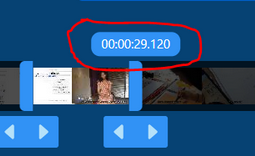
Hey, @Gopavasanth you basically want the tooltip representing the time

image.png (156×255 px, 28 KB)

to be editable right?

Hey, @Gopavasanth you basically want the tooltip representing the time

image.png (156×255 px, 28 KB)

to be editable right?

Yes :)

hey @Punith.nyk removing you from the assignee here, since its open from long time.
also moving the ticket from in-progress to incoming.

feel free to update the ticket if there's any update.

also lets keep this in low priority. doesn't seem like fulfilling a lot of use cases here

Reputation22 moved this task from Doing to Incoming on the VideoCutTool board.
Reputation22 added a subscriber: Punith.nyk.

I have forked the repository and setup the repository locally on my system. I am interested in contributing to this task

Subject: A Quick Plan for Adding Editable Timestamps

Here’s a breakdown of how we can improve the video trimmer. The main idea is to let users type in exact start and end times, instead of just having to drag the handles, which can be a little imprecise.

The Big Picture

Right now, you have to drag the handles to trim a video. We're going to add simple input boxes right next to them. This way, if someone wants to trim a clip from exactly 00:01:30 to 00:05:15, they can just type it in.

How We'll Get It Done

  1. Build a Smart Time-Input Box: First, we'll create a new, reusable component for time input. It'll need to be clever enough to understand formats like HH:MM:SS and show a little error message if the text isn't a valid time. To keep things running smoothly, we'll make sure it only sends an update after the user has finished typing (this is called "debouncing").
  1. Add the Inputs to the Trimmer: Next, we'll drop our new time-input boxes into the main trim component. The trickiest part here will be making sure everything stays perfectly in sync. If a user drags a handle, the time in the input box should update instantly. Likewise, if they type a new time, the handle on the timeline should jump to the correct spot.
  1. Make It Look Good: Of course, we'll need to style these new fields so they look like they belong. We'll make sure they work and look great on mobile, too. If there's an error (like an invalid time), we'll give clear visual feedback, like a red border, so the user knows what’s wrong.
  1. Add Some Guardrails (Validation): Finally, we'll add some simple rules to prevent mistakes. We'll check that the times are in the right format, that the start time is before the end time, and that neither goes beyond the total length of the video.

So, What's the End Result?

  • Users can type in precise timestamps for frame-perfect editing.
  • The app will give instant feedback if the time entered is invalid.
  • The classic drag-and-drop handles will still work just like before.
  • It'll be easy to use on both desktop and mobile.
  • We'll make sure it's fast and doesn't slow the app down.

Files We'll Be Working In:

  • src/components/Trim.jsx (To add the new input fields)
  • src/style/trim.scss (For all the styling)
  • src/utils/time.js (We might need to add or tweak some time-conversion helpers here)

Hi @Punith.nyk, I saw you claimed this task long time ago. Are you still working on it? If not, I’d be glad to take it over.