Page MenuHomePhabricator

DiscussionTools source and preview getting out of sync in Android browsers (keyboard / GBoard app may be involved)
Closed, DuplicatePublicBUG REPORT

Assigned To
None
Authored By
Novem_Linguae
Feb 18 2022, 4:24 PM
Referenced Files
F56862048: Screenshot_20240801-053417.png
Aug 1 2024, 9:53 AM
F56656754: Screenshot_20240724-122824.png
Jul 24 2024, 8:00 PM
Restricted File
Jul 24 2024, 7:52 PM
Restricted File
Jul 24 2024, 7:50 PM
F34957003: 2022-02-18 08.02.58.png
Feb 18 2022, 4:24 PM
F34957005: 2022-02-18 08.03.25.png
Feb 18 2022, 4:24 PM

Description

List of steps to reproduce (step by step, including full links if applicable):
Sorry, this one is pretty intermittent, may be hard to reproduce. Has happened to me around 5 times though.

  • Obtain an Android phone
  • Install Firefox for Android
  • Load en.wikipedia.org
  • Get out of mobile, get into desktop mode by clicking the "Desktop View" link in the footer, if needed
  • (Possible unnecessary step, haven't tested with this off yet) Turn your phone to landscape orientation.
  • (Possible unnecessary step, haven't tested with this off yet) Click on ... -> Desktop site -> yes
  • Make sure DiscussionTools is enabled
  • Visit a talk page and reply to a thread. In case it is page/wikicode dependent, here is a specific URL where it happened to me, when replying to the message that starts with "@Novem Linguae just want to make sure you saw this thread.": https://en.wikipedia.org/w/index.php?title=Template_talk:SPI_report&oldid=1072593207
  • Make sure you are in the Source tab, not the Visual tab
  • Type some stuff. Then backspace. Then click around to a new spot. Type some more stuff. Cut and paste a little.
  • Occasionally the preview box will get out of sync with the text box, requiring not submitting and doing a page refresh to fix.

What happens?:

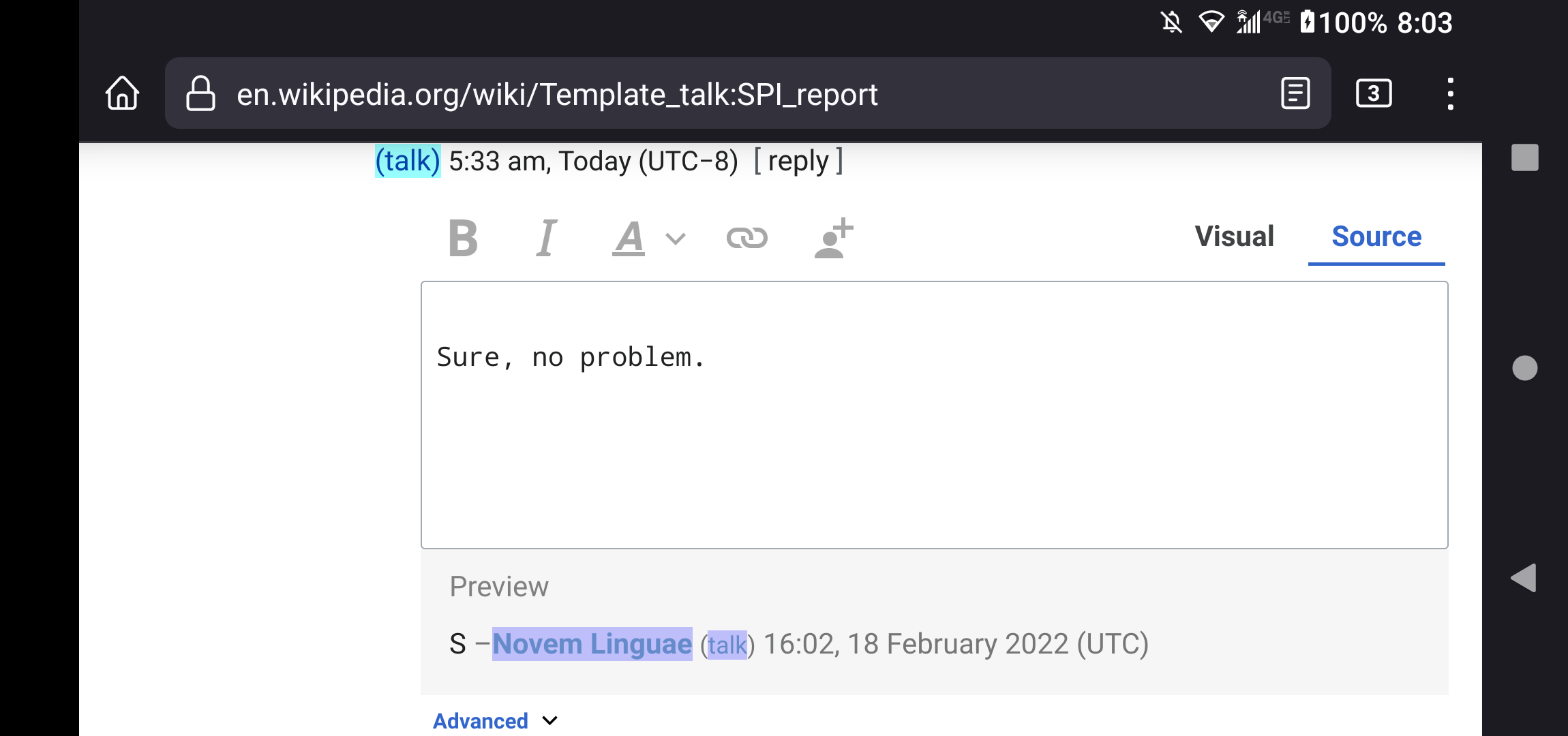
  • Garbled preview text
  • Text box sometimes becomes unresponsive to some or all inputs
  • I think the reply button stops working too, but not sure, I will need to test more
  • Sometimes typing and copy/pasting will suddenly expose mangled wikicode in the text box that was previously hidden
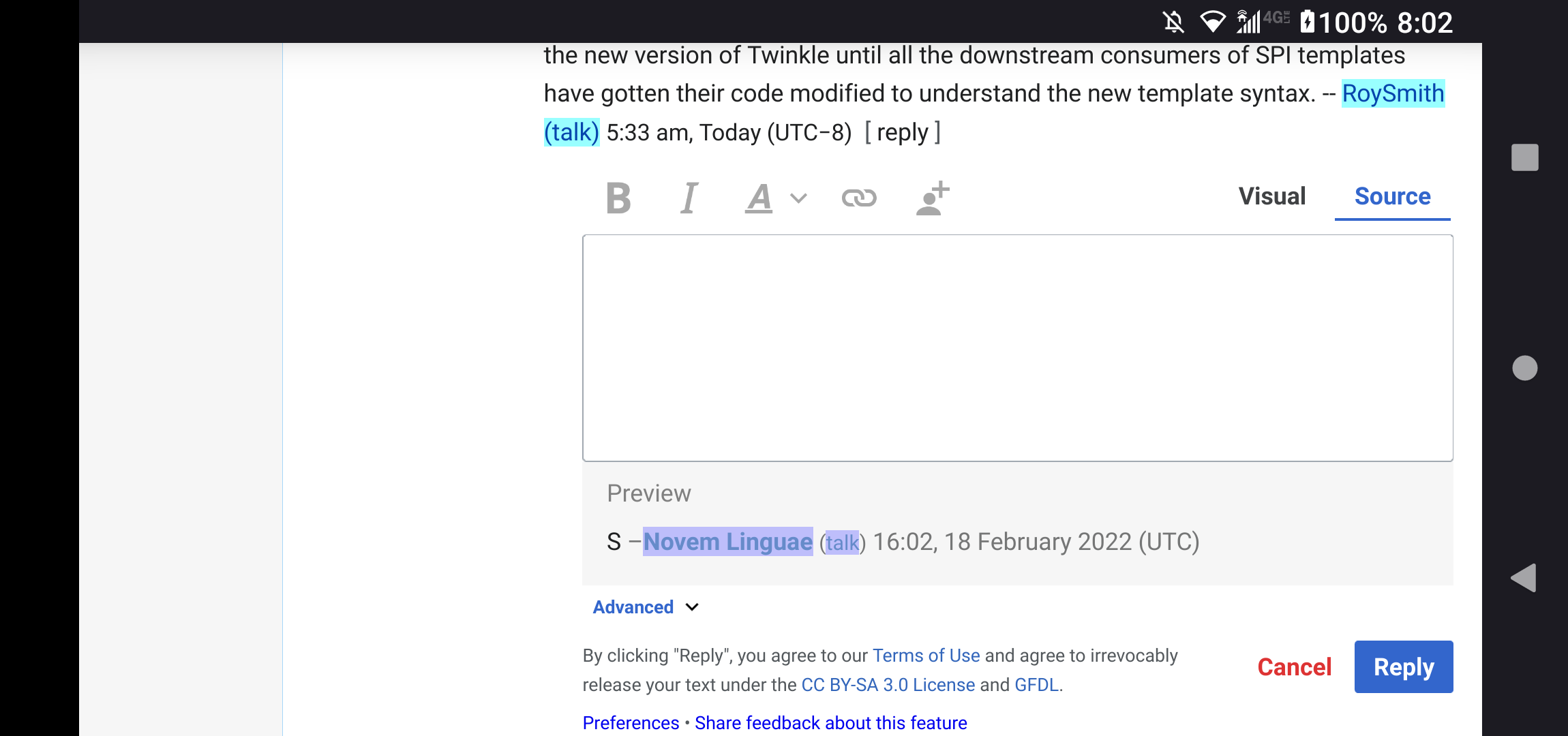
2022-02-18 08.02.58.png (1×2 px, 167 KB)

2022-02-18 08.03.25.png (1×2 px, 115 KB)

What should have happened instead?:

Software version (if not a Wikimedia wiki), browser information, screenshots, other information, etc.:

  • enwiki MediaWiki 1.38.0-wmf.22 (529f223)
  • DiscussionTools 0.0.0 (902a389)
  • Firefox for Android 97.2.0 (Build #2015863827)

Event Timeline

hi @Novem_Linguae – we appreciate you reporting this issue. If you're able to detect a pattern in what causes this issue to surface, please let us know. Until then, we're going to hold off on looking into this issue.

ppelberg added a project: Editing-team.
ppelberg moved this task from Untriaged to This Fiscal Year on the Editing-team board.

I confirm this bug is still present. Had it happen today. It affects both the live preview and the rendered text.

https://en.wikipedia.org/w/index.php?title=Wikipedia_talk:WikiProject_Articles_for_creation&diff=prev&oldid=1099437609

Bug still present as of Nov 22, 2023. Unfortunately, the subtask T312558: Google Keyboard input events can leave VisualEditor DM out of sync getting a patch didn't fix this.

Is a pretty bad bug. Using a combination of a large talk page and a long typed reply, the text slowly gets corrupted any time you press backspace or delete anything, then replace it with something else. The corruption can be silent and not noticeable until you post it sometimes.

One way to more easily test this is to do a bunch of typing, backspace, typing, etc. Then select all and cut your text. The cut may not match what you typed, and there may still be some text left in the preview box even though the text box is empty.

Some ideas for workarounds:

  • Do some testing to figure out exactly what environments this affects (is this a GBoard thing? is this a browser thing?). Then try turning off live previews for that environment and see if that works as a band aid fix. Better to have something off than to have it corrupted.
  • Try adding some kind of resync routine that recalculates the preview box, model, etc. from scratch based on the contents of the text box, run periodically somehow.
Novem_Linguae renamed this task from Source and preview getting out of sync on Firefox for Android to Source and preview getting out of sync on Firefox for Android (keyboard / GBoard app may be involved).Nov 22 2023, 10:10 PM

Adding @TK-999 since they wrote a patch for a similar issue in VE. Maybe they can provide some insights :)

Adding @TK-999 since they wrote a patch for a similar issue in VE. Maybe they can provide some insights :)

Thanks for the ping! These seem suspiciously similar to two bugs that our team fixed recently. I believe we were looking to upstream these:

These are generally input (ie Gboard) specific issues. For reproduction it's usually easiest to use an Android virtual device (e.g. via IDE integration) as simple in-browser mobile emulation won't cut it.

If it's useful, I frequently experience the same bug using Firefox on Android mobile (can't reproduce it today, but this has been nagging me for ages, I think the last time on November 25). I'm not using landscape or desktop mode.

Adding @TK-999 since they wrote a patch for a similar issue in VE. Maybe they can provide some insights :)

Thanks for the ping! These seem suspiciously similar to two bugs that our team fixed recently. I believe we were looking to upstream these:

Yes, please do upstream these :) If you could let us know when this happens in this ticket, I'd be happy to re-test after the patches are merged, to see if the bug goes away.

Do we think these VisualEditor patches will fix this issue in DiscussionTools? (i.e. does DT use the VE code for this?)

Noting that I've been experiencing this issue for a long time, and it's quite frustrating. Landscape setting isn't a part of it for me, but I was able to reproduce it doing roughly what Novem describes. It's frustrating because the steps that Novem describes are often involved in writing a longer message (cut and paste, copy editing), which have led me to lose a longer message more times than I can count. Alternatively, I'll hit reply and half the message just ends up missing.

A possible contributing factor may be switching out of the window.

My notes:

  • I use a Pixel 7 (Android)
  • Chrome browser
  • Desktop mode is enabled
  • Happens on talk pages, both user and Wikipedia
  • Discussion Tools are enabled
  • I believe switching windows may also be relevant/trigger whatever the screen rotation may have for some (I'll switch to the Wiki app but reply in browser, since the app has issues)
  • Reply tool never gets disabled for me
  • The preview ends up being damaged compared to the text
  • When I try to copy the text, when I realize this has happeened (so I can do the hard refresh), I'll highlight all the text in my reply and copy it. However, only the text that would have been displayed copies over.
  • When I copy all but a single character, it works and allows me to copy it to notepad to save my reply
  • When I just tried to do so right now, I hit select all and the part of my text that wasn't displaying in the preview cleared when I clicked on "select all"

It's an issue I've just come to accept, but it definitely hurts my ability to participate. {F56656685}

Adding @TK-999 since they wrote a patch for a similar issue in VE. Maybe they can provide some insights :)

Thanks for the ping! These seem suspiciously similar to two bugs that our team fixed recently. I believe we were looking to upstream these:

These are generally input (ie Gboard) specific issues. For reproduction it's usually easiest to use an Android virtual device (e.g. via IDE integration) as simple in-browser mobile emulation won't cut it.

@TK-999, did your patches make it into mediawiki's visual editor code? Does discussiontools use visual editor code (and therefore your patches have a chance of fixing this discussiontools bug)?

Novem_Linguae renamed this task from Source and preview getting out of sync on Firefox for Android (keyboard / GBoard app may be involved) to DiscussionTools source and preview getting out of sync in Android browsers (keyboard / GBoard app may be involved).Jul 24 2024, 7:29 PM

Screenshot_20240724-122824.png (1×1 px, 294 KB)
This is what happened when I experienced the issue earlier today. I use an android phone with a chrome browser on desktop mode. I've experienced this several times before.

{F56656685}

Please note that your images added in edits aren’t visible (neither F56656685 nor F56656681). See https://www.mediawiki.org/wiki/Phabricator/Help#File_visibility.

It happened again and it's very frustrating. This time I went to add a ping after writing my comment and it completely erased it. I was able to type it out again by looking at the screenshot but I shouldn't have to do that.

Screenshot_20240801-053417.png (1×1 px, 379 KB)

@Tacipasci it doesn't really matter if the edits themselves are visible because this is happening before you even publish it. Retyping everything out because you have to doesn't show on a diff.

@Clovermoss I was speaking about edits to the Phabricator comment, not edits to a wiki page. If you go to T302083#10012488, you probably won’t see the image at the end of the comment either.

FYI the fix for missing images is for the file uploader (Clovermoss?) to view the Phab ticket on a desktop computer, in the right menu look for "Referenced files", then click "File Not Attached" for the files that are highlighted red. More info here.

I had similar results on a Pixel device that I own. Tho based on some percussive testing this seems like just a side effect of T217223. It seems like Android (and other Google-adjacent hardware) is missing some events that the VisualEditor tracks. In my experience, the reproduction case is as such:

  • Write three paragraphs of text
  • Drop the cursor at the start of the second paragraph
  • Backspace to combine the first paragraph with the second

Based on using the debug mode, when this combination of inputs is pressed, VisualEditor's internal model somehow treats the backspace as a complete deletion of the content in the second paragraph and only shows the first and third paragraphs. (The expected outcome would be that the second paragraph would be deleted and the content of the second paragraph be merged into the first one)

Write three paragraphs of text
Drop the cursor at the start of the second paragraph
Backspace to combine the first paragraph with the second

Tested, good steps to reproduce, this reliably reproduces the bug on my Android. Good info.

I can also reproduce it with @Soda’s steps using Gboard (both in Firefox, as indicated by the description, and in Chrome), but cannot reproduce it using the stock Samsung keyboard – exact same browsers, exact same wiki page (https://hu.m.wikipedia.org/wiki/Vita:Kezdőlap), only the keyboard changed, and the bug went away. And when I switched back to Gboard, it came back. So it’s really Gboard that is to be blamed. (Which also means that the workaround is easy: just use a different keyboard.)

FYI the fix for missing images is for the file uploader (Clovermoss?) to view the Phab ticket on a desktop computer, in the right menu look for "Referenced files", then click "File Not Attached" for the files that are highlighted red. More info here.

Wait I'm confused. Are you saying that my files did not upload because I was on a phone?

No, @Novem_Linguae confused/wrote unclearly things:

  • The uploader of the problematic file (F56656685) is @Hey_man_im_josh, not you @Clovermoss.
  • The problem has nothing to do with mobile vs desktop. The only difference between mobile and desktop is that “Referenced files” is on the right on desktop but on the top on mobile.
  • Also, the file did upload, it’s just not visible to anyone but the uploader.

Oh okay, that does make more sense to me. Thanks.