
User Details
- User Since
- Oct 25 2014, 10:11 AM (508 w, 6 d)
- Availability
- Available
- IRC Nick
- Andyrom75
- LDAP User
- Unknown
- MediaWiki User
- Andyrom75 [ Global Accounts ]
Jun 5 2024
@JWheeler-WMF, since this bug affect ALL the wikis, are you sure that its priority shall be classified as "low"?
Apr 11 2024
Apr 5 2024
@JWheeler-WMF , I'm not skilled on video, so I've tried to do "something close to it" :-)
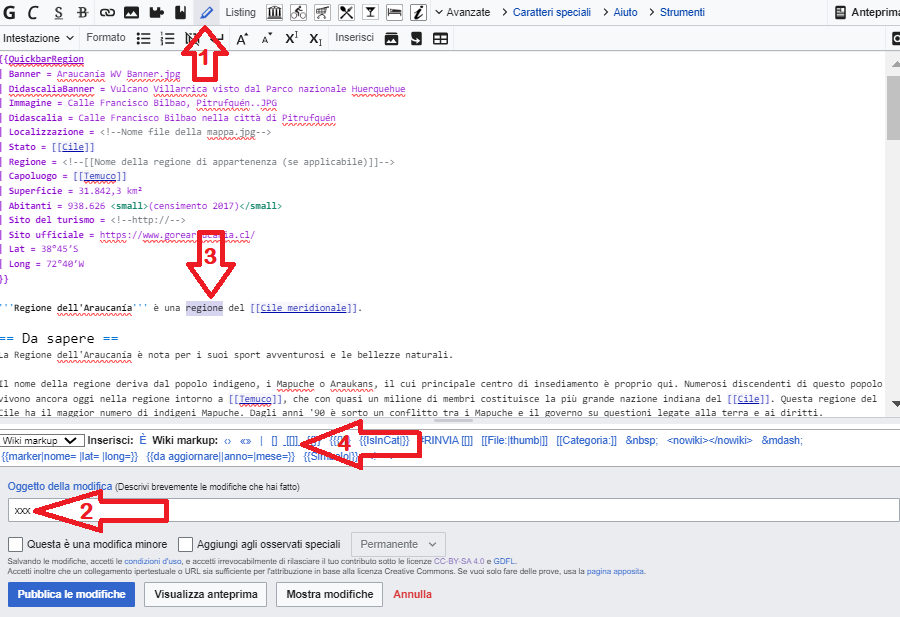
Ok, in this case I'm not able to support.
Thanks for your clarification.
Apr 3 2024
In the meanwhile I reopen the ticket to allow someone from SyntaxHighlight team to give a look
@Aklapper on Locating_broken_scripts is written that if the issue persist on safemode=1 I'm supposed to open a ticket here :-)
@Aklapper I've tried Firefox latest version on Windows and:
- If I'm logged I have the same issue
- if I'm NOT logger I don't have it
I suppose there's an issue with one gadget that suddenly create this issue.
In this case, which would be the best place for this support request?
@Aklapper, yes, in Wikipedia is "Under "Per inserire del testo tra questi segni selezionalo e clicca sul link:", while in Wikivoyage is next to "Inserisci:" and "Wiki markup:".
Apr 1 2024
Mar 14 2024
@Anoop I don't know how to reset my current default, but I've found the checkbox to set a new one. In a way or another I've solved my personal issue :-)
Now I see all the three NSs. Thanks
Mar 13 2024
@Anoop, from the homepage, if I click on "Ricerca" (i.e. Search) button, I'll land to the page https://it.wikivoyage.org/w/index.php?search=&title=Speciale:Ricerca, and here, differently from your srceenshot, I can see only two NS pre-selected: "Template" and "Modulo". "(Principale)" (i.e. "(Main)") is missing.
Maybe is this the reason why I can't see "Firenze" within the search result.
Mar 10 2024
Hi @Anoop,
I've noticed the following behaviors:
Mar 9 2024
@Jdlrobson unfortunately also in en:voy there's the need for some user to show/use the TOC, so it's necessary to solve the bug server-side, restoring the previous behavior.
Thanks for contacting @cscott or whomever could be involved on its resolution.
Mar 6 2024
@Anoop thanks for your support, NS:Portale (100) can be removed because is composed by old out-of-date content (not deleted only for historical reference)
Mar 5 2024
Feb 25 2024
Nov 16 2023
Jun 30 2023
Thanks @Jdlrobson for mitigating the issue disabling the Listing Editor.
Jun 8 2022
This will be managed locally
May 7 2022
I've applied the naming convention of the classes for infobox, ambox and hatnotes (found in the page you mentioned) and it seems that the output has been now uniformed. Thanks!
@Jdlrobson also https://it.m.wikivoyage.org/wiki/Hammerfest has the same content but it doesn't cause that issue. Do you know why?
May 6 2022
@Jdlrobson assuming now that this behavior is desired, I don't understand why it doesn't work on articles like https://it.m.wikivoyage.org/wiki/Norvegia.
Apparently the only difference is on the "infobox template" QuickbarCountry Vs. QuickbarCity (both leverage on the same template and module).
@TheDJ any idea on who should be pinged to properly address this issue?
Looking at the wiki-text, it's the very first sentence after the infobox and before the first section.
In desktop view is show correctly in its position, but in mobile view of https://it.m.wikivoyage.org/wiki/Hammerfest is shown before the infobox, instead of being shown after it.
May 5 2022
Thanks @TheDJ, your patch solved one part of the issue (the title inside the infobox), however there is still an issue on https://it.m.wikivoyage.org/wiki/Hammerfest: the incipit is shown before the infobox instead of after it, as it happens on the desktop view (i.e. https://it.wikivoyage.org/wiki/Hammerfest) or in another mobile view article like https://it.m.wikivoyage.org/wiki/Norvegia that use a QuickbarCountry in place of QuickbarCity.
May 4 2022
@Jdlrobson I've taken a look but I don't understand why https://it.m.wikivoyage.org/wiki/Norvegia (that use QuickbarCountry) looks good while https://it.m.wikivoyage.org/wiki/Hammerfest (that use QuickbarCity) don't.
Mar 21 2022
Mar 19 2022
Feb 7 2022
Jan 21 2022
@TheDJ do you know who can support?
Jan 18 2022
Jan 17 2022
I still see thousands lint errors on https://it.wikivoyage.org/wiki/Speciale:LintErrors/inline-media-caption; is it normal?
Jan 14 2022
Thanks @Izno, just done.
This morning I've found this new lint error category: https://it.wikivoyage.org/wiki/Speciale:LintErrors/inline-media-caption
but honestly I haven't understood the issue in most of the cases. If I show a File: without thumb/right/left the image, its link and its caption are rendered inside a SPAN so it's fine to show them inline.
But if I use thumb/right/left the same image is rendered inside a DIV so I can understand where the issue is and I know how to solve it.
Any comment?
Thanks again @Ladsgroup.
This morning I've found this new lint error category: https://it.wikivoyage.org/wiki/Speciale:LintErrors/inline-media-caption
but honestly I haven't understood the issue in most of the cases. If I show a File: without thumb/right/left the image, its link and its caption are rendered inside a SPAN so it's fine to show them inline.
But if I use thumb/right/left the same image is rendered inside a DIV so I can understand where the issue is and I know how to solve it.
Any suggestion?
Jan 12 2022
Thanks @Ladsgroup, it seems that the statistics now are almost perfect!
Jan 8 2022
@Jdlrobson any update?
Dec 29 2021
Dec 28 2021
@Sbailey since I got this issue on 3 pages of https://it.wikivoyage.org/wiki/Speciale:LintErrors, I was wondering if there's a way to force the refresh of the counters. Consider that 2 page counters out of 3, are stuck since a couple of week (+ or -). All of them should be zero.
Dec 27 2021
Dec 26 2021
@Jdlrobson I've started two discussions:
- it:voy: https://it.wikivoyage.org/wiki/Wikivoyage:Lounge#Argomenti_correlati_e_spazio_vuoto_nella_parte_inferiore_degli_articoli
- en:voy: https://en.wikivoyage.org/wiki/Wikivoyage:Travellers%27_pub#Related_topics_%26_empty_space_in_articles_bottom
In both cases there is no objections on proceeding.
Dec 24 2021
Dec 21 2021
@Jdlrobson so if I'm understanding it correctly, by default it will be shown certain article bases on "similar text", is it right?
Dec 18 2021
@Jdlrobson unfortunately I'm not enough expert to fully understand the implication of such configuration change, however, if you think that passing from "no API" to "API" will solve the issue and all the pages with 1 or more related articles, will keep on showing them (hence no side effect), well, yes, let's change the configuration for the whole project.
Dec 15 2021
@Jdlrobson I've taken a look at the code you highlighted.
Although I'm not able to put my hands on that I have few questions:
- Is that code only for Wikivoyage or for any wiki-project?
- If only for Wikivoyage, does make sense to put the line $data .= \Html::element( 'div', [ 'class' => 'read-more-container' ] ); inside into an if-block where the condition is the presence of at least one related page? I suppose that $relatedPages[] at line 182 could help
Dec 14 2021
Dec 10 2021
@Jdlrobson it seems that the patch works!
@Jdlrobson actually some pages use the "related features", like https://en.wikivoyage.org/wiki/Hawaii_Volcanoes_National_Park, but it seems that this mechanism is buggy.
If I reload that page whan I'm at the bottom I'll see the empty space, but if I pgup + pgdown, that spaces is filled with the related article. It's a kind of magic :-D
Dec 6 2021
Dec 5 2021
Dec 4 2021
Dec 3 2021
Nov 24 2021
Nov 13 2021
@cscott as per @Jdlrobson request, I've added you on this ticket to check the issue during his two weeks absence. Thanks in advance for your support.
@Jdlrobson just opened T295632 as requested. If you can, give a quick look to be sure that as been correctly opened.
Nov 12 2021
@Jdlrobson I've noticed another strange behavior. As previously mentioned, when visualizing an article everything is fine now, but during the preview the standard TOC is still visible. This is quite annoying because "what we see is NOT what we get" after publishing the content.
Do you want me to open another ticket or can this bug managed here with the same ticket?
Nov 10 2021
@Jdlrobson you can successfully close this ticket. Thanks a lot for your quick support!
Nov 9 2021
Thanks @Jdlrobson! I've removed the patch several hours ago on it:voy and checked now to avoid cache issues; all works correctly. I've just removed the patch in en:voy and asked fr:voy & ru:voy to do the same. Without comments from their side I would say that we can close the ticket within tomorrow.
@Jdlrobson since recently someone (successfully) worked on the WikidataPageBanner (T295003), could be the right time to ask to try to solve also this issue?
Nov 5 2021
@Jdlrobson is not possible to use the suggested CSS on MediaWiki:Common.css because it will affect ALL the pages, not only the ones that use the banner. That's why, the applied temporary patch use a dynamic JS that looks first for the ext-wpb-pagebanner class, introduced by the extension.
As well is not possible to use __NOTOC__ because it will hide also the custom banner menu (the one that replace the standard TOC)
Nov 4 2021
@SHB2000 see my clarification above
Oct 21 2021
https://en.wikivoyage.org/w/index.php?title=Main_Page&action=credits is an empty page while in april 2021 its content is visible in this archived page https://web.archive.org/web/20210414182218/https://en.wikivoyage.org/w/index.php?title=Main_Page&action=credits
Oct 8 2021
@Tgr, thanks for your reply. If I understand correctly, the only way to format a SiteNotice (not a CentralNotice) is to change MediaWiki:Common.css (and/or MediaWiki:Mobile.css I suppose) all the time I need a specific style, because the .css configuration files will affect all the sitenotice (not just some as I need). Is it correct?
Oct 3 2021
@Tgr answer to question 1 is clear, but I haven't understood how to solve the problem asked with the second question.
Could you provide me few links or write here some practical examples?
Oct 2 2021
Oct 1 2021
Sep 30 2021
@bd808 Great job! Now the whole site works!